https://docs.isaacsim.omniverse.nvidia.com/5.1.0/ros2_tutorials/tutorial_ros2_python.html
ROS 2 Bridge in Standalone Workflow — Isaac Sim Documentation
Standalone scripting is typically ideal for manual control of the simulation steps. An OnImpulseEvent OmniGraph node can be connected to any ROS2 OmniGraph node so that the frequency of the publishers and subscribers can be carefully controlled. An example
docs.isaacsim.omniverse.nvidia.com
학습 목표 (Learning Objectives)
- Standalone ROS2 파이썬 예제 실행하기
- ROS2 컴포넌트들을 수동으로 step(틱)하기 ==> 이는 내가 버튼 누르듯이 신호를 주면, 그때 노드가 publish를 한번 수행하는것
ROS2 컴포넌트 수동 스텝(tick)
- Standalone 스크립팅은 Isaac Sim을 GUI로 조작하지 않고, 터미널에서 파이썬 스크립트로 Isaac Sim을 실행/제어하는 방식.
- 이는 씬 로드, 센서 추가, ActionGraph 생성, Play/Stop, 프레임 step까지를 코드로 함.
- ROS publish/subscribe도 “언제 실행할지”를 코드로 더 정밀하게 제어 가능
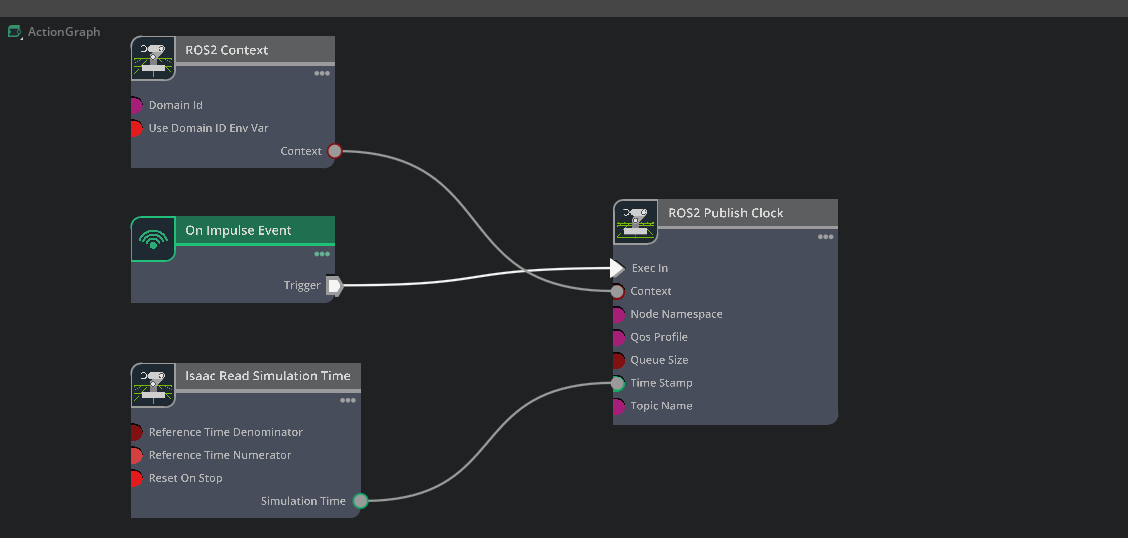
1. 우리는 ROS2 Domain ID를 1로 설정하고, ROS2 Publish Clock노드를 정확히 제어할 수 있도록, 새로운 action graph를 구성한다.
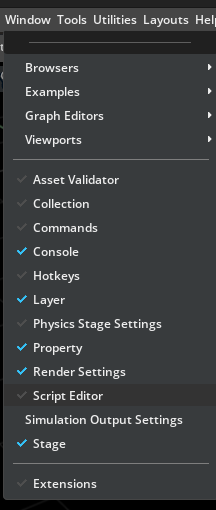
- 우선 window의 script editor에서 아래의 스크립트를 입력.

import omni.graph.core as og
# Create a new graph with the path /ActionGraph
og.Controller.edit(
    {"graph_path": "/ActionGraph", "evaluator_name": "execution"},
    {
        og.Controller.Keys.CREATE_NODES: [
            ("ReadSimTime", "isaacsim.core.nodes.IsaacReadSimulationTime"),
            ("Context", "isaacsim.ros2.bridge.ROS2Context"),
            ("PublishClock", "isaacsim.ros2.bridge.ROS2PublishClock"),
            ("OnImpulseEvent", "omni.graph.action.OnImpulseEvent"),
        ],
        og.Controller.Keys.CONNECT: [
            # Connecting execution of OnImpulseEvent node to PublishClock so it will only publish when an impulse event is triggered
            ("OnImpulseEvent.outputs:execOut", "PublishClock.inputs:execIn"),
            # Connecting simulationTime data of ReadSimTime to the clock publisher node
            ("ReadSimTime.outputs:simulationTime", "PublishClock.inputs:timeStamp"),
            # Connecting the ROS2 Context to the clock publisher node so it will run under the specified ROS2 Domain ID
            ("Context.outputs:context", "PublishClock.inputs:context"),
        ],
        og.Controller.Keys.SET_VALUES: [
            # Assigning topic name to clock publisher
            ("PublishClock.inputs:topicName", "/clock"),
            # Assigning a Domain ID of 1 to Context node
            ("Context.inputs:domain_id", 1),
            # Disable useDomainIDEnvVar to ensure we use the above set Domain ID
            ("Context.inputs:useDomainIDEnvVar", False),
        ],
    },
)
2. 그러면 아래와 같은 그래프가 생성될거임
3. 어느 프레임에서든 아래를 실행해 impulse event를 발생시키면, clock 퍼블리셔가 한 번 tick 됩니다.
- og.Controller.set(og.Controller.attribute("/ActionGraph/OnImpulseEvent.state:enableImpulse"), True)

'코딩 및 기타' 카테고리의 다른 글
| [isaac sim] ROS 2 Navigation 2 (0) | 2026.03.11 |
|---|---|
| [isaac sim] ROS 2 Navigation (0) | 2026.03.10 |
| [isaac sim] ROS2 tutorials 8 (0) | 2026.03.05 |
| [isaac sim] ROS2 tutorials 7 (0) | 2026.03.04 |
| [isaac sim] ROS2 tutorials 6 (0) | 2026.03.03 |