ADE20K dataset
Database --> Full Dataset Register here to download the ADE20K dataset and annotations. By doing so, you agree to the terms of use. Toolkit See our GitHub Repository for an overview of how to access and explore ADE20K. Scene Parsing Benchmark Scene parsing
ade20k.csail.mit.edu
1. 우선 위에서 데이터셋을 다운로드...
2. 이미지의 경로를 읽어들인다.
import os, glob, random
from PIL import Image
import numpy as np
import torch
from torch.utils.data import Dataset, DataLoader
from torchvision.transforms import v2
from pathlib import Path

DATA_ROOT = Path("/home/jihong/Downloads/ade20k/ADE20K")

def collect_pairs(split):
    seg_paths = sorted(glob.glob(os.path.join( DATA_ROOT, "images", "ADE", split, "**", "*_seg.png") , recursive=True))
    pairs = []
    miss = []
    for sp in seg_paths:
        ip = sp.replace("_seg.png", ".jpg")
        if os.path.exists(ip):
            pairs.append((ip, sp))
        else:
            miss.append(sp)
    print(f"[{split}] pairs={len(pairs)}  missing jpg={len(miss)}")
    return pairs

train_pairs = collect_pairs("training")
val_pairs   = collect_pairs("validation")
assert len(train_pairs) and len(val_pairs), "이미지-세그 페어가 비어있음"
3. 데이터 로드
NUM_CLASSES = 150
IGNORE = 255
CROP = 512  # 480~512 권장

train_tf = v2.Compose([
    v2.ToImage(),
    v2.RandomResizedCrop((CROP, CROP), scale=(0.5, 2.0), ratio=(0.9, 1.1), antialias=True),
    v2.RandomHorizontalFlip(),
    v2.ColorJitter(0.2,0.2,0.2,0.05),
    v2.ToDtype(torch.float32, scale=True),
    v2.Normalize(mean=(0.485,0.456,0.406), std=(0.229,0.224,0.225)),
])
val_tf = v2.Compose([
    v2.ToImage(),
    v2.Resize((CROP, CROP), antialias=True),
    v2.ToDtype(torch.float32, scale=True),
    v2.Normalize(mean=(0.485,0.456,0.406), std=(0.229,0.224,0.225)),
])

class ADEPerImageDataset(Dataset):
    def __init__(self, pairs, transform):
        self.pairs = pairs
        self.tf = transform

    def __len__(self): return len(self.pairs)

    def _normalize_label(self, lab):
        """lab: np.uint8 [H,W]
        - 255는 ignore 유지
        - 그 외 값이 1..150이면 1을 빼서 0..149로
        - 이미 0..149이면 그대로
        """
        u = np.unique(lab)
        if 255 in u: u = u[u!=255]
        if u.size and u.min() >= 1 and u.max() <= 150:
            lab = lab.copy()
            mask = (lab != 255)
            lab[mask] = lab[mask] - 1
        return lab

    def __getitem__(self, i):
        ip, sp = self.pairs[i]
        img = Image.open(ip).convert("RGB")
        seg = Image.open(sp)            # index PNG

        x = self.tf(img)                # [3,H,W]
        lab = np.array(seg, dtype=np.uint8)   # [H0,W0], index or 255
        lab = self._normalize_label(lab)

        # 크기 맞추기 (NEAREST!)
        y = torch.from_numpy(lab[None])            # [1,H0,W0]
        y = torch.nn.functional.interpolate(y[None].float(), size=x.shape[-2:], mode="nearest")[0,0].to(torch.long)
        return x, y

train_dl = DataLoader(ADEPerImageDataset(train_pairs, train_tf),
                      batch_size=8, shuffle=True, num_workers=4, pin_memory=True)
val_dl   = DataLoader(ADEPerImageDataset(val_pairs, val_tf),
                      batch_size=8, shuffle=False, num_workers=4, pin_memory=True)
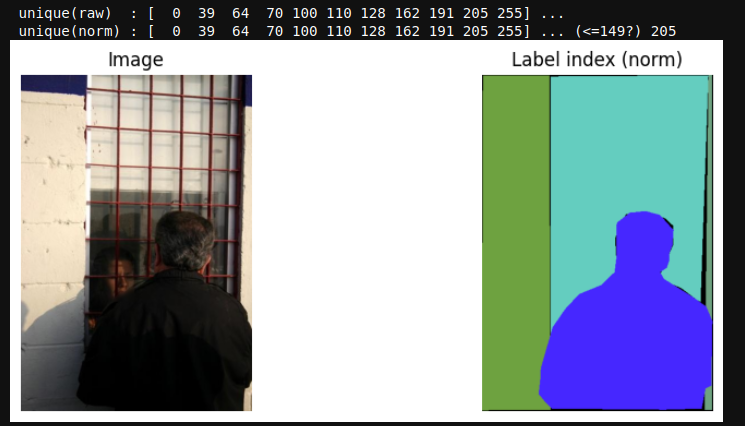
4. 잘되었는지 확인
import random, matplotlib.pyplot as plt
ip, sp = random.choice(train_pairs)
img = Image.open(ip).convert("RGB")
lab = np.array(Image.open(sp), dtype=np.uint8)

# 정규화 규칙 적용 미리보기
def normalize(lab):
    u = np.unique(lab)
    if 255 in u: u = u[u!=255]
    if u.size and u.min() >= 1 and u.max() <= 150:
        lab = lab.copy(); mask = (lab!=255); lab[mask] -= 1
    return lab
labn = normalize(lab)

print("unique(raw)  :", np.unique(lab)[:20], "...")
print("unique(norm) :", np.unique(labn)[:20], "... (<=149?)", np.max(labn[labn!=255]))

plt.figure(figsize=(10,4))
plt.subplot(1,2,1); plt.title("Image"); plt.imshow(img); plt.axis("off")
plt.subplot(1,2,2); plt.title("Label index (norm)"); plt.imshow(labn, vmin=0, vmax=149); plt.axis("off")
plt.show()
'코딩 및 기타' 카테고리의 다른 글
| ynet 작업 1 (0) | 2025.11.18 |
|---|---|
| yolo로 '사람 추적' 및 '바운딩 박스' 좌표 저장하기 (0) | 2025.11.17 |
| Dino v3써보기 (0) | 2025.11.10 |
| [torch][warn] UserWarning: torch.meshgrid: in an upcoming release, it will be required to pass the indexing argument. (0) | 2025.11.04 |
| [torch][warn] userWarning: Creating a tensor from a list of numpy.ndarrays is extremely slow. (0) | 2025.11.04 |