1. PX4의 FCU(비행 컨트롤러)와 ROS2 사이를 이어주는 mavros노드를 지정한 설정으로 실행하는 ROS2 launch명령어
ros2 launch mavros px4.launch fcu_url:=serial:///dev/serial/by-id/usb-Silicon_Labs_CP2102_USB_to_UART_Bridge_Controller_0001-if00-port0:921600 fcu_protocol:=v2.0- ros2 launch
- ros2의 런치 시스템을 호출한다.
- mavros
- 런치파일이 존재하는 패키지 이름. mavros는 MAVLink<-->ROS 브릿지이다.
- px4.launch
- px4용 기본 설정으로 mavros_node를 띄우는 launch파일이다.
- fcu_url
- MAVROS가 FCU에 연결하는 방법을 지정하는 URI이다.
- serial:///은 직렬 포트 연결을 뜻함.
- :921600은 보드와의 통신속도이다. 보드의 해당 포트 설정과 일치해야함.
- fcu_protocol:=v2.0
- MAVLink 프로토콜 버전을 강제로 지정한다.
- 기본값은 v2.0이며, 최신버전의 px4는 MAVLink 2를 사용한다.
- MAVLink 프로토콜 버전을 강제로 지정한다.
2. intel realsense ros2 드라이버를 실행하는 ROS2 launch명령어
ros2 launch realsense2_camera rs_launch.py align_depth:=true enable_gyro:=true enable_accel:=true unite_imu_method:=linear_interpolation enable_sync:=true publish_tf:=false
- align_depth:=true
- 깊이 영상을 컬러 영상 좌표계로 정렬해서 /camera/aligned_depth_to_color/image_raw로 publish한다.
- enable_gyro:=true enable_accel:=true
- 자이로/가속도 IMU 스트림을 활성화.
- 활성화를하면 관련 토픽이 추가됨
- unite_imu_method:=linear_interpolation
- 분리된 자이로/가속도 스트림을 하나의 /camera/imu메시지로 결합한다.
- linear_interpolation은 gyro의 timestamp에 가속도 값을 선형 보간해서 붙인다.
- enable_sync:=true
- librealsense가 color*depth 프레임을 동기화해서 일치하는 프레임셋으로 제공.
- RGB-D 단일 메시지를 쓸때도 하는것이 권장
- publish_tf:=false
- 드라이버가 TF를 publish하지 않도록한다.
즉, 내가 직접 static_transform_publisher등으로 프레임을 제공해야한다.
- 드라이버가 TF를 publish하지 않도록한다.
https://simple.wikipedia.org/wiki/File:Yaw_Axis_Corrected.svg
File:Yaw Axis Corrected.svg - Simple English Wikipedia, the free encyclopedia
From Simple English Wikipedia, the free encyclopedia Summary DescriptionYaw Axis Corrected.svg English: An image showing all three axes Українська: Зображення, що показує всі три осі Date 10 February 2010, 00:50 (UTC)
simple.wikipedia.org
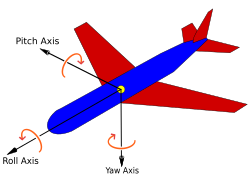
3.정적 TF를 publish해서 TF트리에 계속 유지시키는 명령어
ros2 run tf2_ros static_transform_publisher 0 0 0 1 0 0 0 base_link base_link_frd- 0 0 0 평행이도 없음
- 1 0 0 0 x축으로 180'회전을 뜻한다
- ==> 일반적으로 base_link는 FLU이다. 이를 FRD로 하기 위해서는 x축으로 180'회전을 걸어야한다...
4. 정적 TF를 publish해서 TF트리에 계속 유지시키는 명령어
ros2 run tf2_ros static_transform_publisher 0 0 0 0 0 0 1 base_link_frd camera_link- x y z => 0 0 0 두 프레임의 원점이 같다
- qx qy qz qw => 0 0 0 1 항등 회전( 돌리지 않는 회전 )
- camera_link가 base_link_frd 좌표계에서의 원점이 같으며 축도 같은 방향이라는 고정변환을 계속 publish한다.
5.정적 TF를 publish해서 TF트리에 계속 유지시키는 명령어
ros2 run tf2_ros static_transform_publisher 0 0 0 -0.5 0.5 -0.5 0.5 camera_link camera_color_optical_frame- x y z => 0 0 0 두 프레임의 원점이 같다.
- qx qy qz qw => -0.5 0.5 -0.5 0.5 이는 roll=-90' , pitch=0' , yaw= -90' 회전이다.
ros2 run rtabmap_odom rgbd_odometry --ros-args -p frame_id:=base_link -p odom_frame_id:=odom -p publish_tf:=true -p wait_for_transform:=0.8 -p approx_sync:=true -p approx_sync_max_interval:=0.02 -p qos:=2 -p qos_camera_info:=2 -r rgb/image:=/camera/camera/color/image_raw -r depth/image:=/camera/camera/depth/image_rect_raw -r rgb/camera_info:=/camera/camera/color/camera_info -r odom:=/rtabmap/odom -r imu:=/mavros/imu/data
ros2 run rtabmap_slam rtabmap --ros-args -p frame_id:=base_link -p odom_frame_id:=odom -p map_frame_id:=map -p publish_tf:=true -p tf_delay:=0.12 -p tf_tolerance:=0.5 -p wait_for_transform:=0.8 -p subscribe_depth:=true -p subscribe_rgb:=true -p approx_sync:=true -p approx_sync_max_interval:=0.12 -p qos_image:=2 -p qos_camera_info:=2 -r rgb/image:=/camera/camera/color/image_raw -r depth/image:=/camera/camera/depth/image_rect_raw -r rgb/camera_info:=/camera/camera/color/camera_info -r odom:=/rtabmap/odom -r imu:=/mavros/imu/data
'px4_sim' 카테고리의 다른 글
| ros2 run rtabmap_odom rgbd_odometry (0) | 2025.09.30 |
|---|---|
| 움직이기 (0) | 2025.09.19 |
| [px4][slam] rtabmap 설치 (0) | 2025.08.18 |
| [px4][map_변경] px4 시뮬레이터에서 맵을 변경해서 실행하기 및 카메라 보기 (0) | 2025.06.15 |
| [px4] 시뮬레이터 설치 (0) | 2025.05.16 |