ros2 run teleop_twist_keyboard teleop_twist_keyboard --ros-args -p stamped:=true
ros2 run teleop_twist_keyboard teleop_twist_keyboard
depth 카메라를 가지고 충돌을 감지하는 노드
구독하는 노드는 image/raw/depth를 해야하며, 퍼블리시하는 노드는?
서비스타입?
depth image
- depth이미지는 각 필셀이 센서에서 해당 지점까지의 거리(보통 m단위이다.)를 나타내는 데이터이다.
- ex) 만약 픽셀값이 1.5라면, 그 픽셀에 해당하는 점이 센서에서 1.5m 떨어져 있다는것을 의미.
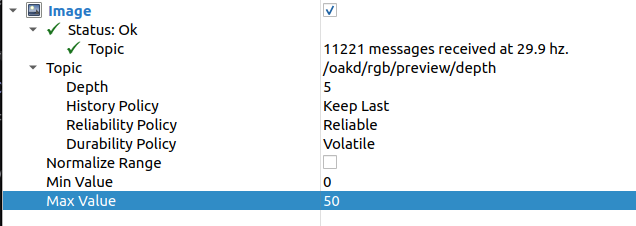
1. 우선 rivz에서 시각화할때 각각 인터페이스 봐보자.
- 초당 약 30hz개의 메시지를 송신하고 있음을 알 수 있다.
- depth는 해당되는 토픽의 queue크기를 의미한다. 여기서는 최대 5개의 메시지를 버퍼에 저장중이다.
- History Policy: Keep Last는 Ros2의 QoS정책이며, 최근 메시지 N개만 저장한다. ( 여기서 N개는 Depth에서 지정한 개수만큼이다. )
- Normalize Range는 이미지의 픽셀값을 0~1로 정규화할지 여부이다.
- min value / max value
- depth image시각화시에 픽셀값을 어떤 범위로 mapping할지 지정
2. 우선 작업 공간을 생성하자.
mkdir -p ~/collision_ws/src
cd ~/collision_ws/src
3. ROS2 파이썬 패키지를 생성하자.
ros2 pkg create depth_collision_warning --build-type ament_python --dependencies rclpy sensor_msgs cv_bridge
4. 종속성 설치
pip install opencv-python
pip install numpy==1.26.4
5.Python 노드 코드 작성
cd ~/collision_ws/src/depth_collision_warning/depth_collision_warning
touch depth_collision_warning_node.py
import rclpy
from rclpy.node import Node
from sensor_msgs.msg import Image
import numpy as np
import cv2
from cv_bridge import CvBridge, CvBridgeError
class DepthCollisionWarningNode(Node):
def __init__(self):
super().__init__('depth_collision_warning_node')
self.subscription = self.create_subscription(
Image,
'/oakd/rgb/preview/depth',
self.listener_callback,
qos_profile=rclpy.qos.QoSProfile(
reliability=rclpy.qos.ReliabilityPolicy.RELIABLE,
durability=rclpy.qos.DurabilityPolicy.VOLATILE,
depth=10
)
)
self.bridge = CvBridge()
self.collision_distance = 2.0 # 2미터 이하에서 경고
def listener_callback(self, msg):
try:
depth_image = self.bridge.imgmsg_to_cv2(msg, desired_encoding='32FC1')
valid_depths = depth_image[np.isfinite(depth_image)]
if valid_depths.size > 0 and np.any(valid_depths < self.collision_distance):
self.get_logger().warn("⚠️ 주의! 충돌 위험 물체가 2m 이내에 있습니다!")
except CvBridgeError as e:
self.get_logger().error(f"CvBridge Error: {e}")
def main(args=None):
rclpy.init(args=args)
depth_collision_warning_node = DepthCollisionWarningNode()
rclpy.spin(depth_collision_warning_node)
depth_collision_warning_node.destroy_node()
rclpy.shutdown()
if __name__ == '__main__':
main()
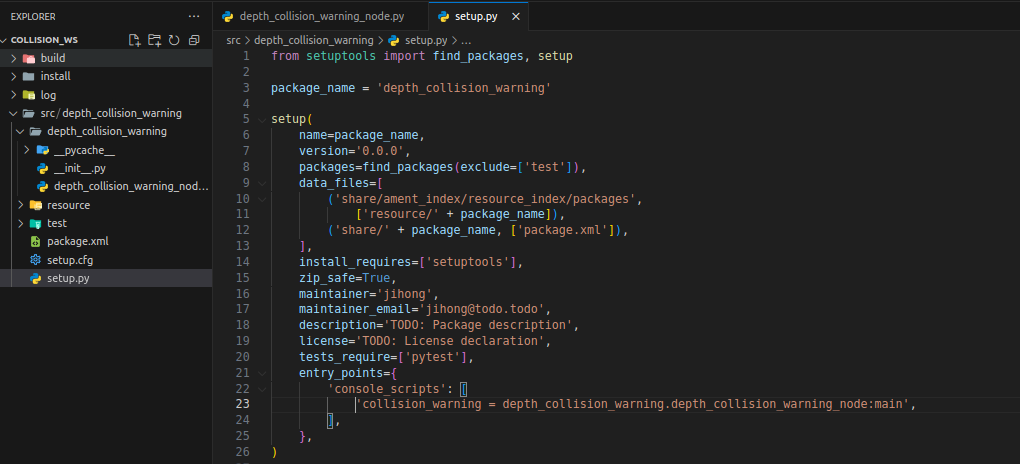
6. setup.py에 진입점(Entry Point) 추가하기
- ~/collision_ws/src/depth_collision_warning/setup.py를 수정
entry_points={
    'console_scripts': [
        'collision_warning = depth_collision_warning.depth_collision_warning_node:main',
    ],
},
7. 패키지 빌드 및 노드 실행
cd ~/collision_ws
colcon build --symlink-install
source install/setup.bash

ros2 run depth_collision_warning collision_warning
===> 개선사항 : 바닥도 인식해서 경고가 발생함.
'gazebo' 카테고리의 다른 글
| [turtlebot4][path] rrt planner__1 (0) | 2025.06.05 |
|---|---|
| [turtlebot4][depth] 일정 거리만큼 가까워지면 경고 보내는 노드 - 2 (0) | 2025.05.21 |
| [ turtlebot4_AStar ] 4번째 시도 (1) | 2025.05.15 |
| turtlebot4_gz_bringup의 turtlebot4_gz.launch파일 (1) | 2025.04.17 |
| 터틀봇을 다른 맵에 spawn해보기 - (터틀봇 spawn위치 설정) (0) | 2025.04.17 |