https://docs.nav2.org/setup_guides/urdf/setup_urdf.html#
Setting Up The URDF — Nav2 1.0.0 documentation
Note Note that you will also be setting up a SDF for simulation in Gazebo in the next tutorials. URDF is used to set up the robot frames and describe the robot’s structure for run-time use on hardware and possibly in simulation. SDF is a specific file fo
docs.nav2.org
- 해당되는 튜토리얼에서는 URDF파일을 이용하여 간단한 differential drive robot을 만들어 볼것이다.
- 또한 로봇의 state publisher와 RVIZ 시각화를 위한 세팅도 할 것이다.
- 마지막에는 시뮬레이션이라는 목적에 맞게, kinematic 속성을 urdf파일에 추가할 것 이다.
- 이러한 과정들은 네비게이션에서 센서,hw,robot transform을 사용하기 위해서 필요하다.
- 우리는 https://jihong.tistory.com/591의 튜토리얼에서 말했듯이, nav2를 사용하기 위해서는 base_link에서 다양한 센서들을 기준 좌표 프레임으로의 transform이 필요합니다.
- transform tree는 단순하게 링크가 1개몬 존재하는 구조일수 있으며( base_link --> laser_link ), 여러 위치에 여러 센서들이 각각의 좌표프레임을 가진 상태로 설치되어 있는 복잡한 구조일 수도 있다.
- 이러한 모든 좌표의 변환을 처리하기 위해서 publisher를 각각 만드는 것은 번거러울 것이다. 그래서 우리는 Robot_state_Publisher 패키지를 사용해서 publish할 것이다.
- ROS_State_Publisher
- ROS2의 패키지이다.
- tf 패키지와 상호작용하며 로봇의 기하학적 구조로부터 직접 유추할 수 있는 모든 필요한 좌표 변환을 publish한다.
- 해당 패키지에 올바른 URDF파일을 제공하면, transform publish를 자동으로 해준다.

1. URDF 파일 생성

- 우선 로봇 본체의 크기를 정의한다. base_link의 가로 세로 높이이다.

- 바퀴의 반지름 , 바퀴 두께 , 바퀴와 본체 사이의 y축 거리 , 바닥을 기준으로 바닥의 높이 , 바퀴의 x축 위치

- 앞쪽 캐스터의 x축 위치이다. 캐스터는 회전이 가능한 바퀴이다.
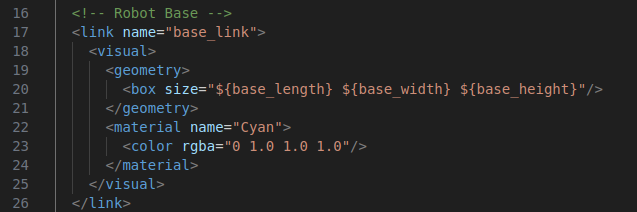
- link는 로봇의 물리적 구성요소이다.
- visual은 gazebo에서 보이게 될 3d모양
- geometry는 박스 형상
- material에서 색상을 지정중

- 시뮬레이션 상에서는 보이지 않는 가상의 링크이다. 로봇이 바닥에 투영되었을때 중심점 역할을 수행

- fixed 조인트로 base_link와 base_footprint를 연결한다.
- z축의 위치는 로봇 바닥이 지면에 닿도록 설정한다. ${ -( wheel_radius + wheel_zoof ) }
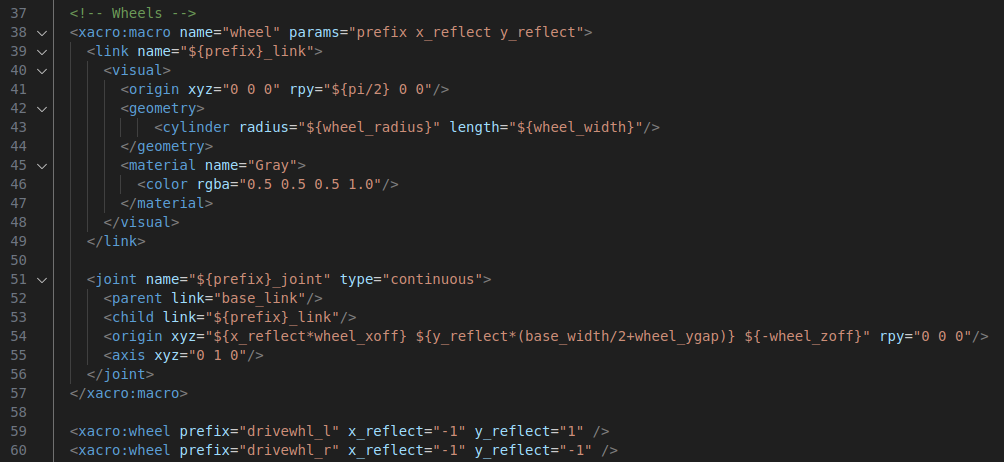
- 바퀴 생성을 위한 매크로를 정의
- params에서 'prefix는 바퀴 이름 앞에 붙일 식별자'이며 'x_reflect와 y_reflect'는 x,y축을 기준으로 좌우/앞뒤 대칭 위치를 계산
- 바퀴는 원통형으로 정의하며, rpy로 x축을 중심으로 90도 회전 시켜서 바퀴가 y축을 따라서 회전하도록 설정
- joint는 continuos로 회전이 가능하게
- axis는 y축을 기준으로 회전함을 의미
<?xml version="1.0"?>
<robot name="sam_bot" xmlns:xacro="http://ros.org/wiki/xacro">
	  <!-- Define robot constants -->
  <xacro:property name="base_width" value="0.31"/>
  <xacro:property name="base_length" value="0.42"/>
  <xacro:property name="base_height" value="0.18"/>

  <xacro:property name="wheel_radius" value="0.10"/>
  <xacro:property name="wheel_width" value="0.04"/>
  <xacro:property name="wheel_ygap" value="0.025"/>
  <xacro:property name="wheel_zoff" value="0.05"/>
  <xacro:property name="wheel_xoff" value="0.12"/>

  <xacro:property name="caster_xoff" value="0.14"/>

  <!-- Robot Base -->
  <link name="base_link">
    <visual>
      <geometry>
        <box size="${base_length} ${base_width} ${base_height}"/>
      </geometry>
      <material name="Cyan">
        <color rgba="0 1.0 1.0 1.0"/>
      </material>
    </visual>
  </link>

  <!-- Robot Footprint -->
  <link name="base_footprint"/>

  <joint name="base_joint" type="fixed">
    <parent link="base_link"/>
    <child link="base_footprint"/>
    <origin xyz="0.0 0.0 ${-(wheel_radius+wheel_zoff)}" rpy="0 0 0"/>
  </joint>

  <!-- Wheels -->
  <xacro:macro name="wheel" params="prefix x_reflect y_reflect">
    <link name="${prefix}_link">
      <visual>
        <origin xyz="0 0 0" rpy="${pi/2} 0 0"/>
        <geometry>
            <cylinder radius="${wheel_radius}" length="${wheel_width}"/>
        </geometry>
        <material name="Gray">
          <color rgba="0.5 0.5 0.5 1.0"/>
        </material>
      </visual>
    </link>

    <joint name="${prefix}_joint" type="continuous">
      <parent link="base_link"/>
      <child link="${prefix}_link"/>
      <origin xyz="${x_reflect*wheel_xoff} ${y_reflect*(base_width/2+wheel_ygap)} ${-wheel_zoff}" rpy="0 0 0"/>
      <axis xyz="0 1 0"/>
    </joint>
  </xacro:macro>

  <xacro:wheel prefix="drivewhl_l" x_reflect="-1" y_reflect="1" />
  <xacro:wheel prefix="drivewhl_r" x_reflect="-1" y_reflect="-1" />

  <!-- Caster Wheel -->
  <link name="front_caster">
    <visual>
      <geometry>
        <sphere radius="${(wheel_radius+wheel_zoff-(base_height/2))}"/>
      </geometry>
      <material name="Cyan">
        <color rgba="0 1.0 1.0 1.0"/>
      </material>
    </visual>
  </link>

  <joint name="caster_joint" type="fixed">
    <parent link="base_link"/>
    <child link="front_caster"/>
    <origin xyz="${caster_xoff} 0.0 ${-(base_height/2)}" rpy="0 0 0"/>
  </joint>


</robot>
2. launch파일
from launch import LaunchDescription
from launch.actions import DeclareLaunchArgument
from launch.conditions import IfCondition, UnlessCondition
from launch.substitutions import Command, LaunchConfiguration
from launch_ros.actions import Node
from launch_ros.substitutions import FindPackageShare
import os

def generate_launch_description():
    # sam_bot_description이라는 ros 패키지에서 공유 디렉토리 경로를 찾는다.
    pkg_share = FindPackageShare(package='sam_bot_description').find('sam_bot_description')
    # 로봇 모델 URDF 파일의 기본 경로를 정의
    default_model_path = os.path.join(pkg_share, 'src', 'description', 'sam_bot_description.urdf')
    # rviz 설정 파일의 경로를 정의
    default_rviz_config_path = os.path.join(pkg_share, 'rviz', 'config.rviz')

    # robot_state_publisher 노드를 정의합니다.
    robot_state_publisher_node = Node(
        package='robot_state_publisher', # 패키지 이름 ( 반드시 실존하는 ros패키지 이름 명시)
        executable='robot_state_publisher', # 실행할 노드 이름 ( 위의 package안에 있는 실행 파일 이름을 지정)
        # parameters는 노드를 실행할때 전달할 파라미터 목록이다.
        parameters=[{'robot_description': Command(['xacro ', LaunchConfiguration('model')])}]
    )
    joint_state_publisher_node = Node(
        package='joint_state_publisher',
        executable='joint_state_publisher',
        name='joint_state_publisher',
        parameters=[{'robot_description': Command(['xacro ', default_model_path])}],
        condition=UnlessCondition(LaunchConfiguration('gui'))
    )
    joint_state_publisher_gui_node = Node(
        package='joint_state_publisher_gui',
        executable='joint_state_publisher_gui',
        name='joint_state_publisher_gui',
        condition=IfCondition(LaunchConfiguration('gui'))
    )
    rviz_node = Node(
        package='rviz2',
        executable='rviz2',
        name='rviz2',
        output='screen',
        arguments=['-d', LaunchConfiguration('rvizconfig')],
    )

    # 최종적으로 launchDescription 객체를 생성하여, 모든 액션을 리스트로 반환
    return LaunchDescription([
        # gui인자 선언
        DeclareLaunchArgument(name='gui', default_value='True', description='Flag to enable joint_state_publisher_gui'),
        # model 이자를 선언
        DeclareLaunchArgument(name='model', default_value=default_model_path, description='Absolute path to robot model file'),
        # rviz 설정
        DeclareLaunchArgument(name='rvizconfig', default_value=default_rviz_config_path, description='Absolute path to rviz config file'),
        joint_state_publisher_node,
        joint_state_publisher_gui_node,
        robot_state_publisher_node,
        rviz_node
    ])
3. package.xml 수정
<exec_depend>joint_state_publisher</exec_depend>
<exec_depend>joint_state_publisher_gui</exec_depend>
<exec_depend>robot_state_publisher</exec_depend>
<exec_depend>rviz</exec_depend>
<exec_depend>xacro</exec_depend>
4. rviz.config 생성
Panels:
  - Class: rviz_common/Displays
    Help Height: 78
    Name: Displays
    Property Tree Widget:
      Expanded:
        - /Global Options1
        - /Status1
        - /RobotModel1/Links1
        - /TF1
      Splitter Ratio: 0.5
    Tree Height: 557
Visualization Manager:
  Class: ""
  Displays:
    - Alpha: 0.5
      Cell Size: 1
      Class: rviz_default_plugins/Grid
      Color: 160; 160; 164
      Enabled: true
      Name: Grid
    - Alpha: 0.6
      Class: rviz_default_plugins/RobotModel
      Description Topic:
        Depth: 5
        Durability Policy: Volatile
        History Policy: Keep Last
        Reliability Policy: Reliable
        Value: /robot_description
      Enabled: true
      Name: RobotModel
      Visual Enabled: true
    - Class: rviz_default_plugins/TF
      Enabled: true
      Name: TF
      Marker Scale: 0.3
      Show Arrows: true
      Show Axes: true
      Show Names: true
  Enabled: true
  Global Options:
    Background Color: 48; 48; 48
    Fixed Frame: base_link
    Frame Rate: 30
  Name: root
  Tools:
    - Class: rviz_default_plugins/Interact
      Hide Inactive Objects: true
    - Class: rviz_default_plugins/MoveCamera
    - Class: rviz_default_plugins/Select
    - Class: rviz_default_plugins/FocusCamera
    - Class: rviz_default_plugins/Measure
      Line color: 128; 128; 0
  Transformation:
    Current:
      Class: rviz_default_plugins/TF
  Value: true
  Views:
    Current:
      Class: rviz_default_plugins/Orbit
      Name: Current View
      Target Frame: <Fixed Frame>
      Value: Orbit (rviz)
    Saved: ~
5. CMakeList.txt에 다음 내용 추가
install(
  DIRECTORY src launch rviz
  DESTINATION share/${PROJECT_NAME}
)
colcon build
. install/setup.bash

ros2 launch sam_bot_description display.launch.py
'gazebo > Nav2' 카테고리의 다른 글
| nav2 - Writing a New Costmap2D Plugin (0) | 2025.05.10 |
|---|---|
| nav2 - Setting Up Odometry - Gazebo (0) | 2025.04.17 |
| nav2 - (STVL) Using an External Costmap Plugin (0) | 2025.04.03 |
| nav2 - (SLAM) Navigating While Mapping (0) | 2025.04.03 |
| nav2 - Setting Up Transformations (1) | 2025.04.01 |