ros2 run rqt_console rqt_console
#!/bin/bash

# === 고유 식별자 ===
IDENTIFIER_MAP_SERVER="__ID__MAP_SERVER__"
IDENTIFIER_AMCL="__ID__AMCL__"
IDENTIFIER_PLANNER_SERVER="__ID__PLANNER_SERVER__"
IDENTIFIER_CONTROLLER_SERVER="__ID__CONTROLLER_SERVER__"
IDENTIFIER_BT="__ID__BT_NAVIGATOR__"
IDENTIFIER_SMOOTHER="__ID__SMOOTHER__"
IDENTIFIER_NAV_BEHAVIOR_SERVER="__ID__NAV_BEHAVIOR_SERVER__"
IDENTIFIER_PATH="__ID__MY_PATH_NODE__"
IDENTIFIER_RVIZ="__ID__RVIZ2__"

# === Ctrl+C 처리 ===
trap ctrl_c INT
function ctrl_c() {
  echo ""
  echo "🛑 Ctrl+C 감지됨. 노드 종료 중..."
  pkill -f "$IDENTIFIER_MAP_SERVER"
  pkill -f "$IDENTIFIER_AMCL"
  pkill -f "$IDENTIFIER_PLANNER_SERVER"
  pkill -f "$IDENTIFIER_CONTROLLER_SERVER"
  pkill -f "$IDENTIFIER_BT"
  pkill -f "$IDENTIFIER_SMOOTHER"
  pkill -f "$IDENTIFIER_NAV_BEHAVIOR_SERVER"
  pkill -f "$IDENTIFIER_PATH"
  pkill -f "$IDENTIFIER_RVIZ"
  echo "✅ 종료 완료."
  exit
}

# === Nav2 노드 실행 ===
gnome-terminal -- bash -c "
  echo '$IDENTIFIER_MAP_SERVER';
  ros2 run nav2_map_server map_server --ros-args -p yaml_filename:=$(pwd)/my_map.yaml -p use_sim_time:=true;
  exec bash
" &

gnome-terminal -- bash -c "
  echo '$IDENTIFIER_AMCL';
  ros2 run nav2_amcl amcl --ros-args --params-file $(ros2 pkg prefix turtlebot4_navigation)/share/turtlebot4_navigation/config/nav2.yaml -p use_sim_time:=true;
  exec bash
" &

gnome-terminal -- bash -c "
  echo '$IDENTIFIER_PLANNER_SERVER';
  ros2 run nav2_planner planner_server --ros-args --params-file /opt/ros/jazzy/share/nav2_bringup/params/nav2_params.yaml -p use_sim_time:=true;
  exec bash
" &

gnome-terminal -- bash -c "
  echo '$IDENTIFIER_CONTROLLER_SERVER';
  ros2 run nav2_controller controller_server --ros-args --params-file $(ros2 pkg prefix turtlebot4_navigation)/share/turtlebot4_navigation/config/nav2.yaml -p use_sim_time:=true;
  exec bash
" &

gnome-terminal -- bash -c "
  echo '$IDENTIFIER_BT';
  ros2 run nav2_bt_navigator bt_navigator --ros-args --params-file $(ros2 pkg prefix turtlebot4_navigation)/share/turtlebot4_navigation/config/nav2.yaml -p use_sim_time:=true;
  exec bash
" &

gnome-terminal -- bash -c "
  echo '$IDENTIFIER_SMOOTHER';
  ros2 run nav2_smoother smoother_server --ros-args --params-file $(ros2 pkg prefix turtlebot4_navigation)/share/turtlebot4_navigation/config/nav2.yaml -p use_sim_time:=true;
  exec bash
" &

gnome-terminal -- bash -c "
  echo '$IDENTIFIER_NAV_BEHAVIOR_SERVER';
  ros2 run nav2_behaviors behavior_server --ros-args --params-file $(ros2 pkg prefix turtlebot4_navigation)/share/turtlebot4_navigation/config/nav2.yaml -p use_sim_time:=true;
  exec bash
" &

#gnome-terminal -- bash -c "
#  echo '$IDENTIFIER_RVIZ';
#  ros2 launch nav2_bringup bringup_launch.py use_sim_time:=true;
#  exec bash
#" &
#  ros2 launch nav2_bringup rviz_launch.py use_sim_time:=true;
# ros2 launch nav2_bringup bringup_launch.py use_sim_time:=true params_file:=/opt/ros/jazzy/share/nav2_bringup/params/nav2_params.yaml;
# ros2 launch nav2_bringup rviz_launch.py use_sim_time:=true params_file:=/opt/ros/jazzy/share/nav2_bringup/params/nav2_params.yaml;

gnome-terminal -- bash -c "
  echo '$IDENTIFIER_PATH';
  ros2 launch nav2_bringup rviz_launch.py use_sim_time:=true default_nav_to_pose_bt_xml:=/home/jihong/ros2_ws/src/my_nav2_bt.xml;
  exec bash
" &

# === Gazebo 시뮬레이터 실행 ===
echo ""
echo "🎮 Gazebo 시뮬레이터를 실행합니다..."
ros2 launch turtlebot4_gz_bringup turtlebot4_gz.launch.py slam:=false nav2:=false rviz:=false use_sim_time:=true &
GAZEBO_PID=$!

sleep 5

# === Gazebo 종료 대기 ===
wait $GAZEBO_PID

# === Gazebo 종료 시 모든 노드 종료 ===
echo ""
echo "🛑 Gazebo 종료 감지됨. 노드들도 종료합니다..."
pkill -f "$IDENTIFIER_MAP_SERVER"
pkill -f "$IDENTIFIER_AMCL"
pkill -f "$IDENTIFIER_PLANNER_SERVER"
pkill -f "$IDENTIFIER_CONTROLLER_SERVER"
pkill -f "$IDENTIFIER_BT"
pkill -f "$IDENTIFIER_SMOOTHER"
pkill -f "$IDENTIFIER_NAV_BEHAVIOR_SERVER"
pkill -f "$IDENTIFIER_RVIZ"
pkill -f "$IDENTIFIER_PATH"


echo "✅ 모든 노드가 안전하게 종료되었습니다."
나는 지금까지 아래의 과정을 거쳐왔다..
https://jihong.tistory.com/583
gazebo turtlebot path planning
/opt/ros/jazzy/share/turtlebot4_navigation/config 1. 시뮬레이터 실행ros2 launch turtlebot4_gz_bringup turtlebot4_gz.launch.py slam:=false nav2:=false rviz:=false use_sim_time:=true 2. map server를 활성화 해보자. (https://jihong.
jihong.tistory.com
https://jihong.tistory.com/590
gazebo path planning 시뮬레이션 해보기 정리...
1. 다음의 쉘 파일로 우선 시뮬레이터와 다른 노드들 활성화 시킨다. 2. 첫번째 라이프사이클 활성화 시킬것들... map server와 amclros2 lifecycle set /map_server configureros2 lifecycle set /map_server activateros2 li
jihong.tistory.com
위에 까지는 했으나 결국에는 나의 path planning 알고리즘이 작동이 안되었다.
찾아보니 nav2의 파라미터 파일을 수정해야만 적용이 된다더라. ( nav2_params.yaml )
아래는 해당되는 부분이다.

(왜 저부분을 수정해야하는지는 아래와 나와있다.) https://jihong.tistory.com/588
navigation concepts
https://docs.nav2.org/concepts/index.html#ros-2 Navigation Concepts — Nav2 1.0.0 documentationThis page is to help familiarize new roboticists to the concepts of mobile robot navigation, in particular, with the concepts required to appreciating and work
jihong.tistory.com
그리고 기존의 python pkg가 아니라 c++로 다시 작성해본다.
1. 우선 ~/ros2_ws/src에서 c++패키지를 만들어주자.
cd ~/ros2_ws/src
ros2 pkg create --build-type ament_cmake my_astar_planner --dependencies rclcpp nav2_core pluginlib nav2_costmap_2d geometry_msgs nav2_msgs nav_msgs
2. package가 잘 생성되었는지 확인해보자.

3. 아래의 디렉토리로 우선 이동하자. 그리고 저기에 작성을 할것이다.

4. 위에서 이동한 디렉토리에 astar_planner.hpp 를 작성해주자.
#ifndef MY_ASTAR_PLANNER__ASTAR_PLANNER_HPP_
#define MY_ASTAR_PLANNER__ASTAR_PLANNER_HPP_

/*
- a star기반의 global path planner 클래스 정의 헤더 파일
- 즉, a star알고리즘으로 전역 경로 계획을 수행한다.
- 이 파일에서는 nav2_core::GlobalPlanner 인터페이스를 상속받아서, a star알고리즘을 이용한 경로 생성을 수행한다.
- ros2의 node의 lifecycle구조에 맞춰서 configure activate deactivate cleanup 메서드를 구현하며, 실제 경로 생성은 createPlan 메서드로 수행한다.
*/

#include "nav2_core/global_planner.hpp" // nav2에서 제공하는 global path planner 인터페이스 정의
#include "nav2_costmap_2d/costmap_2d_ros.hpp" // 2d costmap을 다루는 ros 인터페이스
#include "rclcpp/rclcpp.hpp" // ros2의 c++ 클라이언트 라이브러리를 사용하기 위한 헤더
#include "geometry_msgs/msg/pose_stamped.hpp" // 로봇이나 목표지점의 pose 정보를 담는 메시지 타입
#include "nav_msgs/msg/path.hpp" // path 정보를 담는 메시지 타입
#include "tf2_ros/buffer.h" // TF 변환 정보를 담고, 질의할 수 있는 버퍼

namespace my_astar_planner
{
// a star알고리즘을 이용한 global planner 클래스.
// nav2_core::GlobalPlanner를 상속받아서 override method를 통해서 전역 경로를 생성하고, lifecycle 기반 method들을 구현
class AStarPlanner : public nav2_core::GlobalPlanner
{
public:
  AStarPlanner(); // 생성자
  ~AStarPlanner(); // 소멸자

  // planner를 configure하는 method
  // lifecycle 상태에서 'configuring'상태로 전환될때 호출된다.
  void configure(
    const rclcpp_lifecycle::LifecycleNode::WeakPtr & parent, //Lifecycle의 약한 포인터 ( 노드에 접근하기 위함 )
    std::string name,// node나 plugin을 식별하기 위한 이름
    std::shared_ptr<tf2_ros::Buffer> tf,// TF 정보(좌표변환)를 제공하는 tf2_ros::Buffer의 공유 포인터
    std::shared_ptr<nav2_costmap_2d::Costmap2DROS> costmap_ros) override;// costmap_ros 로컬 or 전역 costmap접근을 위한 nav2_costmap_2d::Costmap2DROS 객체의 공유 포인터

  void cleanup() override;//lifecycle에서 cleaning up상태로 전환될 때 호출. ( 이를 통해서 메모리 및 리소스를 해제 )
  void activate() override;// activate 상태로 전환시 호출. ( planner가 활성화되어서 createPlan 호출을 수용할 수 있는 상태로 진입)
  void deactivate() override;//deactivate상태로 전환시 호출. ( planner가 일시적으로 비활성화되며, createPlan호출을 수용하지 않도록 설정 )

  // global path planning을 생성하는 method
  // a star 알고리즘을 기반으로 start에서 goal까지의 경로를 계산해서 반환한다.
  // canel_checker를 통해서 계산중에 취소 요청이 들어왔는지 확인할 수 있다.
  nav_msgs::msg::Path createPlan(
    const geometry_msgs::msg::PoseStamped & start,// 로봇의 시작 위치를 참조...( PostStamped 형태 )
    const geometry_msgs::msg::PoseStamped & goal,// 목표위치를 참조...( PostStamped 형태 )
    std::function<bool()> cancel_checker) override; // 경로 계산 중 취소 여부를 확인하는 콜백 함수

private:
  rclcpp_lifecycle::LifecycleNode::SharedPtr node_; // 현재 lifecycle 노드에 대한 shared pointer
  std::string name_;  // 이 planner 인스턴스의 이름
  rclcpp::Logger logger_; // 로그 출력을 위한 logger객체
  std::shared_ptr<nav2_costmap_2d::Costmap2DROS> costmap_ros_;// costmap접근을 위한 shared pointer
  nav2_costmap_2d::Costmap2D * costmap_;// 실제 경로 탐색에 사용되는 raw costmap 포인터
  std::shared_ptr<tf2_ros::Buffer> tf_;// TF 좌표 변환을 처리하기 위한 shared pointer
};

}  // namespace my_astar_planner

#endif  // MY_ASTAR_PLANNER__ASTAR_PLANNER_HPP_
5. 이번에는 ~/ros2_ws/src/my_astar_planner/src에 astar_planner.cpp을 작성하자
// shared pointer는 강한참조라면 , weak pointer는 약한 참조

#include "my_astar_planner/astar_planner.hpp"
#include "pluginlib/class_list_macros.hpp"
#include <queue>
#include <vector>
#include <cmath>

namespace my_astar_planner
{
// 생성자: AStarPlanner 객체가 생성될때 호출된다. 여기에서는 logger 인스턴스를 초기화해서 나중에 log출력을 가능하게 한다. ( :는 멤버 초기화 리스트를 시작한다는 의미)
AStarPlanner::AStarPlanner() : logger_(rclcpp::get_logger("AStarPlanner")) {}
// 소멸자
AStarPlanner::~AStarPlanner() {}

// configure
/*
- node의 lifecycle이 configuring으로 전환할때 호출
- planner가 사용할 노드 , 이름 , TF버퍼 , costmap 인터페이스를 설정한다. 이후 createPlan()호출을 위한 초기 설정 작업을 수행
*/
void AStarPlanner::configure(
  const rclcpp_lifecycle::LifecycleNode::WeakPtr & parent,// 호출한 lifecycle의 약한 포인터
  std::string name,// 플러그인을 식별하기 위한 이름
  std::shared_ptr<tf2_ros::Buffer> tf,// TF변환을 처리할 버퍼
  std::shared_ptr<nav2_costmap_2d::Costmap2DROS> costmap_ros)// 2d costmap 접근을 위한 객체
{
  node_ = parent.lock();  // 약한 포인터에서 shared_ptr로 변환하여 노드에 안전하게 접근.
  name_ = name; // 플러그인 인스턴스를 구분하기 위한 이름
  tf_ = tf;// tf버퍼 저장
  costmap_ros_ = costmap_ros;// costmap2D ROS의 객체를 저장한다.
  costmap_ = costmap_ros_->getCostmap();// cost map 2d ros에서 실제 costmap 데이터 포인터를 획득한다.
  logger_ = node_->get_logger();// 노드의 로거를 가져온다.
  RCLCPP_INFO(logger_, "AStarPlanner configured successfully. 노드의 이름은 %s이다. \n" , name_.c_str() );
}

// cleanup: node의 lifecycle이
void AStarPlanner::cleanup() {}
void AStarPlanner::activate() {
  RCLCPP_INFO(logger_ , "\n%s : activating a star.... a star 알고리즘을 활성화...\n", name_.c_str());
}
void AStarPlanner::deactivate() {}

// node 구조체
// - a star 탐색시에 각 셀을 노드로 표현
// - x,y : 그리드 좌표
// - g_cost : 출발지로부터 누적된 실제 이동 비용
// - h_cost : 현재 노드에서 목표까지의 휴리스틱 추정 비용
// - parent : 경로 복원시에 사용되는 부모 노드의 포인터
struct Node
{
  int x, y;
  double g_cost, h_cost;
  Node *parent;

  double f_cost() const { return g_cost + h_cost; }

  // operator>는 두 node객체의 크기를 비교하기 위한 연산자 오버로딩.
  // 여기에서는 node의 인트턴스를 f_cost값을 기준으로 비교하는 방식을 정의
  bool operator>(const Node &other) const
  {
    return f_cost() > other.f_cost();
  }
};

// 휴리스틱 함수.
// 유클리드 거리 계산
double heuristic(int x1, int y1, int x2, int y2)
{
  return std::hypot(x2 - x1, y2 - y1);
}

// --------------------------------------------------
// createPlan():
// - a*알고리즘으로 start -> goal까지의 최적 경로 생성
// - cancelChcker로 취소 요청 처리
// - 각각 시작 위치 , 목표위치 , 최소 요청 확인 함수
nav_msgs::msg::Path AStarPlanner::createPlan( const geometry_msgs::msg::PoseStamped &start , const geometry_msgs::msg::PoseStamped &goal , std::function<bool()> cancel_checker){
  nav_msgs::msg::Path path;// 결과 경로의 메시지를 초기화
  path.header.frame_id = "map"; // costmap이 사용하는 frame id
  path.header.stamp = node_->now(); // 현재 시각 스템프

  unsigned int start_x, start_y, goal_x, goal_y;
  RCLCPP_INFO(logger_ , "입력받은 start의 좌표는 %d %d 이다. goal의 좌표는 %d %d이다.\n" , start_x , start_y , goal_x , goal_y);

  // 입력받은 world좌표를 map좌표로 변환한다.( costmap2D 셀 인덱스로 )
  costmap_->worldToMap(start.pose.position.x, start.pose.position.y, start_x, start_y);
  costmap_->worldToMap(goal.pose.position.x, goal.pose.position.y, goal_x, goal_y);

  // open_set은 방문할 후보 노드들을 우선순위 큐로 관리.
  std::priority_queue<Node, std::vector<Node>, std::greater<Node>> open_set;
  // closed_set은 이미 처리한 셀을 표시한다. ( 중복 탐색을 방지하기 위함 )
  std::vector<std::vector<bool>> closed_set(costmap_->getSizeInCellsX(), std::vector<bool>(costmap_->getSizeInCellsY(), false));

  // 출발 노드를 생성하여 OPEN_SET에 추가
  Node start_node{(int)start_x, (int)start_y, 0.0, heuristic(start_x, start_y, goal_x, goal_y), nullptr};
  open_set.push(start_node);

  // 메모리 해제 관리를 위해서, 생성된 모든 동적 node 포인터를 저장.
  std::vector<Node*> all_nodes;
  Node *goal_node = nullptr;
  bool path_found = false;

  // 8방향 이웃 좌표 오프셋
  std::vector<std::pair<int, int>> neighbors = {{-1,0},{1,0},{0,-1},{0,1},{-1,-1},{-1,1},{1,-1},{1,1}};

  // 메인 탐색 루프
  while (!open_set.empty())
  {
    // 취소 요청 확인 : 외부에서 경로 계산을 중단하는 것이 가능하다.
    if (cancel_checker()) {
      RCLCPP_WARN(logger_, "Planning canceled!");
      break;
    }

    // 최우선 노드를 꺼내서 현재 노드로 설정한다.
    Node current = open_set.top();
    open_set.pop();

    // 이미 처리된 셀이라면 건너뛴다.
    if (closed_set[current.x][current.y])
      continue;

    // 현재 셀을 방문처리 한다.
    closed_set[current.x][current.y] = true;

    // 목표에 도달했으면, 경로 생성 루프를 종료
    if (current.x == (int)goal_x && current.y == (int)goal_y) {
      goal_node = new Node(current);
      path_found = true;
      break;
    }

    // 이웃 노드를 탐색
    for (auto &offset : neighbors)
    {
      int nx = current.x + offset.first;
      int ny = current.y + offset.second;

      // 맵의 범위를 벗어난 경우에는 무시한다.
      if (nx < 0 || ny < 0 || nx >= (int)costmap_->getSizeInCellsX() || ny >= (int)costmap_->getSizeInCellsY())
        continue;

      // 이미 방문했거나 치명적인 장애물이라면 무시한다.
      if (closed_set[nx][ny] || costmap_->getCost(nx, ny) >= nav2_costmap_2d::LETHAL_OBSTACLE)
        continue;

      // g비용 ( 현재까지 누적 비용 ) 계산 : 대각선 이동시 거리 고려
      double new_g_cost = current.g_cost + heuristic(current.x, current.y, nx, ny);
      double new_h_cost = heuristic(nx, ny, goal_x, goal_y);

      // 새 이웃 노드 생성 ( 부모로 current 복사 )
      Node neighbor{nx, ny, new_g_cost, new_h_cost, new Node(current)};

      // 우선 순위 큐에 추가
      open_set.push(neighbor);

      // 나중에 해제할 메모리를 저장
      all_nodes.push_back(neighbor.parent);
    }
  }

  if (path_found)
  {
    Node *current = goal_node;
    while (current)
    {
      geometry_msgs::msg::PoseStamped pose;
      pose.header.frame_id = "map";
      costmap_->mapToWorld(current->x, current->y, pose.pose.position.x, pose.pose.position.y);
      pose.pose.orientation.w = 1.0;
      path.poses.insert(path.poses.begin(), pose);
      current = current->parent;
    }
    RCLCPP_INFO(logger_, "Path successfully found.");
  }
  else
    RCLCPP_WARN(logger_, "Failed to find path.");

  for(auto ptr : all_nodes) delete ptr;
  delete goal_node;

  return path;
}

}  // namespace my_astar_planner

PLUGINLIB_EXPORT_CLASS(my_astar_planner::AStarPlanner, nav2_core::GlobalPlanner)
6. CMakeLists.txt를 수정하자.
cmake_minimum_required(VERSION 3.8)
project(my_astar_planner)

if(CMAKE_COMPILER_IS_GNUCXX OR CMAKE_CXX_COMPILER_ID MATCHES "Clang")
  add_compile_options(-Wall -Wextra -Wpedantic)
endif()

# find dependencies
find_package(ament_cmake REQUIRED)
find_package(rclcpp REQUIRED)
find_package(nav2_core REQUIRED)
find_package(pluginlib REQUIRED)
find_package(nav2_costmap_2d REQUIRED)
find_package(geometry_msgs REQUIRED)
find_package(nav2_msgs REQUIRED)
find_package(nav_msgs REQUIRED)

include_directories(
  include
)

add_library(my_astar_planner SHARED
  src/astar_planner.cpp
)

ament_target_dependencies(my_astar_planner
  rclcpp
  nav2_core
  pluginlib
  nav2_costmap_2d
  nav2_msgs
  nav_msgs
  geometry_msgs
)

pluginlib_export_plugin_description_file(nav2_core astar_plugin.xml)

install(TARGETS my_astar_planner
  ARCHIVE DESTINATION lib
  LIBRARY DESTINATION lib
  RUNTIME DESTINATION bin
)

install(DIRECTORY include/
  DESTINATION include/
)

if(BUILD_TESTING)
  find_package(ament_lint_auto REQUIRED)
  # the following line skips the linter which checks for copyrights
  # comment the line when a copyright and license is added to all source files
  set(ament_cmake_copyright_FOUND TRUE)
  # the following line skips cpplint (only works in a git repo)
  # comment the line when this package is in a git repo and when
  # a copyright and license is added to all source files
  set(ament_cmake_cpplint_FOUND TRUE)
  ament_lint_auto_find_test_dependencies()
endif()

ament_package()
7. package.xml에 아래의 내용의 존재하는지 확인. ( 의존성 명시를 위해서 )
<?xml version="1.0"?>
<?xml-model href="http://download.ros.org/schema/package_format3.xsd" schematypens="http://www.w3.org/2001/XMLSchema"?>
<package format="3">
  <name>my_astar_planner</name>
  <version>0.0.0</version>
  <description>TODO: Package description</description>
  <maintainer email="jihong@todo.todo">jihong</maintainer>
  <license>TODO: License declaration</license>

  <buildtool_depend>ament_cmake</buildtool_depend>

  <depend>rclcpp</depend>
  <depend>nav2_core</depend>
  <depend>pluginlib</depend>
  <depend>nav2_costmap_2d</depend>
  <depend>geometry_msgs</depend>
  <depend>nav2_msgs</depend>
  <depend>nav_msgs</depend>

  <test_depend>ament_lint_auto</test_depend>
  <test_depend>ament_lint_common</test_depend>

  <export>
    <build_type>ament_cmake</build_type>
  </export>
</package>
8. 패키지의 최상단에 astar_plugin.xml을 추가
<library path="my_astar_planner">
  <class type="my_astar_planner::AStarPlanner" base_class_type="nav2_core::GlobalPlanner">
    <description>A custom A* planner plugin.</description>
  </class>
</library>
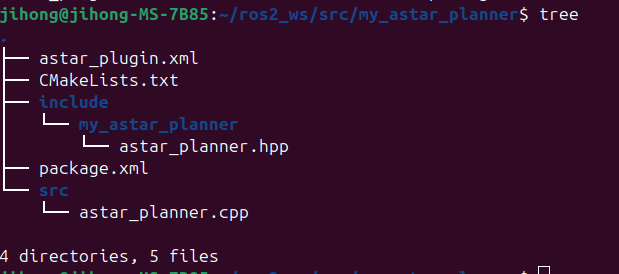
9. 빌드
cd ~/ros2_ws
colcon build --symlink-install --packages-select my_astar_planner
source install/setup.bash
10. nav2의 파라미터 파일 수정. ( 항상 하기전에는 잘못할수 있으니 백업을 만들자 )
- ( 나는 turtlebot4에서 제공하는것을 사용중이니, opt ros jazzy share turtlebot4_navigation config에 있는거 수정 )
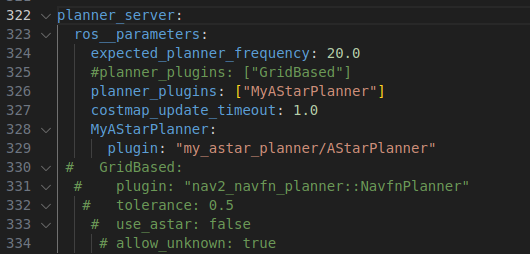
11. nav2의 다음 부분도 수정
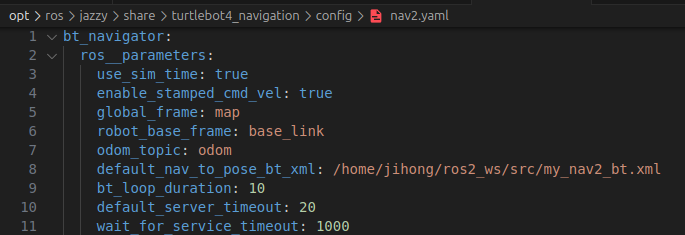
12. 이제 아래의 사진을 보며 해당 디렉토리로 가보자
- 그러면 현재 띄운 파일을 ros2_ws의 src로 cp해보자

13. 그리고 astar planner를 등록하자.

<!--
  This Behavior Tree replans the global path periodically at 1 Hz and it also has
  recovery actions specific to planning / control as well as general system issues.
  This will be continuous if a kinematically valid planner is selected.
-->
<root BTCPP_format="4" main_tree_to_execute="MainTree">
  <BehaviorTree ID="MainTree">
    <RecoveryNode number_of_retries="6" name="NavigateRecovery">
      <PipelineSequence name="NavigateWithReplanning">
        <ControllerSelector selected_controller="{selected_controller}" default_controller="FollowPath" topic_name="controller_selector"/>
        <PlannerSelector selected_planner="{selected_planner}" default_planner="MyAStarPlanner" topic_name="planner_selector"/>
        <RateController hz="1.0">
          <RecoveryNode number_of_retries="1" name="ComputePathToPose">
            <ComputePathToPose goal="{goal}" path="{path}" planner_id="{selected_planner}" error_code_id="{compute_path_error_code}"/>
            <Sequence>
              <WouldAPlannerRecoveryHelp error_code="{compute_path_error_code}"/>
              <ClearEntireCostmap name="ClearGlobalCostmap-Context" service_name="global_costmap/clear_entirely_global_costmap"/>
            </Sequence>
          </RecoveryNode>
        </RateController>
        <RecoveryNode number_of_retries="1" name="FollowPath">
          <FollowPath path="{path}" controller_id="{selected_controller}" error_code_id="{follow_path_error_code}"/>
          <Sequence>
            <WouldAControllerRecoveryHelp error_code="{follow_path_error_code}"/>
            <ClearEntireCostmap name="ClearLocalCostmap-Context" service_name="local_costmap/clear_entirely_local_costmap"/>
          </Sequence>
        </RecoveryNode>
      </PipelineSequence>
      <Sequence>
        <Fallback>
          <WouldAControllerRecoveryHelp error_code="{follow_path_error_code}"/>
          <WouldAPlannerRecoveryHelp error_code="{compute_path_error_code}"/>
        </Fallback>
        <ReactiveFallback name="RecoveryFallback">
          <GoalUpdated/>
          <RoundRobin name="RecoveryActions">
            <Sequence name="ClearingActions">
              <ClearEntireCostmap name="ClearLocalCostmap-Subtree" service_name="local_costmap/clear_entirely_local_costmap"/>
              <ClearEntireCostmap name="ClearGlobalCostmap-Subtree" service_name="global_costmap/clear_entirely_global_costmap"/>
            </Sequence>
            <Spin spin_dist="1.57" error_code_id="{spin_error_code}"/>
            <Wait wait_duration="5.0"/>
            <BackUp backup_dist="0.30" backup_speed="0.15" error_code_id="{backup_code_id}"/>
          </RoundRobin>
        </ReactiveFallback>
      </Sequence>
    </RecoveryNode>
  </BehaviorTree>
</root>
14. shell파일 실행
export GZ_RENDER_ENGINE=ogre2
12. 다음 새 터미널에 입력
ros2 launch nav2_bringup bringup_launch.py use_sim_time:=true params_file:=/opt/ros/jazzy/share/nav2_bringup/params/nav2_params.yaml
15. 첫번째 라이프사이클 활성화 시킬것들... map server와 amcl
ros2 lifecycle set /map_server configure
ros2 lifecycle set /map_server activate

ros2 lifecycle set /amcl configure
ros2 lifecycle set /amcl activate
16. initial pose 설정
ros2 topic pub -1 /initialpose geometry_msgs/msg/PoseWithCovarianceStamped '
header:
  frame_id: "map"
pose:
  pose:
    position:
      x: 0.0
      y: 0.0
      z: 0.0
    orientation:
      x: 0.0
      y: 0.0
      z: 0.0
      w: 1.0
  covariance: [0.0, 0.0, 0.0, 0.0, 0.0, 0.0, 0.0, 0.0, 0.0, 0.0, 0.0, 0.0, 0.0, 0.0, 0.0, 0.0, 0.0, 0.0, 0.0, 0.0, 0.0, 0.0, 0.0, 0.0, 0.0, 0.0, 0.0, 0.0, 0.0, 0.0, 0.0, 0.0, 0.0, 0.0, 0.0, 0.0]'
17. 두번째 라이프 사이클 활성화
ros2 lifecycle set /behavior_server configure
ros2 lifecycle set /behavior_server activate


ros2 lifecycle set /controller_server configure
ros2 lifecycle set /controller_server activate

ros2 lifecycle set /planner_server configure
ros2 lifecycle set /planner_server activate


ros2 lifecycle set /smoother_server configure
ros2 lifecycle set /smoother_server activate

ros2 lifecycle set /bt_navigator configure
ros2 lifecycle set /bt_navigator activate
18. 확인해보기
ros2 lifecycle get /map_server
ros2 lifecycle get /amcl
ros2 lifecycle get /planner_server
ros2 lifecycle get /controller_server
ros2 lifecycle get /behavior_server
ros2 lifecycle get /bt_navigator
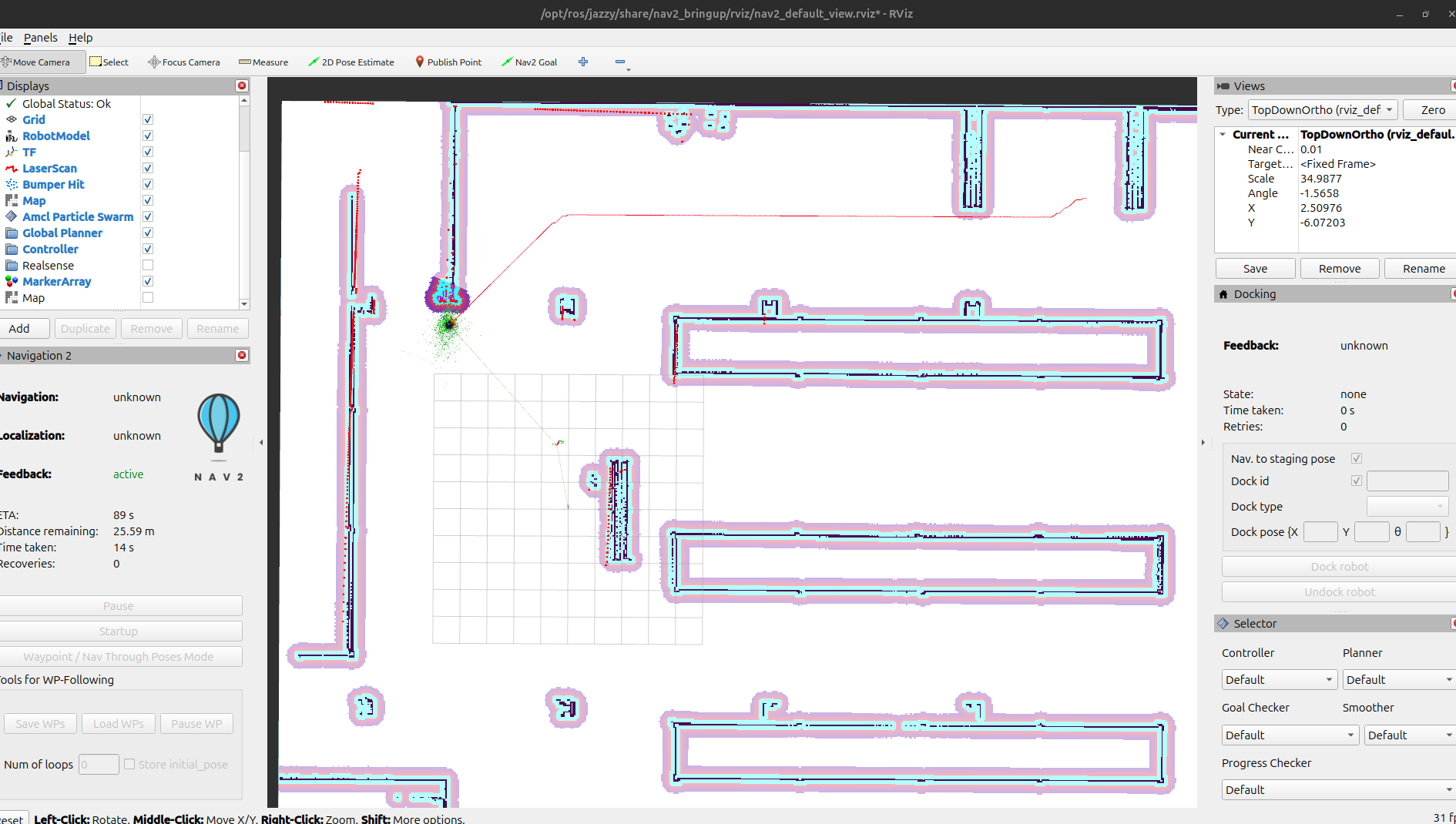
19. plugin도 확인해보기
ros2 param get /planner_server planner_plugins
'gazebo' 카테고리의 다른 글
| turtlebot4_gz_bringup의 turtlebot4_gz.launch파일 (1) | 2025.04.17 |
|---|---|
| 터틀봇을 다른 맵에 spawn해보기 - (터틀봇 spawn위치 설정) (0) | 2025.04.17 |
| gazebo path planning 시뮬레이션 해보기 정리... (0) | 2025.03.28 |
| forklift model 만들기 ( gz sim ) (0) | 2025.03.26 |
| gazebo turtlebot path planning (0) | 2025.03.21 |