Writing a simple publisher and subscriber (Python) — ROS 2 Documentation: Jazzy documentation
Writing a simple publisher and subscriber (Python) — ROS 2 Documentation: Jazzy documentation
Navigate into ros2_ws/src/py_pubsub/py_pubsub. Recall that this directory is a Python package with the same name as the ROS 2 package it’s nested in. Now there will be a new file named publisher_member_function.py adjacent to __init__.py. Open the file u
docs.ros.org
Goal
- create and run a publisher abd subsriber node using python
Background
- in this tutorial, 다른 topic으로 string형태의 메시지 정보를 전달하는 nodes를 만들것이다.
- 간단하게 talker와 listener를 만들자.
- talker는 data를 publish할것이며, listener는 다른 topic을 subsribe하여 data를 받게 할것이다.
Task
- 1. 우선 ros2_ws 디렉토리로 이동하자
- 2. 그라고 src 디렉토리로 이동하자.
- 앞의 ROS 2 Tutorials : Creating a package 에서도 언급하였으나, packages는 root에 존재하지 않고 src 디렉토리 안으로 넣어줘야한다.
- 3, 아래의 명령어로 package를 만들자.
ros2 pkg create --build-type ament_python --license Apache-2.0 py_pubsub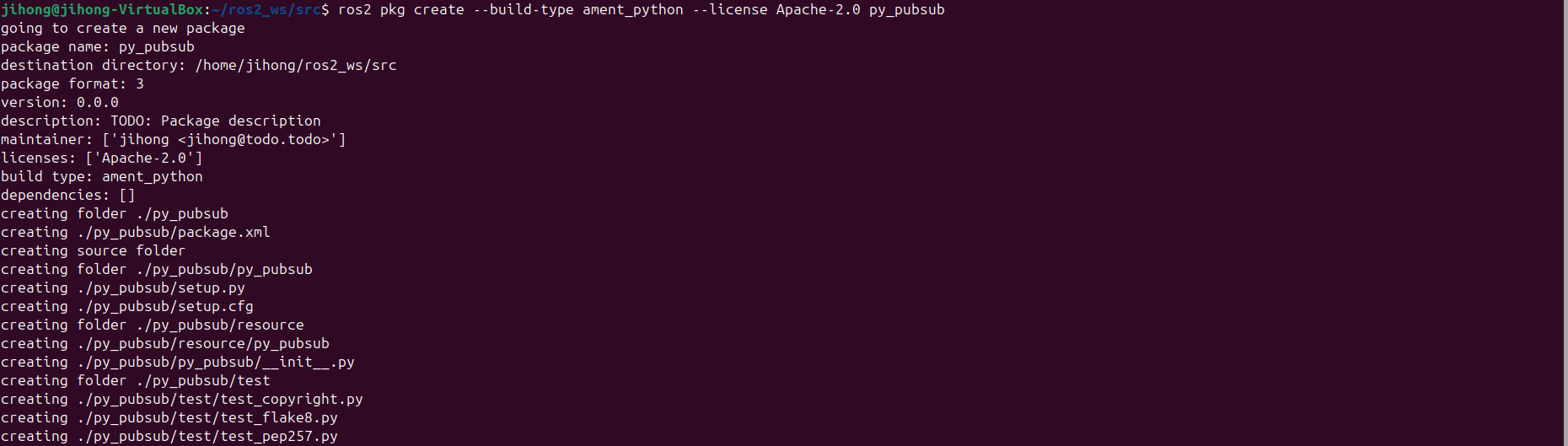
- 4. 다음을 입력하여 talker 예시 코드를 다운로드 하자. ( /py_pubsub/py_pubsub 으로 이동해서... )
- 그러면 publisher_member_function.py가 새로 생길거임

wget https://raw.githubusercontent.com/ros2/examples/jazzy/rclpy/topics/minimal_publisher/examples_rclpy_minimal_publisher/publisher_member_function.pyimport rclpy
from rclpy.node import Node
from std_msgs.msg import String
# ROS 2 노드를 정의하는 클래스
# 이 노드는 주기적으로 msg를 publish함.
class MinimalPublisher(Node):
def __init__(self):
super().__init__('minimal_publisher') # 부모 클래스(node)의 생성자를 호출해서 노드 초기화
self.publisher_ = self.create_publisher(String, 'topic', 10) # topic이라는 이름의 토픽에 string 타입 메시지를 publish할 publisher생성. 10은 queue size이다.
timer_period = 0.5 # 타이머 주기
self.timer = self.create_timer(timer_period, self.timer_callback)
self.i = 0 # 메시지를 보내기 위한 카운터 초기화
def timer_callback(self): # 타이머가 호출될 때마다 실행되는 콜백함수
msg = String() # string msg를 생성
msg.data = 'Hello World: %d' % self.i # msg에 hellow world + cnt를 포함기킴
self.publisher_.publish(msg) # 퍼블러셔를 사용해서 msg를 topic이라는 토픽으로 publish
self.get_logger().info('Publishing: "%s"' % msg.data) # 로깅으로 published 메시지 출력
self.i += 1
def main(args=None):
rclpy.init(args=args) # rclpy 라이브러리를 초기화해서 ROS 2 통신을 시작
minimal_publisher = MinimalPublisher() # 노드를 생성 및 실행
rclpy.spin(minimal_publisher) # 노드가 종료될때 까지 계속 실행
# rclpy.spin은 해당 노드는 지정된 콜백함수가 호출될때까지 계속 실행됨
# Destroy the node explicitly
# (optional - otherwise it will be done automatically
# when the garbage collector destroys the node object)
minimal_publisher.destroy_node()
rclpy.shutdown()
if __name__ == '__main__':
main()- 5. add dependencies
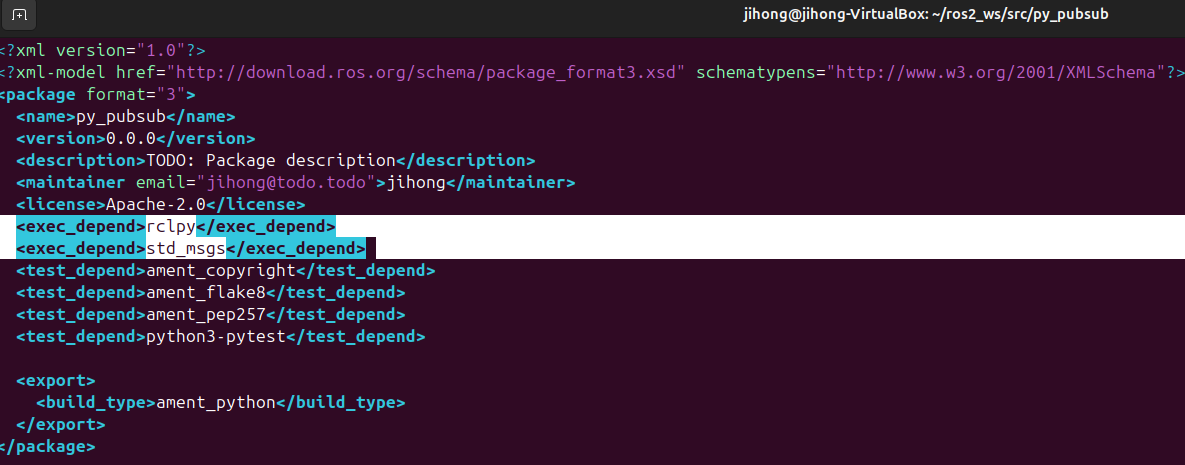
- 우선 ros2_ws/src/py_pubsub으로 가자. 그리면 setup.cfg 와 setup.py 와 package.xml이 있을거임
- 1. 우선 pacakge.xml을 열어서 아래와 같이 수정하자.
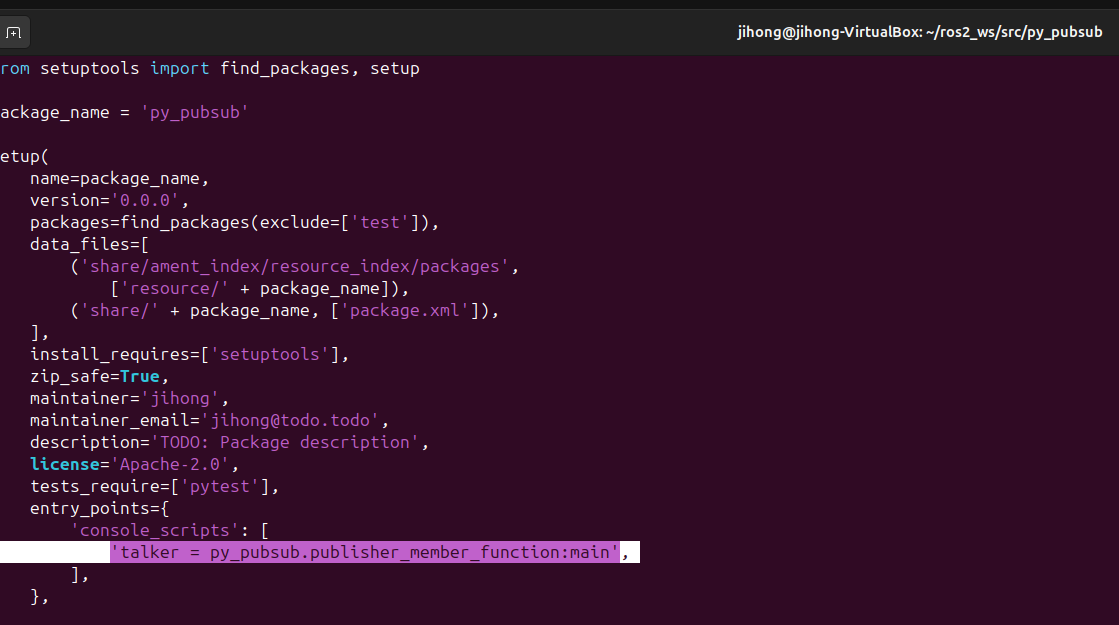
- 2. setup.py 파일도 아래와 같이 수정하자.
- 3. 아마도 setup.cfg는 자동적으로 채워주니 아래와 같은 것이다.

- 6. subscriber node를 다운로드 하자.
- 그러면 이제 아래와 같이 파일들이 존재할거임.
- 코드는 다음과 같을것이다.
wget https://raw.githubusercontent.com/ros2/examples/jazzy/rclpy/topics/minimal_subscriber/examples_rclpy_minimal_subscriber/subscriber_member_function.py
import rclpy
from rclpy.node import Node

from std_msgs.msg import String

# 특정한 토픽에 publish된 메시지를 구독하고 출력하는 클래스
class MinimalSubscriber(Node):

    def __init__(self):
        super().__init__('minimal_subscriber') # 부모 클래스(node)의 생성자를 호출해서 초기화
# topic이라는 이름의 토픽에서 string 타입 메시지를 구독할 subscriber를 생성
# self.listener_callback은 메시지 수신시 호출될 콜백 함수. queue의 크기는 10으로...
        self.subscription = self.create_subscription( String , 'topic' , self.listener_callback , 10 )
        self.subscription  # 해당 변수는 사용하지 않았으니 ros2의 warning을 피하기 위해서 사용

    def listener_callback(self, msg): # 메시지가 수신되면 호출되는 콜백함수
        self.get_logger().info('I heard: "%s"' % msg.data)


def main(args=None):
    rclpy.init(args=args)

    minimal_subscriber = MinimalSubscriber()

    rclpy.spin(minimal_subscriber)

    # Destroy the node explicitly
    # (optional - otherwise it will be done automatically
    # when the garbage collector destroys the node object)
    minimal_subscriber.destroy_node()
    rclpy.shutdown()


if __name__ == '__main__':
main()- 7. add entry point
- 다시 setup.py를 열어서 subscriber node의 entry point를 추가하자. ( publisher밑에 )

- 8. build
- 아래의 명령어로 빠진 의존성이 없는지 확인하자.
- 그리고 두번째 명령어로 빌드하자.
rosdep install -i --from-path src --rosdistro jazzy -y
colcon build --packages-select py_pubsub

- 9. run
- 첫번째 코드
- 두번째 코드
- 다음과 같이 출력 될거임 4
source install/setup.bash
ros2 run py_pubsub talker
source install/setup.bash
ros2 run py_pubsub listener
summary
- 이번에는 2개의 노드를 생성하였다. 하나는 publish하고 나머지는 subscribe한다. 이는 데이터를 다른 topic으로 전송하는 역할을 한다.
- running하기전에는 항상 의존성과 entry point를 수정해줘야 한다.
'ROS 2' 카테고리의 다른 글
| URDF란? (1) | 2025.02.03 |
|---|---|
| ROS 2 Tutorials : Writing a simple service and client (Python) (0) | 2025.01.15 |
| ROS 2 Tutorials : Creating a package (0) | 2025.01.13 |
| ROS 2 Tutorials : Creating a workspace (0) | 2025.01.13 |
| ROS 2 Tutorials : Using colcon to build packages (0) | 2025.01.13 |