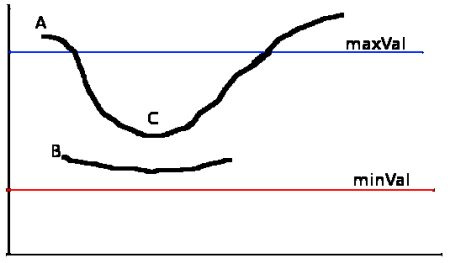
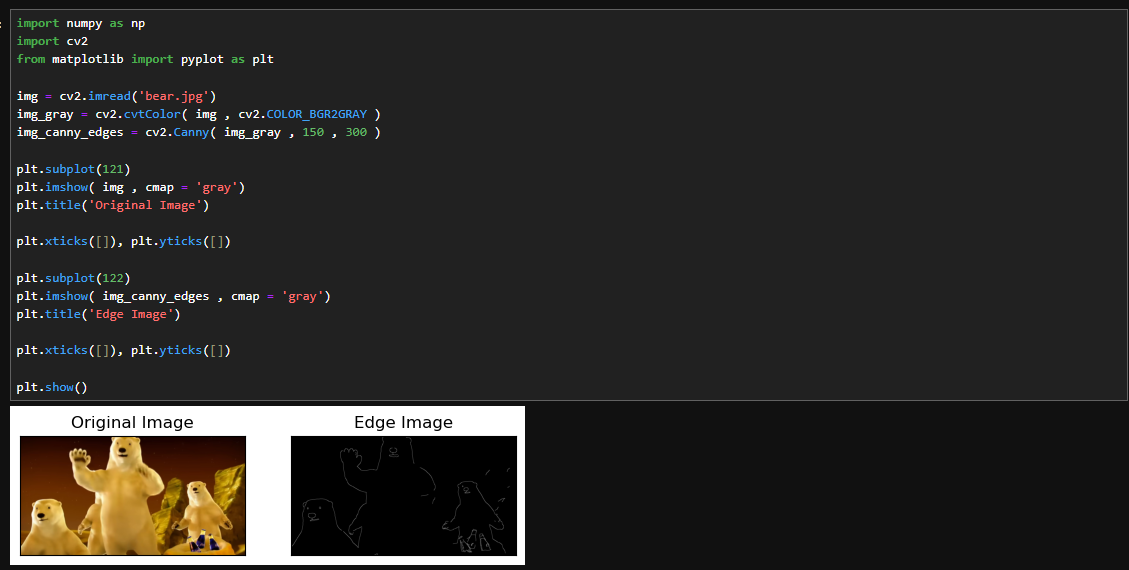
edge hysteresis에 관한 사진. 출처:opencv docs (그림 1)
sobel 연산자..
라디안과 각도 변환 공식
canny edge detection
이미지에서 객체의 엣지를 찾아내는 알고리즘
주요 목적
1. 엣지 감지
image에서 강한 edge와 약한 edge를 구분해서, 구조적 정보 추출
2. 노이즈 감소
입력 image의 노이즈를 최소화해서 edge감지 결과가 왜곡되지 않게 한다.
과정
1. gaussian blurring
이미지를 흐르게 만들어서 노이즈를 감소시킴.
주로 가우시안 필터를 사용하며, 블러링으로 엣지 검출 과정에서 노이즈가 잘못된 edge로 간주되는것 방지
2. calculation to gradient
이미지를 블러링하고, 각 픽셀에서의 기울기를 계산한다.
이떼 sobel연산자를 사용하며, 각 픽셀에 대해서 수평 및 수직 방향으로의 기울기를 계산해서 edge가 있는 곳에서 강한 기울기 값을 것는다.
3. non-maximum suppression ( NMS )
기울기 방향에 따른 국소적인 최대값을 찾아서 엣지를 정의함.
각 픽셀에 대해서 기울기가 강한 방향을 따라서 다른 픽셀을 비교하며, 강한 edge로 판단되는 픽셀만 남기고 나머지 픽셀은 제거됨
4. edge hysteresis
edge를 결정짓는 두가지의 임계값을 설정함.
저임계값과 고임계값을 이용해서 edge를 더 세밀하게 구분함
고임계값maxval 이상은 edge로 인정. 저임계값minval 이하는 엣지가 아니라고 함.
고임계와 저임계 사이값은 상황을 봐서 결정함.
상황은 주변 픽셀이 edge로 연결되면 해당 픽셀도 edge로 인정되게 함.
5. edge추출
장점
단점
계산량 많고 임계값에 따라서 성능이 결정되니 적절한 parameter설정이 중요
import cv2
import numpy as np

def canny_edge_detection( image , low_threshold , high_threshold , use_hsv = False , hsv_channel = 'V' ):
    print(f'입력받은 이미지의 형태는 {image.shape}이다...  hsv 유무: {use_hsv}\n')
    if use_hsv:
        hsv = cv2.cvtColor( image , cv2.COLOR_BGR2HSV )
        channel_map = { 'H':0 , 'S':1 , 'V':2 }
        if hsv_channel not in channel_map:
            raise ValueError( "올바르지 않은 hsv 채널... 다시 입력 바람." )
        channel = hsv[ : , : , channel_map[ hsv_channel ] ]
        processed_image = channel
    else:
        processed_image = cv2.cvtColor( image , cv2.COLOR_BGR2GRAY )
    # 가우시안 블러 처리
    blurred = cv2.GaussianBlur( processed_image , (5,5) , 1.4 )
    print(f'가우시안 블러를 지난 후 형태는 {blurred.shape}\n')
    # 기울기 계산
    grad_x = cv2.Sobel( blurred , cv2.CV_64F , 1 , 0 , ksize = 3 ) # 수평에 대한 것. 즉, 수평 방향으로 경계를 감지함.
    grad_y = cv2.Sobel( blurred , cv2.CV_64F , 0 , 1 , ksize = 3 ) # 수직에 대한 것. 즉, 수직 방향으로 경계를 감지함.
    print(f'grad_x shape is {grad_x.shape}\n{grad_x}\n\ngrad_y shape is {grad_y.shape}\n{grad_y}')
    gradient_magnitude = np.sqrt( grad_x ** 2 + grad_y ** 2 ) # 수평과 수직의 변화량을 가지고 경계의 크기(강도)를 계산함.
    gradient_direction = np.arctan2( grad_y , grad_x ) # 기울기의 방향을 구한다.
    print(f'\ngrad_x 와 grad_y를 가지고 경계의 크기(강도)계산 결과...  shape is {gradient_magnitude.shape}\n{gradient_magnitude}')
    print(f'\ngrad_x 와 grad_y를 가지고 기울기 방향 계산 결과...  shape is {gradient_direction.shape}\n{gradient_direction}')
    # 비최대억제 , non-maximum suppression
    print(f'\narctan의 결과 값은 단위가 라디안이니 각도 단위로 변환합니다. 그리고 0도 ~ 180도 사이로 정규화 합니다.')
    gradient_direction = np.rad2deg( gradient_direction ) % 180 # 라디안 값을 도 단위로 변환하고 0도에서 180도 사이의 범위로 정규화
    print(f'gradient_direction shape is {gradient_direction.shape}\n{gradient_direction}')
    nms = np.zeros_like( gradient_magnitude , dtype = np.uint8 ) # nms 단계에서 사용하는 결과 저장용 배열을 초기화 함.
    print(f'\nnon-maximum suppression에서 사용할 배열 초기화.. gradient_manitude과 같은 크기를 가지며 uint8로써 8비트 정수이며 범위는 0~255')
    rows , cols = gradient_magnitude.shape
    print(f'nms shape is {nms.shape} ..... rows is {rows}..... cols is {cols}\n{nms}')
    for i in range( 1, rows-1 ):
        for j in range( 1 , cols - 1 ):
            angle = gradient_direction[ i , j ]
            mag = gradient_magnitude[ i , j ]
            if ( 0 <= angle < 22.5) or ( 157.5 <= angle <= 180):
                neighbors = [ gradient_magnitude[ i , j - 1 ] , gradient_magnitude[ i , j + 1 ] ]
            elif 22.5 <= angle < 67.5:
                neighbors = [ gradient_magnitude[ i - 1 , j + 1 ] , gradient_magnitude[ i + 1 , j - 1 ] ]
            elif 67.5 <= angle < 112.5:
                neighbors = [ gradient_magnitude[ i - 1 , j ] , gradient_magnitude[ i + 1 , j ] ]
            else:  # 112.5 <= angle < 157.5
                neighbors = [ gradient_magnitude[ i - 1 , j - 1] , gradient_magnitude[ i + 1 , j + 1 ] ]
            if mag >= max( neighbors ):
                nms[ i , j ] = mag
    print(f'\nafter find nms ... {nms.shape} ..... print nms\n{nms}')
    # 강한 엣지와 약한 엣지를 구분하는 부분... threshold를 사용하여 엣지를 분리함...
    # 만약 nms값이 high_threshold보다 크다면 강한 엣지로 분류... 즉, 강한 엣지에는 픽셀 1로 표시하며, 나머지는 0으로 표시
    # 만약 nms 값이 low_threshold < nms <= high_threshold라면 약한 엣지로 분류... 이것도 1로 나타내며, 약한 엣지가 아니면 0으로 표시
    strong_edges = ( nms > high_threshold).astype( np.uint8 )
    weak_edges = ( (nms > low_threshold ) & ( nms <= high_threshold ) ).astype( np.uint8 )
    print(f'\nstrong_edges shape is {strong_edges.shape}\n{strong_edges}\n')
    print(f'weak_edges shape is {weak_edges.shape}\n{weak_edges}')
    # edge hysteresis
    # 강한 엣지는 출력할거니 우선 복사
    final_edges = np.copy( strong_edges )
    for i in range( 1 , rows - 1 ):
        for j in range( 1, cols - 1):
            if weak_edges[ i , j ]: # 약한 엣지에 대해서, 주변애 겅헌 앳지가 존재하는지 확인한다. 하나라도 있다면 출력할거임. 3x3임.
                if np.any( strong_edges[ i-1 : i+2 , j-1 : j+2 ] ):
                    final_edges[ i , j ] = 1
    return ( final_edges * 255 ).astype(np.uint8) # 1값이니 픽셀 255로 바꿔서 출력
import cv2
import numpy as np
def canny_edge_detection( image , low_threshold , high_threshold , use_hsv = False , hsv_channel = 'V' ):
if use_hsv:
hsv = cv2.cvtColor( image , cv2.COLOR_BGR2HSV )
channel_map = { 'H':0 , 'S':1 , 'V':2 }
if hsv_channel not in channel_map:
raise ValueError( "올바르지 않은 hsv 채널... 다시 입력 바람." )
channel = hsv[ : , : , channel_map[ hsv_channel ] ]
processed_image = channel
else:
processed_image = cv2.cvtColor( image , cv2.COLOR_BGR2GRAY )
# 가우시안 블러 처리
blurred = cv2.GaussianBlur( processed_image , (5,5) , 1.4 )
# 기울기 계산
grad_x = cv2.Sobel( blurred , cv2.CV_64F , 1 , 0 , ksize = 3 ) # 수평에 대한 것. 즉, 수평 방향으로 경계를 감지함.
grad_y = cv2.Sobel( blurred , cv2.CV_64F , 0 , 1 , ksize = 3 ) # 수직에 대한 것. 즉, 수직 방향으로 경계를 감지함.
gradient_magnitude = np.sqrt( grad_x ** 2 + grad_y ** 2 ) # 수평과 수직의 변화량을 가지고 경계의 크기(강도)를 계산함.
gradient_direction = np.arctan2( grad_y , grad_x ) # 기울기의 방향을 구한다.
# 비최대억제 , non-maximum suppression
gradient_direction = np.rad2deg( gradient_direction ) % 180 # 라디안 값을 도 단위로 변환하고 0도에서 180도 사이의 범위로 정규화
nms = np.zeros_like( gradient_magnitude , dtype = np.uint8 ) # nms 단계에서 사용하는 결과 저장용 배열을 초기화 함.
rows , cols = gradient_magnitude.shape
for i in range( 1, rows-1 ):
for j in range( 1 , cols - 1 ):
angle = gradient_direction[ i , j ]
mag = gradient_magnitude[ i , j ]
if ( 0 <= angle < 22.5) or ( 157.5 <= angle <= 180):
neighbors = [ gradient_magnitude[ i , j - 1 ] , gradient_magnitude[ i , j + 1 ] ]
elif 22.5 <= angle < 67.5:
neighbors = [ gradient_magnitude[ i - 1 , j + 1 ] , gradient_magnitude[ i + 1 , j - 1 ] ]
elif 67.5 <= angle < 112.5:
neighbors = [ gradient_magnitude[ i - 1 , j ] , gradient_magnitude[ i + 1 , j ] ]
else: # 112.5 <= angle < 157.5
neighbors = [ gradient_magnitude[ i - 1 , j - 1] , gradient_magnitude[ i + 1 , j + 1 ] ]
if mag >= max( neighbors ):
nms[ i , j ] = mag
# 강한 엣지와 약한 엣지를 구분하는 부분... threshold를 사용하여 엣지를 분리함...
# 만약 nms값이 high_threshold보다 크다면 강한 엣지로 분류... 즉, 강한 엣지에는 픽셀 1로 표시하며, 나머지는 0으로 표시
# 만약 nms 값이 low_threshold < nms <= high_threshold라면 약한 엣지로 분류... 이것도 1로 나타내며, 약한 엣지가 아니면 0으로 표시
strong_edges = ( nms > high_threshold).astype( np.uint8 )
weak_edges = ( (nms > low_threshold ) & ( nms <= high_threshold ) ).astype( np.uint8 )
# edge hysteresis
# 강한 엣지는 출력할거니 우선 복사
final_edges = np.copy( strong_edges )
for i in range( 1 , rows - 1 ):
for j in range( 1, cols - 1):
if weak_edges[ i , j ]: # 약한 엣지에 대해서, 주변애 겅헌 앳지가 존재하는지 확인한다. 하나라도 있다면 출력할거임. 3x3임.
if np.any( strong_edges[ i-1 : i+2 , j-1 : j+2 ] ):
final_edges[ i , j ] = 1
return ( final_edges * 255 ).astype(np.uint8) # 1값이니 픽셀 255로 바꿔서 출력입력받은 이미지의 형태는 (640, 640, 3)이다... hsv 유무: True
가우시안 블러를 지난 후 형태는 (640, 640)
grad_x shape is (640, 640)
[[ 0. -16. -24. ... -22. -18. 0.]
[ 0. -17. -23. ... -21. -19. 0.]
[ 0. -18. -22. ... -21. -20. 0.]
...
[ 0. 47. 73. ... 117. 73. 0.]
[ 0. 48. 75. ... 127. 80. 0.]
[ 0. 48. 76. ... 130. 82. 0.]]
grad_y shape is (640, 640)
[[ 0. 0. 0. ... 0. 0. 0.]
[-2. -3. -3. ... 7. 7. 6.]
[-4. -4. -4. ... 5. 4. 4.]
...
[-4. -3. -1. ... 3. 15. 20.]
[-2. -2. -1. ... 3. 8. 10.]
[ 0. 0. 0. ... 0. 0. 0.]]
grad_x 와 grad_y를 가지고 경계의 크기(강도)계산 결과... shape is (640, 640)
[[ 0. 16. 24. ... 22. 18.
0. ]
[ 2. 17.2626765 23.19482701 ... 22.13594362 20.24845673
6. ]
[ 4. 18.43908891 22.36067977 ... 21.58703314 20.39607805
4. ]
...
[ 4. 47.09564736 73.00684899 ... 117.03845522 74.52516354
20. ]
[ 2. 48.0416486 75.00666637 ... 127.03542813 80.39900497
10. ]
[ 0. 48. 76. ... 130. 82.
0. ]]
grad_x 와 grad_y를 가지고 기울기 방향 계산 결과... shape is (640, 640)
[[ 0. 3.14159265 3.14159265 ... 3.14159265 3.14159265
0. ]
[-1.57079633 -2.96692045 -3.01189012 ... 2.8198421 2.78860227
1.57079633]
[-1.57079633 -2.92292371 -2.96173915 ... 2.90784947 2.94419709
1.57079633]
...
[-1.57079633 -0.06374331 -0.01369777 ... 0.02563541 0.20265867
1.57079633]
[-1.57079633 -0.04164258 -0.01333254 ... 0.02361766 0.09966865
1.57079633]
[ 0. 0. 0. ... 0. 0.
0. ]]
arctan의 결과 값은 단위가 라디안이니 각도 단위로 변환합니다. 그리고 0도 ~ 180도 사이로 정규화 합니다.
gradient_direction shape is (640, 640)
[[ 0. 0. 0. ... 0. 0.
0. ]
[ 90. 10.0079798 7.43140797 ... 161.56505118 159.77514057
90. ]
[ 90. 12.52880771 10.30484647 ... 166.60750225 168.69006753
90. ]
...
[ 90. 176.34777722 179.2151754 ... 1.46880071 11.61148642
90. ]
[ 90. 177.61405597 179.23610154 ... 1.35319195 5.71059314
90. ]
[ 0. 0. 0. ... 0. 0.
0. ]]
non-maximum suppression에서 사용할 배열 초기화.. gradient_manitude과 같은 크기를 가지며 uint8로써 8비트 정수이며 범위는 0~255
nms shape is (640, 640) ..... rows is 640..... cols is 640
[[0 0 0 ... 0 0 0]
[0 0 0 ... 0 0 0]
[0 0 0 ... 0 0 0]
...
[0 0 0 ... 0 0 0]
[0 0 0 ... 0 0 0]
[0 0 0 ... 0 0 0]]
after find nms ... (640, 640) ..... print nms
[[ 0 0 0 ... 0 0 0]
[ 0 0 23 ... 22 0 0]
[ 0 0 22 ... 21 0 0]
...
[ 0 0 73 ... 117 0 0]
[ 0 0 75 ... 127 0 0]
[ 0 0 0 ... 0 0 0]]
strong_edges shape is (640, 640)
[[0 0 0 ... 0 0 0]
[0 0 0 ... 0 0 0]
[0 0 0 ... 0 0 0]
...
[0 0 0 ... 0 0 0]
[0 0 0 ... 0 0 0]
[0 0 0 ... 0 0 0]]
weak_edges shape is (640, 640)
[[0 0 0 ... 0 0 0]
[0 0 0 ... 0 0 0]
[0 0 0 ... 0 0 0]
...
[0 0 1 ... 1 0 0]
[0 0 1 ... 1 0 0]
[0 0 0 ... 0 0 0]]
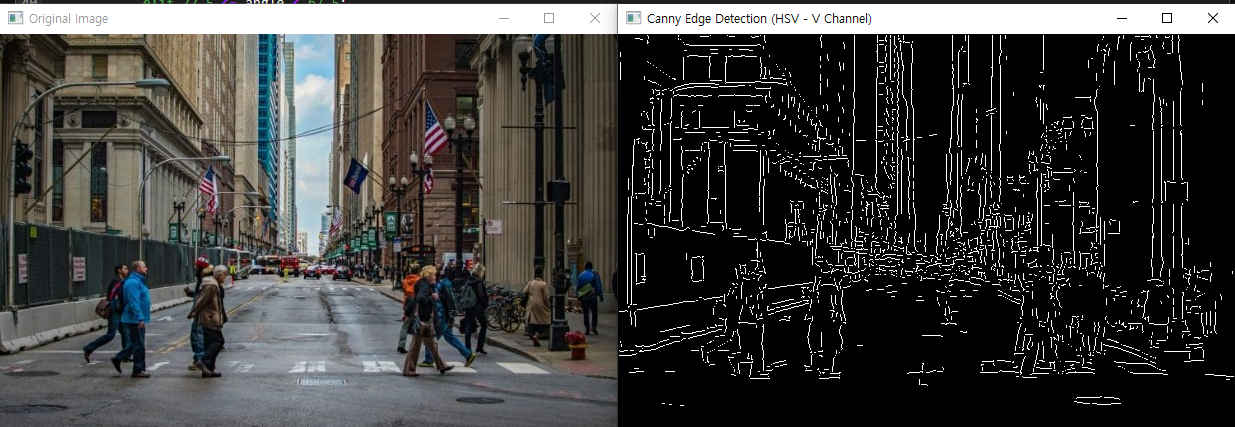
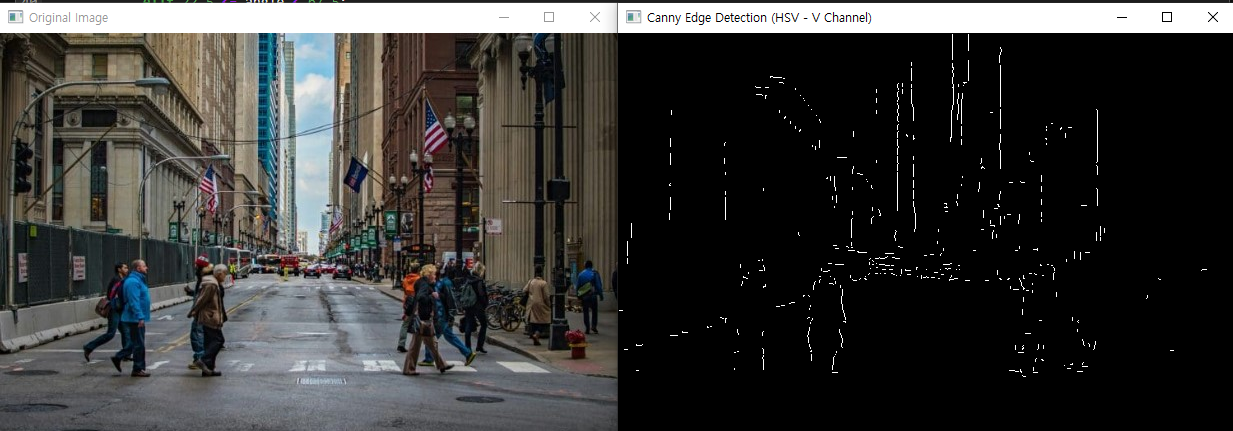
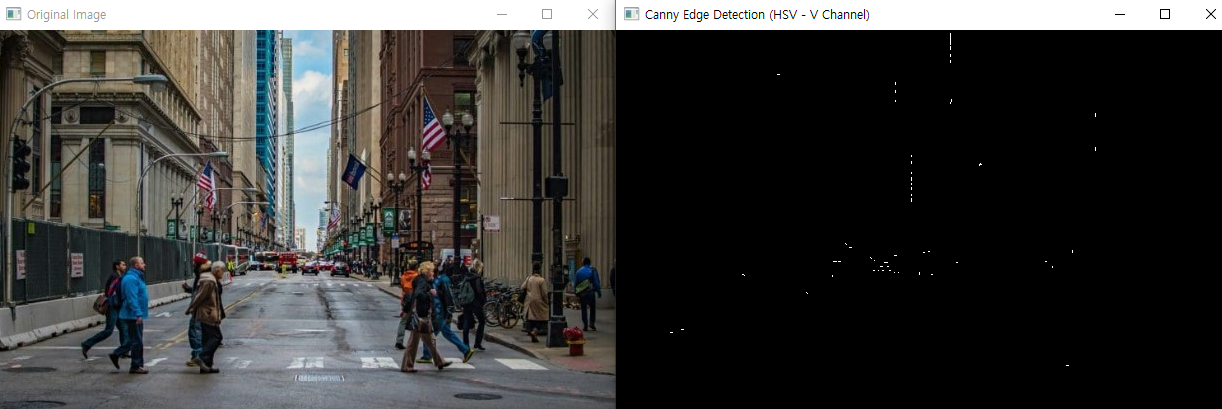
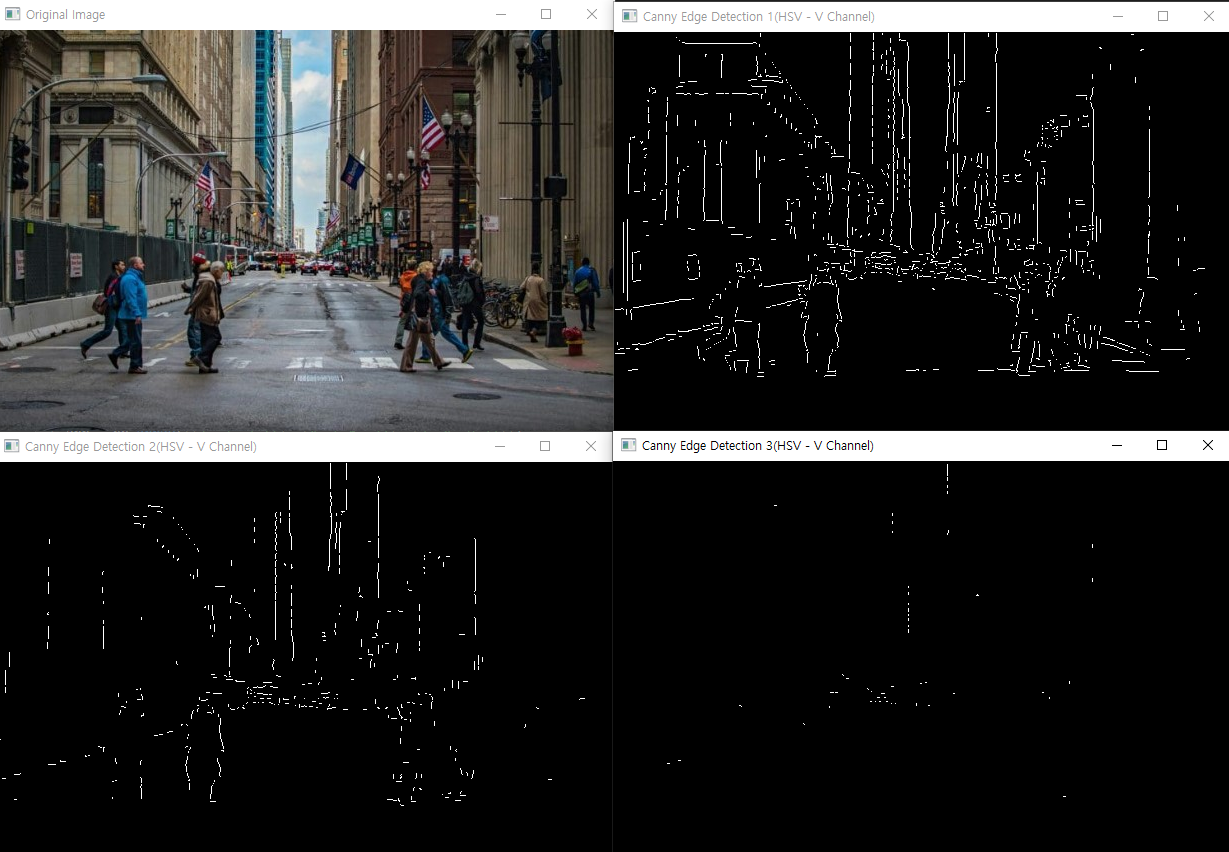
week = 50 , high = 100
weak = 50 , high = 150
week = 50 , high = 200
week = 50 , high = 250
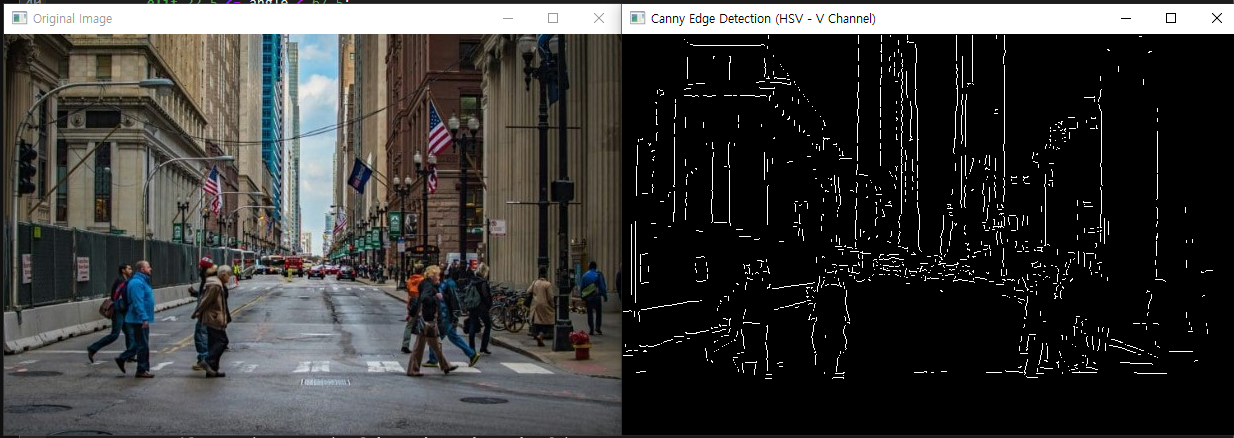
weak = 100 , high = 150 , 200 , 250
이건 위와 같은 조건에서 약한 엣지 주변 5x5에서 찾은것....위에는 3x3