[ROS2_Humble][pkg] depthimage_to_laserscan
이는 ros에서 RGB-D 카메라를 일반적인 2D LaserScan형식으로 바꾸어주는 depthimage_to_laserscan패키지에 대한 내용이다.
https://wiki.ros.org/depthimage_to_laserscan
depthimage_to_laserscan - ROS Wiki
melodic noetic Show EOL distros: EOL distros: fuerte groovy hydro indigo jade kinetic fuerte: Documentation generated on January 07, 2014 at 11:09 AMgroovy: Documentation generated on October 05, 2014 at 11:25 PMhydro: Documentation generated on
wiki.ros.org
depthimage_to_laserscan
- 해당 패키지는 RGB-D Camera에서 깊이 영상을 받아서 sensor_msgs/LaserScan 메시지로 변환해준다.
- 이렇게 변환된 LaserScan형태의 데이터를 활용하면, 기존에 LiDAR기반 알고리즘을 그대로 사용한다.
패키지에 입력 되는 토픽들...
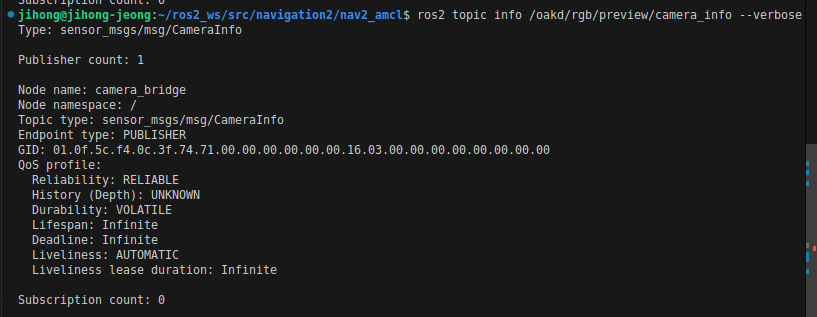
- /oakd/rgb/preview/camera_info
- frame_id , width , height , distortion_model , intrinsic matrix등이 존재
- /oakd/rgb/preview/depth
- depth 카메라에서 제공하는 depth이미지를 전달받음

출력 토픽
- /scan
0. 설치되어있는 확인
ros2 pkg executables depthimage_to_laserscan
1. 우선 depth 카메라가 정상적인지 확인해야한다.
2. depthimage_to_laserscan노드를 실행시킨다
ros2 run depthimage_to_laserscan depthimage_to_laserscan_node
3. 실행이 되었는지 확인해보자.

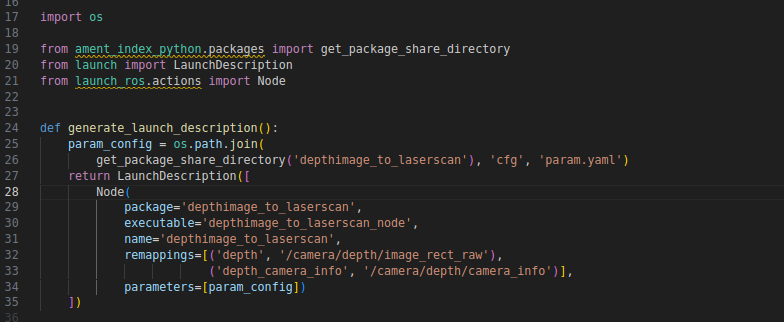
4. 그리면 이제 launch파일을 수정해서, 위의 okad카메라에 대한 데이터를 받아오게 수정하자.
- 수정할 대상은 depthimage_to_laserscan-launch.py이다.

5. 우선 그러면 ros workspace에서 작업하자
mkdir depth_to_laserscan
cd depth_to_laserscan
mkdir src
cd src
git clone -b ros2 https://github.com/ros-perception/depthimage_to_laserscan.git

cd ~/depth_to_laserscan


depthimage_to_laserscan-launch의 remappings부분 수정

colcon build --packages-select depthimage_to_laserscan
source install/setup.bash

ros2 launch depthimage_to_laserscan  depthimage_to_laserscan-launch.py
ros2 launch depthimage_to_laserscan depthimage_to_laserscan-launch.py
해당 패키지의 정보를 조회