nav2 - Setting Up Transformations
https://docs.nav2.org/setup_guides/transformation/setup_transforms.html
Setting Up Transformations — Nav2 1.0.0 documentation
There are two important ROS REPs which we highly suggest for you to check out. These documents detail some standards set about by the ROS community to ensure proper operation across different packages. Nav2 also adheres to these standards and conventions.
docs.nav2.org
Setting Up Transformations
- 이번 튜토리얼에서는 Nav2에서 꼭 필요로 하는 transforms에 대해서 살펴볼게요.
- transforms는 nav2가 여러 sensor와 odometry의 정보를 해석할수 있게 서로 다른 coordinate frames( 좌표 프레임 )을 연결해준다.
- 아래의 사진은 로봇의 전제적인 transform tree예시이다.
- 본 튜토리얼에서는 ros에서의 transform에 대해서 간단히 소개하고, 다음에는 TF2 static publisher를 이용한 간단한 cmommand line demo를 해볼것이다. 그리고 nav2가 function을 publish하기 위해서 필수적으로 필요한 transforms에 대해서 정리할것이다.

Transformations Introduction
- 많은 ROS packages는 TF 2 ROS package를 이용하여, 로봇의 transform tree를 publish할 것을 요구합니다.
- transform tree는 여러 coordinate system사이의 translation , rotation , relative motion 관계를 정의해요.
- ex) 이동식 베이스인 mobile base가 존재하고, 위에 laser sensor가 달린 간단한 로봇을 생각해보자.
- 1. 그렇다면 해당 로봇에는 2개의 coordinate system이 존재한다.
- a. 로봇의 mobile base의 center point에 해당하는 frame
- b. base위에 mounted된 laser sensor의 center point에 해당되는 frame
- a번을 base_link , b번을 base_laser라고 부르겠다.
- 2. 만약에 laser sensor로부터 laser의 center point에 대한 거리 측정 데이터를 받았다고 하자. 즉, 다시 말하면 base_laser coordinate frame을 기준으로 표현된 data가 존재한다.
- 이때, 로봇이 해당 data를 가지고 mobile base가 장애물을 피하게 하려면, base_laser frame에 얻은 laser scan data를 base_link frame으로 transform해야만한다. 즉, base_link와 base_laser간의 coordinate frame 관계( 혹은 transform )를 정의해야한다.
- 3. 아래의 사진처럼, laser가 mobile base의 center point로부터 '앞으로 10cm'와 '위로 20cm'위치에 mounted되어있다고 하자.
- 이는 base_link에서 base_laser로 이동하기 위해서, " x: 0.1m , y: 0.0m , z: 0.2m "의 평행이동이 필요함을 의미한다.
- 반대로, base_laser에서 base_link로 이동하려면 " x: -0.1m , y: 0.0m , z: -0.2m "을 적용해야한다.
- 위의 2개의 coordinate frame간의 관계들을 직접 저장하고 필요할때만 적용해도 된다. 하지만 coordinate frame이 많아질수록 번거러워진다. 다행이 이러한 작업을 직접할 필여 없이, TF 2에 2개의 frame간 관계를 한번 정의해두면, TF 2가 나머지를 알아서 처리해준다.
- 특히, 서로 상대적으로 움직이는 프레임 같은 동적인 transform에도 유용하다.
- 이는 base_link에서 base_laser로 이동하기 위해서, " x: 0.1m , y: 0.0m , z: 0.2m "의 평행이동이 필요함을 의미한다.
- 1. 그렇다면 해당 로봇에는 2개의 coordinate system이 존재한다.
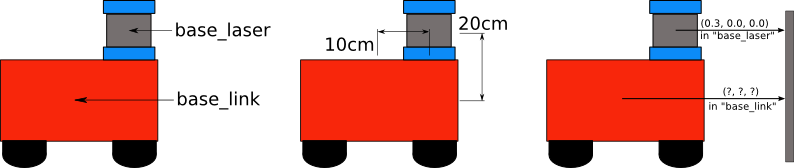
- TF 2에 base_link와 base_laser를 추가하기 위해서는 transform tree에 이들을 포함 시켜야한다.
- transform tree에서 각 node는 coordinate frame을 의미하며, 각각의 edge는 두 node를 연결하는 transform( 부모 -> 자식 )을 의미한다. ( 이러한 이유로, TF 2는 tree 구조를 사용해서 서로 다른 2개의 coordinate frame을 연결할때, 오직 하나의 edge만 존재하게 한다. )
- 아래 사진을 보며 예시를 들자...
- 1. 첫번째 노드는 base_link이며, 두번째 노드는 base_laser이다.
- 2. 노드 간의 edge는 'parent -> child' 방향이며, 여기에서는 base_link를 parent로 지정하고, base_laser를 child로 지정한다.
- 3. 장애물은 " x: 0.3m , y: 0.0m , z: 0.0m "이고, transform은 " x: 0.1m , y: 0.0m , z: 0.2m "이니 결과적으로는 base_link에서는 " x: 0.4m , y: 0.0m , z: 0.2m "로 인식한다.

Static Transform Publisher Demo
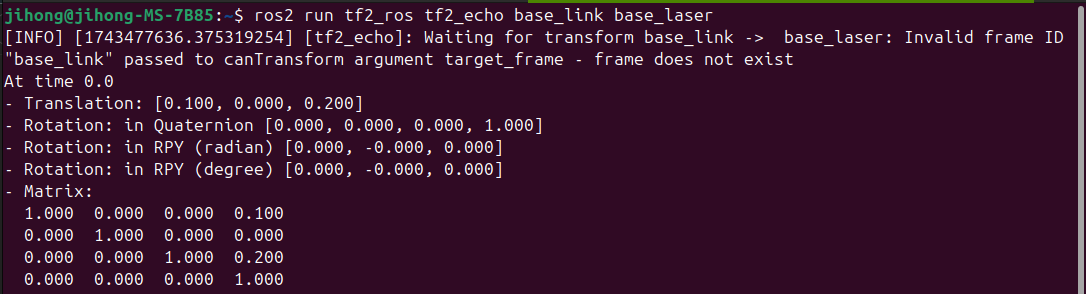
- 여기에서는 TF 2가 제공하는 static_transform_publisher를 이용하여 간단한 transform을 publish해본다.
- 위의 사진들 처럼 base_link -> base_laser로의 평행이동을 게시할것이다.
- 우선 아래처럼 입력해보자

Transforms in Navigation2
- ros community에서 정의한 주요 문서가 2가지 존재하며, nav2도 해당 표준을 따른다.
- 아래를 참고하자.
- REP 105 - Coordinate Frames for Mobile Platforms
- REP 103 - Standard Units of Measure and Coordinate Conventions
REP 103 -- Standard Units of Measure and Coordinate Conventions (ROS.org)
[REP Index] [REP Source] REP:103 Title:Standard Units of Measure and Coordinate Conventions Author:Tully Foote, Mike Purvis Status:Active Type:Informational Content-Type:text/x-rst Created:07-Oct-2010 Post-History:31-Dec-2014 This REP provides a reference
www.ros.org
- REP 105는 ros에서 사용하는 다양한 coordinate frame의 명명 규칙과 의미를 정의
- 아래는 주요한 frame이다.
- base_link : 로못의 메인 chassis나 회전 중심에 해당되는 고정 coordinate frame
- odom : 로봇이 시작한 위치를 기준으로하는 지역적 일관성이 존재하는 frame
- map : 전역적으로 고정된 frame이다.
- 아래는 주요한 frame이다.
- REP 103은 표준 단위와 coordinate 정의에 대한 규칙을 다룬다.
- ros에서는 기본적으로 '오른손 좌표계 right-hand rule'을 사용한다. 이는 z축이 위쪽, x축이 앞쪽이며, 모든 길이와 속도는 SI단위를 사용한다.
- nav2가 올바르게 동작하려면, 아래의 3가지 변환이 ros에 publish되어야한다.
- 1. map -> odom
- 이는 주로 AMCL같은 localization 및 mapping package에서 제공함. 이는 로봇이 움직이며 실시간으로 업데이트 되니, 로봇의 tf tree에 static으로 설정하지는 않는다. 세부적 설정은 package마다 다르다. 그리고 대부분의 package는 실행 시점에 자동으로 이 transform을 publish한다.
- 2. odom -> base_link
- 일반적으로 wheel encoder같은 sensor를 사용하는 odometry system에서 publush한다.
- 3. base_link -> base_laser( 혹은 다른 sensor frame )
- 1. map -> odom
Conclusion
- 해당 튜토리얼에서는 transform의 개념 및 nav2에서 이를 어떻게 사용하는지 알아보았다.
- command line에서 연습해본 static_transform_publisher를 실제로 사용해도 되지만, 보통은 robot state publisher가 더 적합하며, 모델이 복잡해질수록 해당 방법이 더 효율적일것이다.
- Nav2를 사용할 때 필요한 세 가지 변환(map => odom, odom => base_link, base_link => base_laser)은 필수다.