turtlebot slam 에러 ( NTP로 인한 에러 )
1. sensor 데이터 발행
ros2 launch turtlebot4_bringup robot.launch.py


ubuntu@ubuntu:~$ ros2 launch turtlebot4_bringup robot.launch.py
[INFO] [launch]: All log files can be found below /home/ubuntu/.ros/log/2025-03-13-06-27-21-931068-ubuntu-6403
[INFO] [launch]: Default logging verbosity is set to INFO
[INFO] [turtlebot4_node-1]: process started with pid [6404]
[INFO] [turtlebot4_base_node-2]: process started with pid [6406]
[turtlebot4_node-1] [INFO] [1741847242.594998511] [turtlebot4_node]: Init Turtlebot4 Node Main
[turtlebot4_base_node-2] [INFO] [1741847242.631560728] [turtlebot4_base_node]: Turtlebot4 Base Node Running
[turtlebot4_base_node-2] [INFO] [1741847242.635610935] [turtlebot4_base_node]: Init Display
[turtlebot4_base_node-2] int8_t turtlebot4_base::I2cInterface::open_bus(): Connected to /dev/i2c-3
[turtlebot4_node-1] [INFO] [1741847242.666662630] [turtlebot4_node]: Buttons Init
[turtlebot4_base_node-2] [INFO] [1741847242.668869861] [turtlebot4_base_node]: Leds Init
[turtlebot4_node-1] [INFO] [1741847242.674176200] [turtlebot4_node]: Init Display
[turtlebot4_node-1] [INFO] [1741847242.677400918] [turtlebot4_node]: Leds Init
[turtlebot4_node-1] [INFO] [1741847242.693448102] [turtlebot4_node]: Turtlebot4 standard running.
[turtlebot4_node-1] [INFO] [1741847246.650732228] [turtlebot4_node]: OAKD stopped
[turtlebot4_node-1] [INFO] [1741847246.650900096] [turtlebot4_node]: RPLIDAR stopped
[turtlebot4_node-1] [INFO] [1741847247.651239037] [turtlebot4_node]: oakd/stop_camera service available, sending request
[turtlebot4_node-1] [INFO] [1741847247.651734679] [turtlebot4_node]: stop_motor service available, sending request
[turtlebot4_node-1] [INFO] [1741847247.657807842] [turtlebot4_node]: oakd/stop_camera service got results: Success
[turtlebot4_node-1] [INFO] [1741847247.657980433] [turtlebot4_node]:
2. slam 실행
ros2 launch turtlebot4_navigation slam.launch.py
ros2 launch turtlebot4_navigation slam.launch.py --debug


ubuntu@ubuntu:~$ ros2 launch turtlebot4_navigation slam.launch.py
[INFO] [launch]: All log files can be found below /home/ubuntu/.ros/log/2025-03-13-06-28-49-327964-ubuntu-6552
[INFO] [launch]: Default logging verbosity is set to INFO
[INFO] [sync_slam_toolbox_node-1]: process started with pid [6553]
[sync_slam_toolbox_node-1] [INFO] [1741847330.179680182] [slam_toolbox]: Node using stack size 40000000
[sync_slam_toolbox_node-1] [INFO] [1741847330.439044879] [slam_toolbox]: Using solver plugin solver_plugins::CeresSolver
[sync_slam_toolbox_node-1] [INFO] [1741847330.439703761] [slam_toolbox]: CeresSolver: Using SCHUR_JACOBI preconditioner.
3. rviz
아래 에러의 내용은 map 프레임이 없어서 발생한다. 즉, slam이 정상적으로 실행이 안되고 있다는것.
ros2 launch turtlebot4_viz view_robot.launch.py


ubuntu@ubuntu:~$ ros2 launch turtlebot4_viz view_robot.launch.py
[INFO] [launch]: All log files can be found below /home/ubuntu/.ros/log/2025-03-13-06-31-25-864867-ubuntu-6700
[INFO] [launch]: Default logging verbosity is set to INFO
[INFO] [rviz2-1]: process started with pid [6701]

[rviz2-1] [INFO] [1741847490.806216433] [rviz2]: Stereo is NOT SUPPORTED
[rviz2-1] [INFO] [1741847490.806919184] [rviz2]: OpenGl version: 4.5 (GLSL 4.5)
[rviz2-1] [INFO] [1741847491.178201148] [rviz2]: Stereo is NOT SUPPORTED
[rviz2-1] [WARN] [1741847492.449507917] [rcl.logging_rosout]: Publisher already registered for provided node name. If this is due to multiple nodes with the same name then all logs for that logger name will go out over the existing publisher. As soon as any node with that name is destructed it will unregister the publisher, preventing any further logs for that name from being published on the rosout topic.

[rviz2-1] Warning: Invalid frame ID "map" passed to canTransform argument target_frame - frame does not exist
[rviz2-1]          at line 93 in ./src/buffer_core.cpp
[rviz2-1] Warning: Invalid frame ID "map" passed to canTransform argument target_frame - frame does not exist
[rviz2-1]          at line 93 in ./src/buffer_core.cpp
3-1. 에러해결.... ( 문제 파악해보기 )
우선 ros2 topic echo /scan 입력해보니 아무것도 출력이 안된다.
==> 즉, LiDAR센서가 데이터를 정상적으로 발행 못하고 있다. ( SLAM에서는 지도를 만들기 위해서 반드시 LiDAR데이터가 필요하다.)
=====> 다시 말하면, turtlebot의 센서 데이터를 위한 bringup은 실행했으나(1번째 명령어 ), 여기에서 LiDAR센서 데이터가 안나옴. 이로 인해서 SLAM이 map프레임도 못만들어냄.
3-2. 에러해결... ( 3-1에서 말한대로, 그러면 1번째 명령어의 로그를 봐보자. ros2 launch turtlebot4_bringup robot.launch.py --debug )
위의 명령어대로 입력해보면 OAKD stopped와 RPLIDAR stopeed를 볼수있다.

3-3. 에러해결 ( 그러면 liDAR 노드를 따로 실행 시켜보자. )
ros2 launch turtlebot4_bringup rplidar.launch.py
3-4. ros2 topic echo /scan 해보면 데이터가 출력됨을 볼수있다.
==> 결국에는 bringup명령어(1번째 명령어)에서 LiDAR센서를 키고 있지 않다...

3-5. 그러면 아래의 명령어들을 차례로 입력해보자
ros2 launch turtlebot4_bringup robot.launch.py --debug

ros2 launch turtlebot4_bringup rplidar.launch.py --debug

ros2 topic echo /scan # 이거는 확인용

ros2 launch turtlebot4_navigation slam.launch.py --debug

ros2 launch turtlebot4_viz view_robot.launch.py
3-6. 위의 순서대로 입력하면 slam.launch.py실행시 또 다시 queue is full이 발생한다.
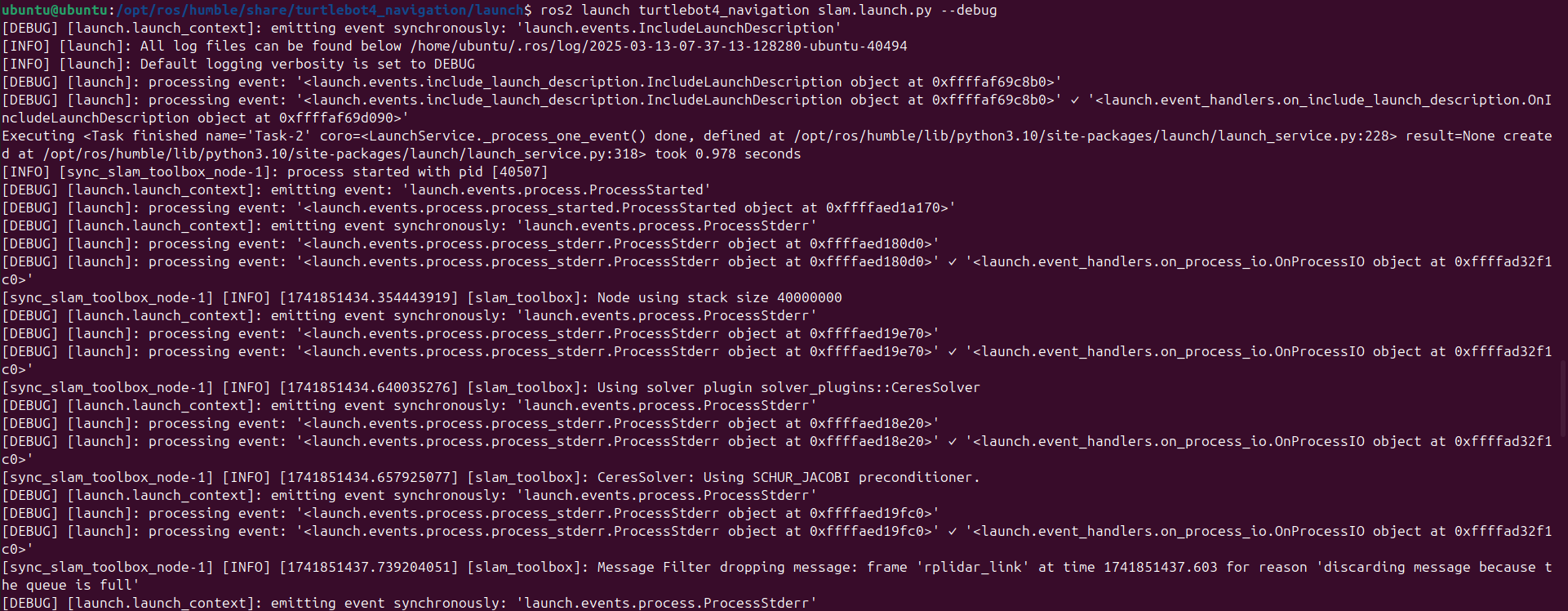
3-7. 찾아보니까 이 사람꺼 한번 따라해보자...
https://github.com/iRobotEducation/create3_docs/discussions/577
slam_toolbox giving error: discarding message because the queue is full · iRobotEducation create3_docs · Discussion #577
How are you connecting to your Create 3? Wi-Fi (ROS 2) Computer(s) Model(s) and Operating System(s) Raspberry Pi 4/ ubuntu 22.04/humble/turtlebot 4 os - VirtualBox ubuntu 22.04 VM/humble Which vers...
github.com
3-8. 보니까 turtlebot4와 compute board간의 NTP 동기화가 이루어 지지않는다...
ubuntu@ubuntu:/opt/ros/humble/share/turtlebot4_navigation/launch$ chronyc tracking
Reference ID    : DD97764E (mail.pyeongga.com)
Stratum         : 3
Ref time (UTC)  : Thu Mar 13 08:20:06 2025
System time     : 0.000121160 seconds slow of NTP time
Last offset     : -0.000226695 seconds
RMS offset      : 0.000518153 seconds
Frequency       : 11.079 ppm fast
Residual freq   : -0.004 ppm
Skew            : 0.155 ppm
Root delay      : 0.004681235 seconds
Root dispersion : 0.000760120 seconds
Update interval : 1027.2 seconds
Leap status     : Normal
ubuntu@ubuntu:/opt/ros/humble/share/turtlebot4_navigation/launch$
ubuntu@ubuntu:/opt/ros/humble/share/turtlebot4_navigation/launch$ chronyc sources -v

  .-- Source mode  '^' = server, '=' = peer, '#' = local clock.
 / .- Source state '*' = current best, '+' = combined, '-' = not combined,
| /             'x' = may be in error, '~' = too variable, '?' = unusable.
||                                                 .- xxxx [ yyyy ] +/- zzzz
||      Reachability register (octal) -.           |  xxxx = adjusted offset,
||      Log2(Polling interval) --.      |          |  yyyy = measured offset,
||                                \     |          |  zzzz = estimated error.
||                                 |    |           \
MS Name/IP address         Stratum Poll Reach LastRx Last sample
===============================================================================
^- prod-ntp-4.ntp4.ps5.cano>     2  10   377   292  +7233us[+7009us] +/-  134ms
^- alphyn.canonical.com          2  10   175   597  +7482us[+7262us] +/-  122ms
^- prod-ntp-3.ntp4.ps5.cano>     2  10   377   833  +8266us[+8049us] +/-  133ms
^- prod-ntp-5.ntp4.ps5.cano>     2  10   377   980    +18ms[  +17ms] +/-  144ms
^- 121.174.142.81                3  10   377   869  -1090us[-1307us] +/-   59ms
^* mail.pyeongga.com             2  10   377   140  -2854us[-3081us] +/- 5120us
^- any.time.nl                   2  10   377   101    +12ms[  +12ms] +/-   34ms
^- 106.247.248.106               2  10   377   946   -898us[-1113us] +/-   29ms
^? 192.168.186.2                 0   0     0     -     +0ns[   +0ns] +/-    0ns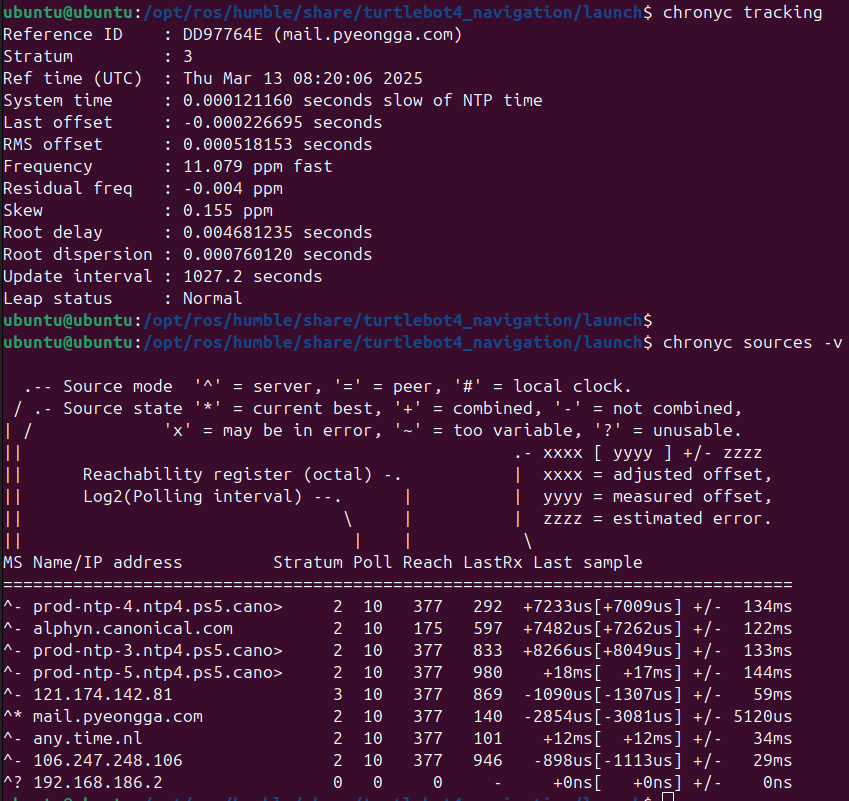
3-9. 우선 아래의 명령어를 다시 순서대로 입력한다.
==> 결과는 똑같이 아직도 동기화가 안되고 있다.
ubuntu@ubuntu:/opt/ros/humble/share/turtlebot4_navigation/launch$ sudo systemctl restart chrony
ubuntu@ubuntu:/opt/ros/humble/share/turtlebot4_navigation/launch$ sudo chronyc tracking
Reference ID    : C17BF302 (193.123.243.2)
Stratum         : 3
Ref time (UTC)  : Thu Mar 13 08:24:49 2025
System time     : 0.000000055 seconds fast of NTP time
Last offset     : -0.000283815 seconds
RMS offset      : 0.000283815 seconds
Frequency       : 11.079 ppm fast
Residual freq   : -60.641 ppm
Skew            : 0.155 ppm
Root delay      : 0.011492726 seconds
Root dispersion : 0.002000898 seconds
Update interval : 1.5 seconds
Leap status     : Normal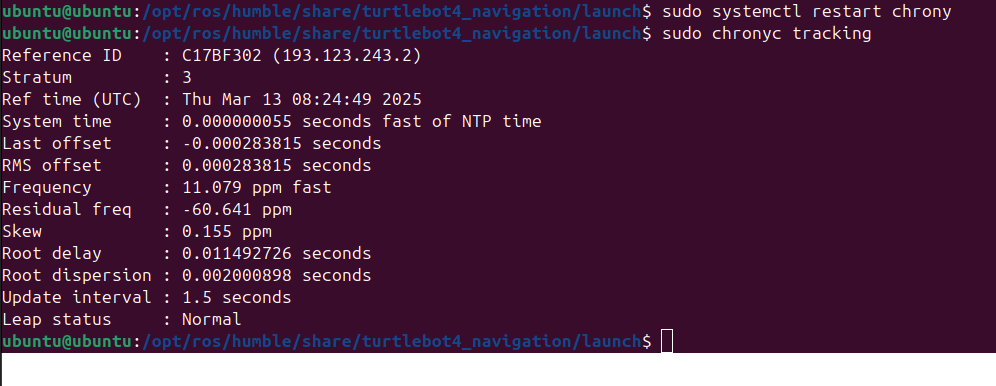
3-10. 아직 반영 안됨...
ubuntu@ubuntu:/opt/ros/humble/share/turtlebot4_navigation/launch$ chronyc sources -v

  .-- Source mode  '^' = server, '=' = peer, '#' = local clock.
 / .- Source state '*' = current best, '+' = combined, '-' = not combined,
| /             'x' = may be in error, '~' = too variable, '?' = unusable.
||                                                 .- xxxx [ yyyy ] +/- zzzz
||      Reachability register (octal) -.           |  xxxx = adjusted offset,
||      Log2(Polling interval) --.      |          |  yyyy = measured offset,
||                                \     |          |  zzzz = estimated error.
||                                 |    |           \
MS Name/IP address         Stratum Poll Reach LastRx Last sample
===============================================================================
^- prod-ntp-4.ntp1.ps5.cano>     2   6    37    56  +8139us[+8139us] +/-  130ms
^- alphyn.canonical.com          2   6    37    57  +5851us[+6056us] +/-  118ms
^- prod-ntp-5.ntp1.ps5.cano>     2   6    37    56  +3914us[+3914us] +/-  125ms
^- prod-ntp-3.ntp4.ps5.cano>     2   6    37    58  +5040us[+5245us] +/-  125ms
^- mail.innotab.com              3   6    37    57   +319us[ +319us] +/- 9820us
^- 121.174.142.82                3   6    37    59  -1767us[-1562us] +/-   50ms
^- 121.174.142.81                3   6    37    31   +796us[ +796us] +/-   48ms
^* 193.123.243.2                 2   6    37    57    -71ns[ +204us] +/- 5954us
^? 192.168.186.2                 0   0     0     -     +0ns[   +0ns] +/-    0ns
3-11. 아래 명령어를 차례대로 입력해봄. ( 그래도 안됨 )
sudo chronyc delete 192.168.186.2
sudo chronyc add server 192.168.186.2 iburst prefer


sudo chronyc makestep
sudo systemctl restart chrony
3-12. nmap 사용해봄...
==> 그랬더니 turtlebot의 방화벽이 123번 포트를 차단하고 있는거 같다.

3-13.
sudo ufw allow 123/udp
sudo ufw reload

sudo systemctl restart chronyd