gazebo
Launch Gazebo from ROS2
정지홍
2025. 3. 4. 16:55
https://gazebosim.org/docs/harmonic/ros2_launch_gazebo/
Launch Gazebo from ROS 2 — Gazebo harmonic documentation
Launch Gazebo from ROS 2 Gazebo can be launched from a ROS 2 launch system in multiple ways: Using the launch files included in ros_gz_sim. The package ros_gz_sim contains two launch files named gz_server.launch.py and gz_sim.launch.py. You can use them to
gazebosim.org
Gazebo를 ROS2 시스템 내에서 통합하는 방법
- 1. ROS를 사용하여 Gazebo를 실행
- ROS에는 시스템의 모든 구성 요소를 실행하는 방봅이 존재한다.
ROS의 Launch 시스템을 사용한다면, 여러 요소를 동시에 실행하는 것이 가능하며, 이때 Gazebo도 해당 방식으로 사용하는 것이 가능하다.
- ROS에는 시스템의 모든 구성 요소를 실행하는 방봅이 존재한다.
- 2. ros_gz 브리지를 사용해서, gazebo와 Ros토픽이 상호작용한다.
- Gazebo를 실행하면 보통 시뮬레이션과 상호작용할 필요가 있다. 이때 주로 토픽을 사용해서 통신하는데. Gazebo는 자체 미들워어인 Gazebo Transport를 이용해서 topic과 service를 제공한다.
하지만 Ros2도 자체적 미들웨어를 가지고 있어서, Gazebo와 직접 통신이 불가능하다.- ===> ros_gz 브리지는 위의 문제를 해결하기 위해서 존재한다. 즉, Gazebo Transport와 Ros2사이에서 데이터를 변환하여 서로 통신할 수 있게 해준다.
- Gazebo를 실행하면 보통 시뮬레이션과 상호작용할 필요가 있다. 이때 주로 토픽을 사용해서 통신하는데. Gazebo는 자체 미들워어인 Gazebo Transport를 이용해서 topic과 service를 제공한다.
- 3. ROS를 사용해서 Gazebo에서 모델 스폰
- gazebo에서는 월드 파일에 미리 정의된 모델을 실행시에 로드하는 것이 가능하나, 실행중 중에 모델을 추가해야 할수도 있다.
이때 Ros2를 사용하면 동적으로 실행중인 Gazebo에 새로운 모델을 추가할 수 있다.
- gazebo에서는 월드 파일에 미리 정의된 모델을 실행시에 로드하는 것이 가능하나, 실행중 중에 모델을 추가해야 할수도 있다.
Gazebo와 ROS2를 연동하기 위한 개념
- launch파일에서 자주 등장하는 2가지 매개변수가 있다. ( use_composition , create_own_container )
- use_composition = True라면....
- => ROS 노드가 하나의 ROS컨테이너 내에서 실행된다.
- 같은 컨테이너 안에 있는 노드들은 하나의 process에서 실행되니 intra-process 통신이 가능하다.
즉, 같은 process 내에서 메모리를 공유하면서 빠르게 데이터를 주고 받을수있다. - (기본적으로 해당 옵션 추천 )
- 같은 컨테이너 안에 있는 노드들은 하나의 process에서 실행되니 intra-process 통신이 가능하다.
- => ROS 노드가 하나의 ROS컨테이너 내에서 실행된다.
- create_own_container는 use_composition=True인 경우에만 의미가 있다.
- => create_own_container=True라면 새로운 ROS 컨테이너를 만들어서 실행
- => create_own_container=False이면 이미 존재하는 컨테이너에 합류해서 실행
- ( 만약 이미 ROS 컨테이너가 실행중이라면, 기존 컨테이너 이름을 지정해서 그 안에서 실행하는 것이 좋음 )
- use_composition = True라면....

- composition을 사용 안하면, 위에서 볼수있듯이, gazebo와 ros노드들이 각각 따로 실행되며, 서로 inter process통신을 해야함. ( 느림 )
- composition을 사용한다면, 같은 컨테이너 내에서 실행되는 노드들어 intra process통신을 할 수 있음 ( 빠름 )
- composition을 사용하지만, 컨테이너를 직접 안만든다면, 실행은 되지만 외부에서 컨테이너를 별도로 실행해야함. 그렇지 않으면 제대로 동작 안함.
ROS2에서 Gazebo 실행하기 - 1 ( ros_gz_sim 패키지를 사용 )
- Gazebo 서버만 실행하기
ros2 launch ros_gz_sim gz_server.launch.py world_sdf_file:=empty.sdf- Gazebo서버와 GUI 실행
ros2 launch ros_gz_sim gz_sim.launch.py gz_args:=empty.sdf
ROS2에서 Gazebo 실행하기 - 2 ( 사용자 지정 launch파일을 사용하여 실행 )
- 1. XML launch 파일에서 <gz_server/>태그를 사용해서 gazebo를 실행할 수 있음.
- 여기에서 인자들은 <gz_server>태그의 속성으로 설정됨
<launch>
  <arg name="world_sdf_file" default="empty.sdf" />
  <arg name="world_sdf_string" default="" />
  <arg name="container_name" default="ros_gz_container" />
  <arg name="create_own_container" default="False" />
  <arg name="use_composition" default="False" />

  <gz_server
    world_sdf_file="$(var world_sdf_file)"
    world_sdf_string="$(var world_sdf_string)"
    container_name="$(var container_name)"
    create_own_container="$(var create_own_container)"
    use_composition="$(var use_composition)">
  </gz_server>
</launch>
- 2. 위에서 만든 파일이 있는 디렉토리에서 패키지 구조를 만들자.
- 아래 디렉토리에서 pkg생성
ros2 pkg create my_gazebo_launch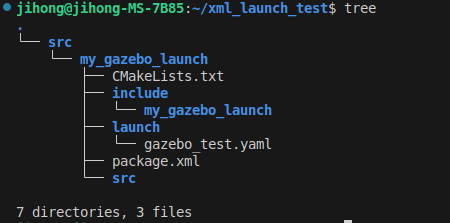
- 3. package.xml과 CMakeLists.txt에 다음 내용을 추가
<exec_depend>ros_gz_sim</exec_depend>install(
DIRECTORY launch
DESTINATION share/${PROJECT_NAME}
)
- 4. 빌드
colcon build --packages-select my_gazebo_launch
source install/setup.bash
- 5. 실행
ros2 launch my_gazebo_launch gazebo_test.xml world_sdf_file:=empty.sdf
ROS2에서 Gazebo 실행하기 - 3 ( python )
- 1. 아래대로 입력하여 패키지 생성
mkdir ~/my_gazebo_launch
cd ~/my_gazebo_launch
mkdir src
cd src

ros2 pkg create --build-type ament_python my_gazebo_launch
- 2. package.xml에 의존성 추가
<depend>ros_gz_sim</depend>
<depend>ros_gz_bridge</depend>
- 3. launch dir을 만들고 gazebo_launch.py파일 작성
# my_gazebo_launch/launch/gazebo_launch.py

from launch import LaunchDescription
from launch_ros.actions import Node
from launch.actions import SetEnvironmentVariable, IncludeLaunchDescription
from launch.launch_description_sources import PythonLaunchDescriptionSource
from launch.substitutions import PathJoinSubstitution
from launch_ros.substitutions import FindPackageShare

def generate_launch_description():
    ros_gz_sim_pkg_path = get_package_share_directory('ros_gz_sim')
    example_pkg_path = FindPackageShare('example_package')  # 사용자가 원하는 패키지 이름으로 대체
    gz_launch_path = PathJoinSubstitution([ros_gz_sim_pkg_path, 'launch', 'gz_sim.launch.py'])

    return LaunchDescription([
        # 환경 변수 설정
        SetEnvironmentVariable(
            'GZ_SIM_RESOURCE_PATH',
            PathJoinSubstitution([example_pkg_path, 'models'])
        ),
        SetEnvironmentVariable(
            'GZ_SIM_PLUGIN_PATH',
            PathJoinSubstitution([example_pkg_path, 'plugins'])
        ),

        # Gazebo 실행을 위한 Launch 파일 포함
        IncludeLaunchDescription(
            PythonLaunchDescriptionSource(gz_launch_path),
            launch_arguments={
                'gz_args': [PathJoinSubstitution([example_pkg_path, 'worlds/example_world.sdf'])],  # 사용자 정의 월드 파일
                'on_exit_shutdown': 'True'
            }.items(),
        ),

        # ROS 2와 Gazebo의 토픽 연결
        Node(
            package='ros_gz_bridge',
            executable='parameter_bridge',
            arguments=['/example_imu_topic@sensor_msgs/msg/Imu@gz.msgs.IMU',],
            remappings=[('/example_imu_topic', '/remapped_imu_topic')],
            output='screen'
        ),
    ])
- 4. 빌드
colcon build --packages-select my_gazebo_launch

source install/setup.bash