ROS 2
URDF : Adding physical and collision properties
정지홍
2025. 2. 4. 07:15
Adding physical and collision properties — ROS 2 Documentation: Jazzy documentation
Goal: Learn how to add collision and inertial properties to links, and how to add joint dynamics to joints. In this tutorial, we’ll look at how to add some basic physical properties to your URDF model and how to specify its collision properties. So far,
docs.ros.org
goal
- 이번에는 collision과 inertial에 알아본다. 그리고 joint dynamics를 joints에 추가하는 것에 대해서도 알아본다.
Collision
- 이는 물리적 충돌을 감지하는데 사용되는 요소이다. 에
- <collision>태그는 <visual>태그와 다르게 충돌 감지 및 물리 시뮬레이션에만 관여하며, 실제로는 안보인다.
- <collision>에서 <origin>태그
- xyz는 부모 링크 기준의 충돌 모델 위치를 지정한다.
- rpy는 회전을 정의한다.
- 위의 값들로 충돌 감지 모델의 정확한 위치를 시각적 모델과 일치시키거나 일부러 오차를 줄수있다.
- <collision>에서 <geometry>태그
- Box size= x y z
- Cylinder length=h radius=r
- Sphere radius=r
- Mesh filename=PATH scale=1 1 1
Collision의 예시
<link name="base_link">
  <visual>
    <geometry>
      <cylinder length="0.6" radius="0.2"/>
    </geometry>
    <material name="blue">
      <color rgba="0 0 .8 1"/>
    </material>
  </visual>

  <collision>
    <geometry>
      <cylinder length="0.6" radius="0.2"/>
    </geometry>
  </collision>
</link>- <visual>은 시각적으로 어떻게 보일지 설정한다.
- <geometry>
- <cylinder>는 원기둥 형상을 정의한다. 높이는 0.6이며 반지름은 0.2이다.
- <material>
- <color>로 색상을 지정. R G B A이며 A는 알파값이다.
- <geometry>
- <collision>
- <geometry>
- <cylinder>의 모양은 보이지 않으나 visual과 동일하게 설정됨.
보이지는 않겠지만, 물리엔진에서는 로봇의 경계(boundary)로 사용됨
- <cylinder>의 모양은 보이지 않으나 visual과 동일하게 설정됨.
- <geometry>
Physical Properties
- 이는 로봇이 실제 물리 환경에서 어떻게 움직이고 반응하는지를 정의하는 요소이다.
- <intertial> : 질량과 관성을 정의
- <collision>
- <contact> : 충돌시 마찰력,바운스 등 추가적인 물리적 특성
- <lateral_friction>은 바닥과의 마찰 계수를 의미한다.
- <rolling_friction>은 회전 마찰을 의미
- <restitution>은 탄성 계수를 의미
Inertial
- 로봇이 얼마나 무겁고, 어떻게 회전하는지를 정의한다.
- <origin>은 질량의 중심 위치를 설정
- <mass>는 링크의 무게
- <inertia>는 관성 행렬로서, 물체가 회전하려는 성질을 나타냄
- ixx , iyy , izz 각 축에 대한 관성
- ixy , ixz , izy는 비대칭 물체의 경우에 필요하다.
<link name="base_link">
  <inertial>
    <origin xyz="0 0 0" rpy="0 0 0"/>  <!-- 질량 중심 위치 -->
    <mass value="5.0"/>               <!-- 질량 (kg) -->
    <inertia
      ixx="0.1" ixy="0.0" ixz="0.0"
      iyy="0.1" iyz="0.0"
      izz="0.2"/>                     <!-- 관성 행렬 -->
  </inertial>
</link>
Inertial의 예시
- <mass value="10"/>를 이용하여 링크의 질량을 10kg으로 설정
- <inertia ixx="1e-3" ixy="0.0" ixz="0.0" iyy="1e-3" iyz="0.0" izz="1e-3"/>는 관성 텐서이다.
<link name="base_link">
  <visual>
    <geometry>
      <cylinder length="0.6" radius="0.2"/>
    </geometry>
    <material name="blue">
      <color rgba="0 0 .8 1"/>
    </material>
  </visual>
  <collision>
    <geometry>
      <cylinder length="0.6" radius="0.2"/>
    </geometry>
  </collision>
  <inertial>
    <mass value="10"/>
    <inertia ixx="1e-3" ixy="0.0" ixz="0.0" iyy="1e-3" iyz="0.0" izz="1e-3"/>
  </inertial>
</link>
URDF의 Joint Dynamics
- 로봇 관절의 운동 특성을 정의함
- 관절이 움직일때 저항을 주는 요소들로, 현실세계의 물리적 특성을 시뮬레이션 하는데 사용한다.
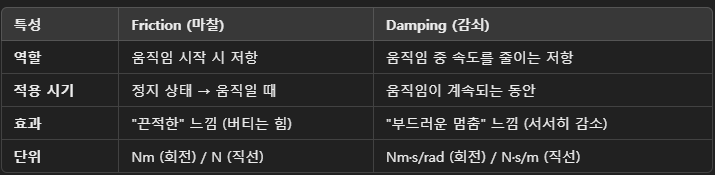
- Friction 정적 마찰
- 관절이 움직이기 시작할 때 저항하는 힘이다.
이는 관절이 너무 쉽게 움직이지 않도록 버티는 힘을 제공한다.- 만약 prismatic joint( 직선 운동 관절 )이라면 저항은 뉴턴(N)이다.
- 만약 revolute joint( 회전 관절 )이라면 저항은 뉴턴*미터(Nm)이다.
- ex) 관절이 회전하려면 0.5 Nm의 힘을 이겨야함.
- <joint name="arm_joint" type="revolute">
<dynamics friction="0.5"/>
</joint>
- <joint name="arm_joint" type="revolute">
- 관절이 움직이기 시작할 때 저항하는 힘이다.
- Damping 감퇴 계수
- 움직이는 관절이 점점 속도를 잃고 멈추도록 하는 힘.
진동이나 과도한 흔들림을 방지하며, 부드러운 멈춤을 유도한다.- prismatic joint는 직선 운동 시 속도를 줄이는 저항
- revolute joint는 회전 운동의 감쇠 효과
- ex) 움직임이 빠르게 멈추도록 0.2 N*s/m의 감쇠력 적용
- <joint name="wrist_joint" type="prismatic">
<dynamics damping="0.2"/>
</joint>
- <joint name="wrist_joint" type="prismatic">
- 움직이는 관절이 점점 속도를 잃고 멈추도록 하는 힘.
- 만약 Damping과 Friction이 없다면??
- 이들의 기본값은 0이며, 결과적으로 로봇이 과도하게 미끄러지거나 계속 흔들릴수있다. 또 한 비현실적인 움직임이 나타날수있음.