ROS 2
ROS 2 Tutorials : Understanding actions
정지홍
2025. 1. 5. 14:28
Understanding actions — ROS 2 Documentation: Jazzy documentation
© Copyright 2025, Open Robotics.
docs.ros.org
background
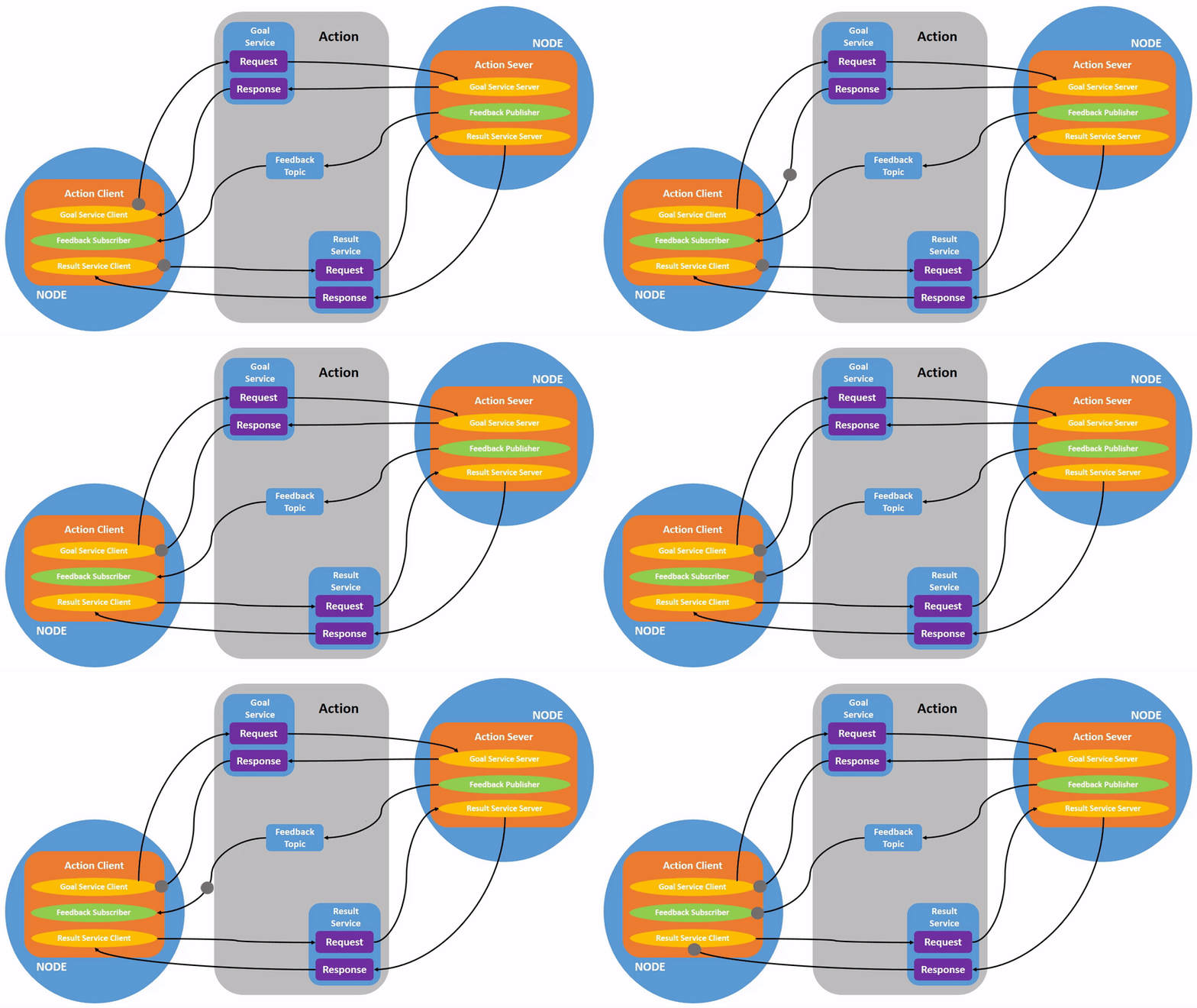
- Actions은 ROS 2의 communication type중 하나이며, long running이 의도된 task이다.
- Action은 3개지 parts로 구성되는데 이는 goal , feedback , result이다.
- Action은 topic과 service를 기반으로 생성된다.
- Action의 기능은 services와 유사하나, service와 다르게 action은 cancel이 가능하다.
또한 꾸준히 feedback을 보낸다. 이와 반면에 services는 single response만 내보낸다. - Action은 publisher-subscriber model과 유사한 client-server model을 사용한다.
- 'action client' node는 목표인 'action server'에게 보내는데, 보내는 것은 stream of feedback과 result이다.
Task
- 1. 늘 그랫듯 거북이,거북조작 실행
ros2 run turtlesim turtlesim_node
ros2 run turtlesim turtle_teleop_key- 2. 거북 조작 실행하면 cli에 아래와 같이 출력된다.
- 만약에 내가 해당되는 keys에서 하나를 누르면, 이는 목표를 action server에게 보내진다.
여기에서는 action server는 turtlesim node가 될것이다. - goal은 거북의 얼굴을 특정한 방향으로 rotate시키는 것이다.
- 만약에 내가 해당되는 keys에서 하나를 누르면, 이는 목표를 action server에게 보내진다.

- 3. turtlesim node의 actions을 보기 위해서 아래의 명령어를 입력해보자.
- 아래 출력에서 알수있는것은 turtlesim아래에 Action servers가 존재한다.
- Action servers 아래에 /turtle1/rotate_absolute가 존재하며, 이는 turtlesim이 respons하고 feedback을 /turtle1/rotate_absolute에게 action을 provide한다.
- 아래 출력에서 알수있는것은 turtlesim아래에 Action servers가 존재한다.
ros2 node info /turtlesim
- 4. 이번에는 거북이 말고 거북회전 노드 정보를 조회해보자.
- 이번에는 Action servers가 아니라 action clients아래에 존재한다. 이것이 의미하는 바는, /turtle1/rotate_absolute가 goal을 보낸다는 것을 뜻한다.
ros2 node info /teleop_turtle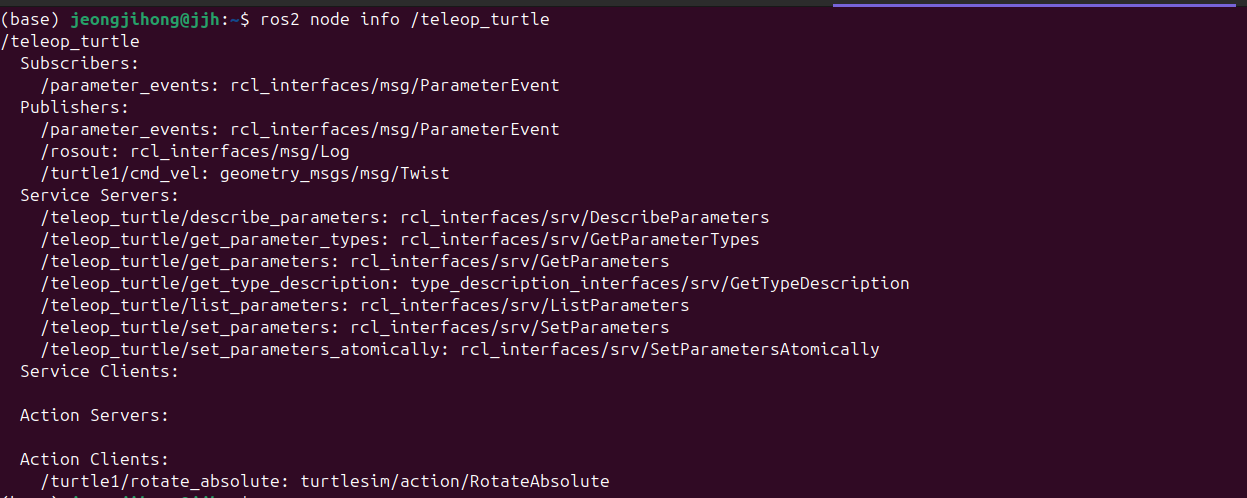
- 5. ROS graph의 모든 action을 알기 위해서는 아래와 같이 입력한다.
ros2 action list- 6. 모든 action을 알때 타입도 알고 싶다면 아래처럼 입력하자.
ros2 action list -t
- 7. 만약 특정한 action의 type을 알고 싶다면 아래와 같이 입력한다.
ros2 action type /turtle1/rotate_absolute
- 8. 특정한 action에 대해서 정보를 알고 싶다면 아래와 같이 입력하자.
- 이를 통해서 action에 대한 action clients와 action servers를 알 수 있다.
ros2 action info /turtle1/rotate_absolute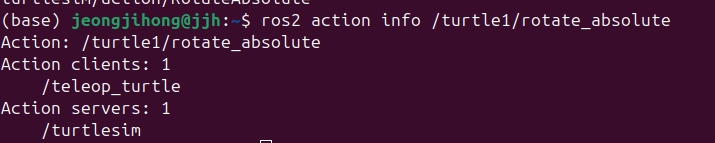
- 9. 만약에 내가 action goal을 send하거나 executing하고 싶으면 action에 대한 세부 정보를 알아야한다.
그러기 위해서는 아래와 같이 입력하면 된다.- 즉, 아래의 명령어는 action의 interface를 알려준다.
- 1번째 출력은 Goal이다.
- 거북이 목표로 향할 각도를 정의 한 것
- 2번째 출력은 Result이다.
- 목표 위치로 이동하기 위해서 회전한 각도이다. 이는 현재 거북이 시작 위치에서 얼마나 회전했음을 알수있다.
- 3번째 출력은 Feedback이다.
- 거북이 앞으로 더 회전해야할 각도이다.
- 1번째 출력은 Goal이다.
- 즉, 아래의 명령어는 action의 interface를 알려준다.
ros2 interface show turtlesim/action/RotateAbsolute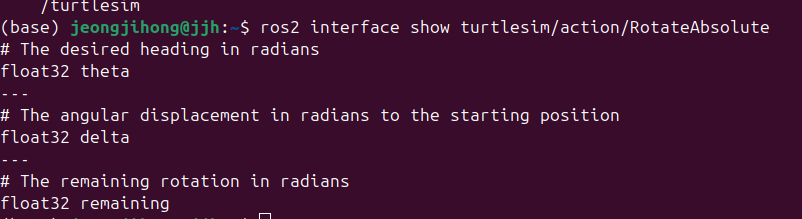
- 10. cli에서 직접 actuin server애 goal을 전송하고 싶으면 아래와 같이 입력하자.
- 이러면 특정한 action server에 goal을 보낼수있다.
ros2 action send_goal <action_name> <action_type> <values>

ros2 action send_goal /turtle1/rotate_absolute turtlesim/action/RotateAbsolute "{theta: 1.57}"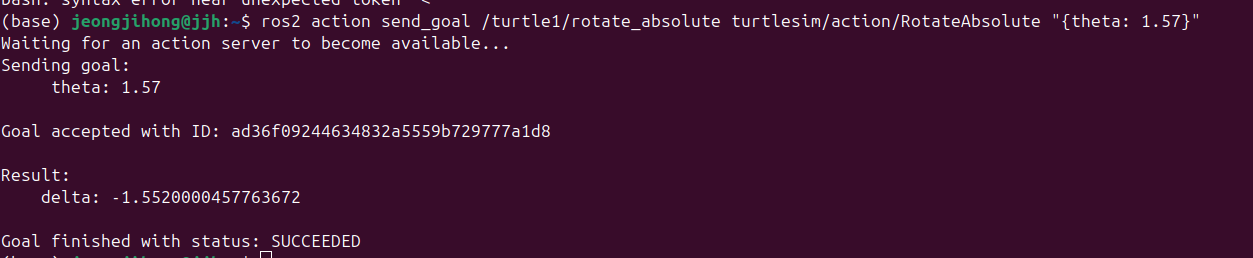
# 아래와 같이 입력하면 실시간으로 feedback을 받을수있다.
ros2 action send_goal /turtle1/rotate_absolute turtlesim/action/RotateAbsolute "{theta: -1.57}" --feedback
Summary
- action은 services와 같이 장기적으로 작업을 수행하게 해주면, 정기적인 feedback을 제공하고 취소할 수 있다.
- 로봇 시스템에서는 내비게이션과 같은 작업에 액션을 사용한다. 액션 목표는 로봇에게 특정 위치로 이동하라고 지시 할 수 있다. 로봇은 해동 위치로 이동하는 동안, 중간 중간 진행 상황을 feedback하고, 최종적으로 목적지에 도달하면 msg를 보낸다.
- turtlesim은 action client가 goal을 보내서 거북이를 회전 시키는 action server를 가지고 있다. 이 튜토리얼에서는 rotate_absolue라는 action을 탐색하여, action이 무엇인지 이해해보았다.