kafka project v1 수정방향
https://jihong.tistory.com/450
kafka project v1
보호되어 있는 글입니다. 내용을 보시려면 비밀번호를 입력하세요.
jihong.tistory.com
위의 프로젝트에서 개선할 점들 정리하자.....
토픽 이름에 관하여...
1. 우선 main으로 보낼 topic이름을 item-log라고 정하자.===> 해결- 그리고 key값을 가지는 상품들을 대략 10개 정도로 칭하자
2. item-log-물건이름 형식으로 1차적으로 보내는 토픽 이름을 정하자. 이는 장바구니 여부와 상관없다.===> 해결
- ex) item-log-apple
3. item-log-물건이름-added 형식으로 장바구니에 담은 로그들만 보낸다.===> 해결
- ex) item-log-apple-added 형식
화면 관련
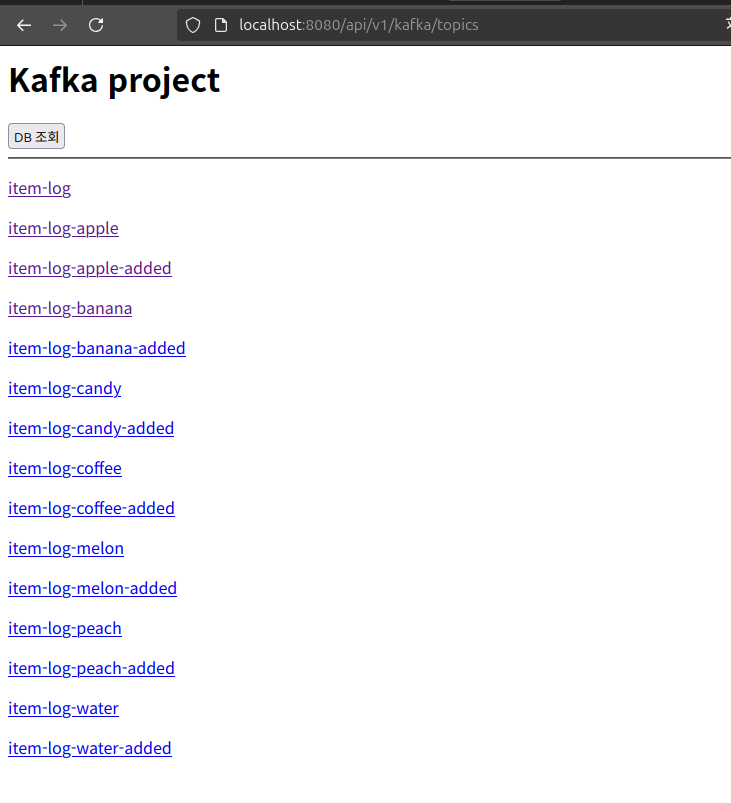
http://localhost:8080/api/v1/kafka/topics 접속하면 불필요 한것들이 출력된다. 이를 개선하자===> 해결
- db조회도 마찬가지...
http://localhost:8080/api/v1/kafka/topics/file-topic 접속하면 보기 불편함.===> 해결
- 보는 방식 개선 및 새로 고침을 하자.
텍스트들 한국어로 바꾸자
기능관련
- 커넥터 너무 치기 길어... 쉘로 짜보자
- 토픽 재설정하는것도 짜자
1. 우선 KafkaTopic을 수정하였다.
- why?
- 이는 spring실행시, 해당 토픽이 존재하는지 보고, 없다면 생성한다.
- bean메서드로 생성하려면, 개별적으로 적어줘야한다... (스프링부트2.6버전부터...)
package com.example.kafka_sw_project.config;

import com.example.kafka_sw_project.topology.FilterTest;
import org.apache.kafka.clients.admin.NewTopic;
import org.springframework.context.annotation.Bean;
import org.springframework.context.annotation.Configuration;
import org.springframework.kafka.config.TopicBuilder;

import java.util.List;
import java.util.logging.Filter;
// configuration 어노테이션은 이 클래스가 하나 이상의 @bean 메서지를 정의하는 클래스임을 나타낸다.
// 즉, 이 클래스는 spring Ioc( inversion of control)컨테이너에서, bean으로 관리되며, 필요한 객체를 생성 및 주입하는데 사용
@Configuration
public class KafkaTopic {
    @Bean
    public NewTopic sourceTopic(){
        return TopicBuilder.name(FilterTest.sourceTopic).partitions(3).replicas(1).build();
    }


    @Bean
    public NewTopic itemLogApple() {
        return TopicBuilder.name("item-log-apple").partitions(3).replicas(1).build();
    }

    @Bean
    public NewTopic itemLogMelon() {
        return TopicBuilder.name("item-log-melon").partitions(3).replicas(1).build();
    }

    @Bean
    public NewTopic itemLogPeach() {
        return TopicBuilder.name("item-log-peach").partitions(3).replicas(1).build();
    }

    @Bean
    public NewTopic itemLogWater() {
        return TopicBuilder.name("item-log-water").partitions(3).replicas(1).build();
    }

    @Bean
    public NewTopic itemLogBanana() {
        return TopicBuilder.name("item-log-banana").partitions(3).replicas(1).build();
    }

    @Bean
    public NewTopic itemLogCandy() {
        return TopicBuilder.name("item-log-candy").partitions(3).replicas(1).build();
    }

    @Bean
    public NewTopic itemLogCoffee() {
        return TopicBuilder.name("item-log-coffee").partitions(3).replicas(1).build();
    }


    @Bean
    public NewTopic itemLogApple2() {
        return TopicBuilder.name("item-log-apple-added").partitions(3).replicas(1).build();
    }

    @Bean
    public NewTopic itemLogMelon2() {
        return TopicBuilder.name("item-log-melon-added").partitions(3).replicas(1).build();
    }

    @Bean
    public NewTopic itemLogPeach2() {
        return TopicBuilder.name("item-log-peach-added").partitions(3).replicas(1).build();
    }

    @Bean
    public NewTopic itemLogWater2() {
        return TopicBuilder.name("item-log-water-added").partitions(3).replicas(1).build();
    }

    @Bean
    public NewTopic itemLogBanana2() {
        return TopicBuilder.name("item-log-banana-added").partitions(3).replicas(1).build();
    }

    @Bean
    public NewTopic itemLogCandy2() {
        return TopicBuilder.name("item-log-candy-added").partitions(3).replicas(1).build();
    }

    @Bean
    public NewTopic itemLogCoffee2() {
        return TopicBuilder.name("item-log-coffee-added").partitions(3).replicas(1).build();
    }

}
// bean은 spring container에 의해 관리될 객체(bean)을 정의할때 사용
// 위의 경우, pizzaTopic매서드는 새로운 카프카 토픽을 생성하고, 이를 spring container에서 bean으로 관리하게 함.

// TopicBuilder는 kafka에서 사용할 새로운 topic을 구성하는데 사용하는 빌더 클래스
// 이클래스의 name메서드는 토픽의 이름을 지정.
// build매서드는 설정이 완료된 NewTopic객체를 반환한다.
package com.example.kafka_sw_project.controller;
import java.sql.Connection;
import java.sql.DriverManager;
import java.sql.ResultSet;
import java.sql.Statement;
import cohttp://m.example.kafka_sw_project.kafka.KafkaProducer;
import org.springframework.http.ResponseEntity;
import org.springframework.web.bind.annotation.*;
import org.springframework.http.HttpStatus;
import java.io.BufferedReader;
import java.io.InputStreamReader; // 추가
import java.io.IOException; // 추가
import java.util.ArrayList;
import java.util.List;
import org.springframework.http.MediaType;
import org.springframework.web.bind.annotation.GetMapping;
import org.springframework.web.bind.annotation.PathVariable;
import org.springframework.web.bind.annotation.RestController;
// RestController는 이 클래스가 spring의 restful 웹서비스의 컨트롤러임을 의미한다. 이 클래스는 http요청을 처리하고, json or xml 형식의 데이터를 반환함.
// RequestMapping은 이 클래스 내의 모든 http요청의 경로가 괄호안으로 시작함을 명시.
@RestController
@RequestMapping("/api/v1/kafka")
public class MessageController {
// KafkaProcuder는 message를 kafka로 전송하는 class이다. 여기서는 MessageController클래스에서 이 producer를 사용해서 message를 전송한다.
private KafkaProducer kafkaProducer;
public MessageController(KafkaProducer kafkaProducer) {
this.kafkaProducer = kafkaProducer;
}
// Kafka 토픽 목록과 메시지 소비
@GetMapping("/topics")
public String listTopics() {
StringBuilder htmlResponse = new StringBuilder();
htmlResponse.append("<html><body>");
htmlResponse.append("<h1>Kafka project</h1>");
// DB 조회 버튼 추가
htmlResponse.append("<a href=\"/api/v1/kafka/topics/mydb\"><button>DB 조회</button></a>");
htmlResponse.append("<hr>"); // 줄 추가
// Kafka 토픽 목록을 출력하는 코드
try {
ProcessBuilder processBuilder = new ProcessBuilder(
"kafka-topics",
"--bootstrap-server", "localhost:9092",
"--list"
);
Process process = processBuilder.start();
BufferedReader reader = new BufferedReader(new InputStreamReader(process.getInputStream()));
String line;
while ((line = reader.readLine()) != null) {
if (line.contains("item") && !line.contains("rst")) {
htmlResponse.append("<p><a href=\"/api/v1/kafka/topics/").append(line).append("\">").append(line).append("</a></p>");
}
}
int exitCode = process.waitFor();
if (exitCode != 0) {
htmlResponse.append("<p>Error executing kafka-topics command.</p>");
}
} catch (IOException | InterruptedException e) {
htmlResponse.append("<p>Error occurred: ").append(e.getMessage()).append("</p>");
}
htmlResponse.append("</body></html>");
return htmlResponse.toString();
}
@GetMapping("/topics/{topic}")
public String printTopicMessages(@PathVariable String topic) {
StringBuilder htmlResponse = new StringBuilder();
htmlResponse.append("<html><head>");
htmlResponse.append("<title>Kafka Topic Messages</title>");
// JavaScript로 새로고침 제어 및 버튼 전환 코드 추가
htmlResponse.append("<script>");
htmlResponse.append("let refreshInterval = setInterval(() => location.reload(), 5000);"); // 5초마다 새로고침
htmlResponse.append("function toggleReloading() {");
htmlResponse.append(" const button = document.getElementById('reloadButton');");
htmlResponse.append(" if (refreshInterval) {");
htmlResponse.append(" clearInterval(refreshInterval);");
htmlResponse.append(" refreshInterval = null;");
htmlResponse.append(" button.textContent = '다시 불러오기';");
htmlResponse.append(" } else {");
htmlResponse.append(" refreshInterval = setInterval(() => location.reload(), 5000);");
htmlResponse.append(" button.textContent = '불러오기 중지';");
htmlResponse.append(" }");
htmlResponse.append("}");
htmlResponse.append("</script>");
htmlResponse.append("</head><body>");
htmlResponse.append("<h1>Topic으로 부터 message를 consuming하는중.....").append("<br>선택한 topic은 ").append(topic).append("입니다.</h1>");
// 새로고침 제어 버튼 추가
htmlResponse.append("<button id='reloadButton' onclick=\"toggleReloading()\">불러오기 중지</button>");
// 테이블 시작
htmlResponse.append("<table border='1'>");
htmlResponse.append("<tr>")
.append("<th>행 번호</th>")
.append("<th>Key값</th>")
.append("<th>회원 아이디</th>")
.append("<th>품목</th>")
.append("<th>장바구니 담기 여부</th>")
.append("<th>담은 시각</th>")
.append("</tr>");
// 메시지를 저장할 리스트
List<String[]> messages = new ArrayList<>();
try {
ProcessBuilder consumerBuilder = new ProcessBuilder(
"kafka-console-consumer",
"--bootstrap-server", "localhost:9092",
"--topic", topic,
"--from-beginning",
"--timeout-ms", "1000", // 2초 제한
"--property", "print.key=true", // Key 출력 설정
"--property", "key.separator= : " // Key-Value 구분자 설정
);
Process consumerProcess = consumerBuilder.start();
BufferedReader consumerReader = new BufferedReader(new InputStreamReader(consumerProcess.getInputStream()));
String consumerLine;
while ((consumerLine = consumerReader.readLine()) != null) {
// Key와 Value 구분
String[] keyValue = consumerLine.split(" : ", 2);
String key = keyValue.length > 1 ? keyValue[0] : "(null)";
String value = keyValue.length > 1 ? keyValue[1] : keyValue[0];
// Value를 콤마로 구분하여 파싱
String[] valueParts = value.split(",\\s*");
String firstValue = valueParts.length > 0 ? valueParts[0] : "(null)";
String secondValue = valueParts.length > 1 ? valueParts[1] : "(null)";
String thirdValue = valueParts.length > 2 ? valueParts[2] : "(null)";
String fourthValue = valueParts.length > 3 ? valueParts[3] : "(null)";
// 메시지 리스트에 추가
messages.add(new String[] { key, firstValue, secondValue, thirdValue, fourthValue });
}
int consumerExitCode = consumerProcess.waitFor();
if (consumerExitCode != 0) {
htmlResponse.append("<p>Error consuming messages from the topic.</p>");
}
} catch (IOException | InterruptedException e) {
htmlResponse.append("<p>Error occurred: ").append(e.getMessage()).append("</p>");
}
// 메시지를 역순으로 테이블에 추가
int rowNumber = messages.size();
for (int i = messages.size() - 1; i >= 0; i--) {
String[] message = messages.get(i);
htmlResponse.append("<tr>")
.append("<td>").append(rowNumber).append("</td>")
.append("<td>").append(message[0]).append("</td>") // Key
.append("<td>").append(message[1]).append("</td>") // First Value
.append("<td>").append(message[2]).append("</td>") // Second Value
.append("<td>").append(message[3]).append("</td>") // Third Value
.append("<td>").append(message[4]).append("</td>") // Fourth Value
.append("</tr>");
rowNumber--;
}
// 테이블 끝
htmlResponse.append("</table>");
htmlResponse.append("<a href=\"/api/v1/kafka/topics\"><button>Topic list로 돌아가기</button></a>");
htmlResponse.append("</body></html>");
return htmlResponse.toString();
}
@GetMapping("/topics/mydb")
public String showDatabasesWithItemUsingJDBC() {
StringBuilder htmlResponse = new StringBuilder();
htmlResponse.append("<html><body>");
htmlResponse.append("<h1>MySQL Databases 조회</h1>");
String jdbcUrl = "jdbc:mysql://localhost:3306";
String username = "root";
String password = "root123";
try (Connection connection = DriverManager.getConnection(jdbcUrl, username, password);
Statement statement = connection.createStatement();
ResultSet resultSet = statement.executeQuery("SHOW DATABASES")) {
while (resultSet.next()) {
String databaseName = resultSet.getString(1);
// "item" 단어가 포함된 경우만 출력
if (databaseName.contains("item")) {
htmlResponse.append("<p><a href=\"/api/v1/kafka/topics/mydb/").append(databaseName).append("\">").append(databaseName).append("</a></p>");
}
}
} catch (Exception e) {
htmlResponse.append("<p>Error occurred: ").append(e.getMessage()).append("</p>");
}
htmlResponse.append("<a href=\"/api/v1/kafka/topics\"><button>Topic 리스트로 돌아가기</button></a>");
htmlResponse.append("</body></html>");
return htmlResponse.toString();
}
@GetMapping("/topics/mydb/{database}")
public String showTables(@PathVariable String database) {
StringBuilder htmlResponse = new StringBuilder();
htmlResponse.append("<html><body>");
htmlResponse.append("<h1>선택한 Database에 존재하는 table들.....<br>선택힌 database는 ").append(database).append("</h1>");
String username = "root";
String password = "root123";
try {
// MySQL SHOW TABLES 명령어 실행
ProcessBuilder processBuilder = new ProcessBuilder(
"mysql",
"-u" + username,
"-p" + password,
"-e", "SHOW TABLES IN " + database
);
Process process = processBuilder.start();
BufferedReader reader = new BufferedReader(new InputStreamReader(process.getInputStream()));
String line;
boolean isHeader = true; // 첫 번째 줄은 'Tables_in_database' 헤더이므로 건너뜀
while ((line = reader.readLine()) != null) {
if (isHeader) {
isHeader = false;
continue;
}
// 테이블 이름을 클릭하면 해당 테이블 데이터를 조회하는 URL로 이동
htmlResponse.append("<p><a href=\"/api/v1/kafka/topics/mydb/")
.append(database).append("/").append(line)
.append("\">").append(line).append("</a></p>");
}
int exitCode = process.waitFor();
if (exitCode != 0) {
htmlResponse.append("<p>Error executing MySQL command.</p>");
}
} catch (IOException | InterruptedException e) {
htmlResponse.append("<p>Error occurred: ").append(e.getMessage()).append("</p>");
}
htmlResponse.append("<a href=\"/api/v1/kafka/topics/mydb\"><button> DB 리스트로 돌아가기 </button></a>");
htmlResponse.append("</body></html>");
return htmlResponse.toString();
}
@GetMapping("/topics/mydb/{database}/{table}")
public String showTableData(@PathVariable String database, @PathVariable String table) {
StringBuilder htmlResponse = new StringBuilder();
htmlResponse.append("<html><body>");
htmlResponse.append("<h1>Table의 data를 조회합니다....<br>").append(database).append(".").append(table).append("</h1>");
String jdbcUrl = "jdbc:mysql://localhost:3306/" + database; // Database를 경로에 포함
String username = "root";
String password = "root123";
try (Connection connection = DriverManager.getConnection(jdbcUrl, username, password);
Statement statement = connection.createStatement()) {
// SQL query to fetch all data from the specified table
String query = "SELECT * FROM " + table;
ResultSet resultSet = statement.executeQuery(query);
// Get column names
int columnCount = resultSet.getMetaData().getColumnCount();
htmlResponse.append("<table border='1'><tr>");
for (int i = 1; i <= columnCount; i++) {
htmlResponse.append("<th>").append(resultSet.getMetaData().getColumnName(i)).append("</th>");
}
htmlResponse.append("</tr>");
// Get row data
while (resultSet.next()) {
htmlResponse.append("<tr>");
for (int i = 1; i <= columnCount; i++) {
htmlResponse.append("<td>").append(resultSet.getString(i)).append("</td>");
}
htmlResponse.append("</tr>");
}
htmlResponse.append("</table>");
} catch (Exception e) {
htmlResponse.append("<p>Error occurred: ").append(e.getMessage()).append("</p>");
}
htmlResponse.append("<a href=\"/api/v1/kafka/topics/mydb/").append(database).append("\"><button> Table 리스트로 돌아가기 </button></a>");
htmlResponse.append("</body></html>");
return htmlResponse.toString();
}
// GetMappring은 http GET요청을 처리하는 핸들러 메서드를 정의함.
// key와 value를 각각 요청 파라미터로 받아 처리
@GetMapping("/publish")
public ResponseEntity<String> publish(
        @RequestParam("key") String key,
        @RequestParam("value") String value) {
    // KafkaProducer의 sendMessage 메서드에 key와 value 전달
    kafkaProducer.sendMessage("item-log", key, value);
    return ResponseEntity.ok("from MessageController : Message를 topic으로 보냄.");
}
}
package com.example.kafka_sw_project.controller;
import java.sql.Connection;
import java.sql.DriverManager;
import java.sql.ResultSet;
import java.sql.Statement;
import cohttp://m.example.kafka_sw_project.kafka.KafkaProducer;
import org.springframework.http.ResponseEntity;
import org.springframework.web.bind.annotation.*;
import org.springframework.http.HttpStatus;
import java.io.BufferedReader;
import java.io.InputStreamReader; // 추가
import java.io.IOException; // 추가
import java.util.ArrayList;
import java.util.List;
import org.springframework.http.MediaType;
import org.springframework.web.bind.annotation.GetMapping;
import org.springframework.web.bind.annotation.PathVariable;
import org.springframework.web.bind.annotation.RestController;
// RestController는 이 클래스가 spring의 restful 웹서비스의 컨트롤러임을 의미한다. 이 클래스는 http요청을 처리하고, json or xml 형식의 데이터를 반환함.
// RequestMapping은 이 클래스 내의 모든 http요청의 경로가 괄호안으로 시작함을 명시.
@RestController
@RequestMapping("/api/v1/kafka")
public class MessageController {
// KafkaProcuder는 message를 kafka로 전송하는 class이다. 여기서는 MessageController클래스에서 이 producer를 사용해서 message를 전송한다.
private KafkaProducer kafkaProducer;
public MessageController(KafkaProducer kafkaProducer) {
this.kafkaProducer = kafkaProducer;
}
// Kafka 토픽 목록과 메시지 소비
@GetMapping("/topics")
public String listTopics() {
StringBuilder htmlResponse = new StringBuilder();
htmlResponse.append("<html><body>");
htmlResponse.append("<h1>Kafka project</h1>");
// DB 조회 버튼 추가
htmlResponse.append("<a href=\"/api/v1/kafka/topics/mydb\"><button>DB 조회</button></a>");
htmlResponse.append("<hr>"); // 줄 추가
// Kafka 토픽 목록을 출력하는 코드
try {
ProcessBuilder processBuilder = new ProcessBuilder(
"kafka-topics",
"--bootstrap-server", "localhost:9092",
"--list"
);
Process process = processBuilder.start();
BufferedReader reader = new BufferedReader(new InputStreamReader(process.getInputStream()));
String line;
while ((line = reader.readLine()) != null) {
if (line.contains("item") && !line.contains("rst")) {
htmlResponse.append("<p><a href=\"/api/v1/kafka/topics/").append(line).append("\">").append(line).append("</a></p>");
}
}
int exitCode = process.waitFor();
if (exitCode != 0) {
htmlResponse.append("<p>Error executing kafka-topics command.</p>");
}
} catch (IOException | InterruptedException e) {
htmlResponse.append("<p>Error occurred: ").append(e.getMessage()).append("</p>");
}
htmlResponse.append("</body></html>");
return htmlResponse.toString();
}
@GetMapping("/topics/{topic}")
public String printTopicMessages(@PathVariable String topic) {
StringBuilder htmlResponse = new StringBuilder();
htmlResponse.append("<html><head>");
htmlResponse.append("<title>Kafka Topic Messages</title>");
// JavaScript로 새로고침 제어 및 버튼 전환 코드 추가
htmlResponse.append("<script>");
htmlResponse.append("let refreshInterval = setInterval(() => location.reload(), 5000);"); // 5초마다 새로고침
htmlResponse.append("function toggleReloading() {");
htmlResponse.append(" const button = document.getElementById('reloadButton');");
htmlResponse.append(" if (refreshInterval) {");
htmlResponse.append(" clearInterval(refreshInterval);");
htmlResponse.append(" refreshInterval = null;");
htmlResponse.append(" button.textContent = '다시 불러오기';");
htmlResponse.append(" } else {");
htmlResponse.append(" refreshInterval = setInterval(() => location.reload(), 5000);");
htmlResponse.append(" button.textContent = '불러오기 중지';");
htmlResponse.append(" }");
htmlResponse.append("}");
htmlResponse.append("</script>");
htmlResponse.append("</head><body>");
htmlResponse.append("<h1>Topic으로 부터 message를 consuming하는중.....").append("<br>선택한 topic은 ").append(topic).append("입니다.</h1>");
// 새로고침 제어 버튼 추가
htmlResponse.append("<button id='reloadButton' onclick=\"toggleReloading()\">불러오기 중지</button>");
// 테이블 시작
htmlResponse.append("<table border='1'>");
htmlResponse.append("<tr>")
.append("<th>행 번호</th>")
.append("<th>Key값</th>")
.append("<th>회원 아이디</th>")
.append("<th>품목</th>")
.append("<th>장바구니 담기 여부</th>")
.append("<th>담은 시각</th>")
.append("</tr>");
// 메시지를 저장할 리스트
List<String[]> messages = new ArrayList<>();
try {
ProcessBuilder consumerBuilder = new ProcessBuilder(
"kafka-console-consumer",
"--bootstrap-server", "localhost:9092",
"--topic", topic,
"--from-beginning",
"--timeout-ms", "1000", // 2초 제한
"--property", "print.key=true", // Key 출력 설정
"--property", "key.separator= : " // Key-Value 구분자 설정
);
Process consumerProcess = consumerBuilder.start();
BufferedReader consumerReader = new BufferedReader(new InputStreamReader(consumerProcess.getInputStream()));
String consumerLine;
while ((consumerLine = consumerReader.readLine()) != null) {
// Key와 Value 구분
String[] keyValue = consumerLine.split(" : ", 2);
String key = keyValue.length > 1 ? keyValue[0] : "(null)";
String value = keyValue.length > 1 ? keyValue[1] : keyValue[0];
// Value를 콤마로 구분하여 파싱
String[] valueParts = value.split(",\\s*");
String firstValue = valueParts.length > 0 ? valueParts[0] : "(null)";
String secondValue = valueParts.length > 1 ? valueParts[1] : "(null)";
String thirdValue = valueParts.length > 2 ? valueParts[2] : "(null)";
String fourthValue = valueParts.length > 3 ? valueParts[3] : "(null)";
// 메시지 리스트에 추가
messages.add(new String[] { key, firstValue, secondValue, thirdValue, fourthValue });
}
int consumerExitCode = consumerProcess.waitFor();
if (consumerExitCode != 0) {
htmlResponse.append("<p>Error consuming messages from the topic.</p>");
}
} catch (IOException | InterruptedException e) {
htmlResponse.append("<p>Error occurred: ").append(e.getMessage()).append("</p>");
}
// 메시지를 역순으로 테이블에 추가
int rowNumber = messages.size();
for (int i = messages.size() - 1; i >= 0; i--) {
String[] message = messages.get(i);
htmlResponse.append("<tr>")
.append("<td>").append(rowNumber).append("</td>")
.append("<td>").append(message[0]).append("</td>") // Key
.append("<td>").append(message[1]).append("</td>") // First Value
.append("<td>").append(message[2]).append("</td>") // Second Value
.append("<td>").append(message[3]).append("</td>") // Third Value
.append("<td>").append(message[4]).append("</td>") // Fourth Value
.append("</tr>");
rowNumber--;
}
// 테이블 끝
htmlResponse.append("</table>");
htmlResponse.append("<a href=\"/api/v1/kafka/topics\"><button>Topic list로 돌아가기</button></a>");
htmlResponse.append("</body></html>");
return htmlResponse.toString();
}
@GetMapping("/topics/mydb")
public String showDatabasesWithItemUsingJDBC() {
StringBuilder htmlResponse = new StringBuilder();
htmlResponse.append("<html><body>");
htmlResponse.append("<h1>MySQL Databases 조회</h1>");
String jdbcUrl = "jdbc:mysql://localhost:3306";
String username = "root";
String password = "root123";
try (Connection connection = DriverManager.getConnection(jdbcUrl, username, password);
Statement statement = connection.createStatement();
ResultSet resultSet = statement.executeQuery("SHOW DATABASES")) {
while (resultSet.next()) {
String databaseName = resultSet.getString(1);
// "item" 단어가 포함된 경우만 출력
if (databaseName.contains("item")) {
htmlResponse.append("<p><a href=\"/api/v1/kafka/topics/mydb/").append(databaseName).append("\">").append(databaseName).append("</a></p>");
}
}
} catch (Exception e) {
htmlResponse.append("<p>Error occurred: ").append(e.getMessage()).append("</p>");
}
htmlResponse.append("<a href=\"/api/v1/kafka/topics\"><button>Topic 리스트로 돌아가기</button></a>");
htmlResponse.append("</body></html>");
return htmlResponse.toString();
}
@GetMapping("/topics/mydb/{database}")
public String showTables(@PathVariable String database) {
StringBuilder htmlResponse = new StringBuilder();
htmlResponse.append("<html><body>");
htmlResponse.append("<h1>선택한 Database에 존재하는 table들.....<br>선택힌 database는 ").append(database).append("</h1>");
String username = "root";
String password = "root123";
try {
// MySQL SHOW TABLES 명령어 실행
ProcessBuilder processBuilder = new ProcessBuilder(
"mysql",
"-u" + username,
"-p" + password,
"-e", "SHOW TABLES IN " + database
);
Process process = processBuilder.start();
BufferedReader reader = new BufferedReader(new InputStreamReader(process.getInputStream()));
String line;
boolean isHeader = true; // 첫 번째 줄은 'Tables_in_database' 헤더이므로 건너뜀
while ((line = reader.readLine()) != null) {
if (isHeader) {
isHeader = false;
continue;
}
// 테이블 이름을 클릭하면 해당 테이블 데이터를 조회하는 URL로 이동
htmlResponse.append("<p><a href=\"/api/v1/kafka/topics/mydb/")
.append(database).append("/").append(line)
.append("\">").append(line).append("</a></p>");
}
int exitCode = process.waitFor();
if (exitCode != 0) {
htmlResponse.append("<p>Error executing MySQL command.</p>");
}
} catch (IOException | InterruptedException e) {
htmlResponse.append("<p>Error occurred: ").append(e.getMessage()).append("</p>");
}
htmlResponse.append("<a href=\"/api/v1/kafka/topics/mydb\"><button> DB 리스트로 돌아가기 </button></a>");
htmlResponse.append("</body></html>");
return htmlResponse.toString();
}
@GetMapping("/topics/mydb/{database}/{table}")
public String showTableData(@PathVariable String database, @PathVariable String table) {
StringBuilder htmlResponse = new StringBuilder();
htmlResponse.append("<html><body>");
htmlResponse.append("<h1>Table의 data를 조회합니다....<br>").append(database).append(".").append(table).append("</h1>");
String jdbcUrl = "jdbc:mysql://localhost:3306/" + database; // Database를 경로에 포함
String username = "root";
String password = "root123";
try (Connection connection = DriverManager.getConnection(jdbcUrl, username, password);
Statement statement = connection.createStatement()) {
// SQL query to fetch all data from the specified table
String query = "SELECT * FROM " + table;
ResultSet resultSet = statement.executeQuery(query);
// Get column names
int columnCount = resultSet.getMetaData().getColumnCount();
htmlResponse.append("<table border='1'><tr>");
for (int i = 1; i <= columnCount; i++) {
htmlResponse.append("<th>").append(resultSet.getMetaData().getColumnName(i)).append("</th>");
}
htmlResponse.append("</tr>");
// Get row data
while (resultSet.next()) {
htmlResponse.append("<tr>");
for (int i = 1; i <= columnCount; i++) {
htmlResponse.append("<td>").append(resultSet.getString(i)).append("</td>");
}
htmlResponse.append("</tr>");
}
htmlResponse.append("</table>");
} catch (Exception e) {
htmlResponse.append("<p>Error occurred: ").append(e.getMessage()).append("</p>");
}
htmlResponse.append("<a href=\"/api/v1/kafka/topics/mydb/").append(database).append("\"><button> Table 리스트로 돌아가기 </button></a>");
htmlResponse.append("</body></html>");
return htmlResponse.toString();
}
// GetMappring은 http GET요청을 처리하는 핸들러 메서드를 정의함.
// key와 value를 각각 요청 파라미터로 받아 처리
@GetMapping("/publish")
public ResponseEntity<String> publish(
@RequestParam("key") String key,
@RequestParam("value") String value) {
// KafkaProducer의 sendMessage 메서드에 key와 value 전달
kafkaProducer.sendMessage("item-log", key, value);
return ResponseEntity.ok("from MessageController : Message를 topic으로 보냄.");
}
}

2. MessageController.java의 GetMapping의 publish부분을 수정한다.
- 이 작업으로 fileProducer에서 메시지를 보내면, springboot가 해당 되는 경로 http://localhost:8080/api/v1/publish에서 받을거임.
그리면 springboot는 item-log의 topic으로 메시지를 보낼거임.
@GetMapping("/publish")
public ResponseEntity<String> publish(
@RequestParam("key") String key,
@RequestParam("value") String value) {
// KafkaProducer의 sendMessage 메서드에 key와 value 전달
kafkaProducer.sendMessage("item-log", key, value);
return ResponseEntity.ok("from MessageController : Message를 topic으로 보냄.");
}package com.example.kafka_sw_project.controller;
import java.sql.Connection;
import java.sql.DriverManager;
import java.sql.ResultSet;
import java.sql.Statement;
import cohttp://m.example.kafka_sw_project.kafka.KafkaProducer;
import org.springframework.http.ResponseEntity;
import org.springframework.web.bind.annotation.*;
import org.springframework.http.HttpStatus;
import java.io.BufferedReader;
import java.io.InputStreamReader; // 추가
import java.io.IOException; // 추가
import java.util.ArrayList;
import java.util.List;
import org.springframework.http.MediaType;
import org.springframework.web.bind.annotation.GetMapping;
import org.springframework.web.bind.annotation.PathVariable;
import org.springframework.web.bind.annotation.RestController;
// RestController는 이 클래스가 spring의 restful 웹서비스의 컨트롤러임을 의미한다. 이 클래스는 http요청을 처리하고, json or xml 형식의 데이터를 반환함.
// RequestMapping은 이 클래스 내의 모든 http요청의 경로가 괄호안으로 시작함을 명시.
@RestController
@RequestMapping("/api/v1/kafka")
public class MessageController {
// KafkaProcuder는 message를 kafka로 전송하는 class이다. 여기서는 MessageController클래스에서 이 producer를 사용해서 message를 전송한다.
private KafkaProducer kafkaProducer;
public MessageController(KafkaProducer kafkaProducer) {
this.kafkaProducer = kafkaProducer;
}
// Kafka 토픽 목록과 메시지 소비
@GetMapping("/topics")
public String listTopics() {
StringBuilder htmlResponse = new StringBuilder();
htmlResponse.append("<html><body>");
htmlResponse.append("<h1>Kafka project</h1>");
// DB 조회 버튼 추가
htmlResponse.append("<a href=\"/api/v1/kafka/topics/mydb\"><button>DB 조회</button></a>");
htmlResponse.append("<hr>"); // 줄 추가
// Kafka 토픽 목록을 출력하는 코드
try {
ProcessBuilder processBuilder = new ProcessBuilder(
"kafka-topics",
"--bootstrap-server", "localhost:9092",
"--list"
);
Process process = processBuilder.start();
BufferedReader reader = new BufferedReader(new InputStreamReader(process.getInputStream()));
String line;
while ((line = reader.readLine()) != null) {
if (line.contains("item") && !line.contains("rst")) {
htmlResponse.append("<p><a href=\"/api/v1/kafka/topics/").append(line).append("\">").append(line).append("</a></p>");
}
}
int exitCode = process.waitFor();
if (exitCode != 0) {
htmlResponse.append("<p>Error executing kafka-topics command.</p>");
}
} catch (IOException | InterruptedException e) {
htmlResponse.append("<p>Error occurred: ").append(e.getMessage()).append("</p>");
}
htmlResponse.append("</body></html>");
return htmlResponse.toString();
}
@GetMapping("/topics/{topic}")
public String printTopicMessages(@PathVariable String topic) {
StringBuilder htmlResponse = new StringBuilder();
htmlResponse.append("<html><head>");
htmlResponse.append("<title>Kafka Topic Messages</title>");
// JavaScript로 새로고침 제어 및 버튼 전환 코드 추가
htmlResponse.append("<script>");
htmlResponse.append("let refreshInterval = setInterval(() => location.reload(), 5000);"); // 5초마다 새로고침
htmlResponse.append("function toggleReloading() {");
htmlResponse.append(" const button = document.getElementById('reloadButton');");
htmlResponse.append(" if (refreshInterval) {");
htmlResponse.append(" clearInterval(refreshInterval);");
htmlResponse.append(" refreshInterval = null;");
htmlResponse.append(" button.textContent = '다시 불러오기';");
htmlResponse.append(" } else {");
htmlResponse.append(" refreshInterval = setInterval(() => location.reload(), 5000);");
htmlResponse.append(" button.textContent = '불러오기 중지';");
htmlResponse.append(" }");
htmlResponse.append("}");
htmlResponse.append("</script>");
htmlResponse.append("</head><body>");
htmlResponse.append("<h1>Topic으로 부터 message를 consuming하는중.....").append("<br>선택한 topic은 ").append(topic).append("입니다.</h1>");
// 새로고침 제어 버튼 추가
htmlResponse.append("<button id='reloadButton' onclick=\"toggleReloading()\">불러오기 중지</button>");
// 테이블 시작
htmlResponse.append("<table border='1'>");
htmlResponse.append("<tr>")
.append("<th>행 번호</th>")
.append("<th>Key값</th>")
.append("<th>회원 아이디</th>")
.append("<th>품목</th>")
.append("<th>장바구니 담기 여부</th>")
.append("<th>담은 시각</th>")
.append("</tr>");
// 메시지를 저장할 리스트
List<String[]> messages = new ArrayList<>();
try {
ProcessBuilder consumerBuilder = new ProcessBuilder(
"kafka-console-consumer",
"--bootstrap-server", "localhost:9092",
"--topic", topic,
"--from-beginning",
"--timeout-ms", "1000", // 2초 제한
"--property", "print.key=true", // Key 출력 설정
"--property", "key.separator= : " // Key-Value 구분자 설정
);
Process consumerProcess = consumerBuilder.start();
BufferedReader consumerReader = new BufferedReader(new InputStreamReader(consumerProcess.getInputStream()));
String consumerLine;
while ((consumerLine = consumerReader.readLine()) != null) {
// Key와 Value 구분
String[] keyValue = consumerLine.split(" : ", 2);
String key = keyValue.length > 1 ? keyValue[0] : "(null)";
String value = keyValue.length > 1 ? keyValue[1] : keyValue[0];
// Value를 콤마로 구분하여 파싱
String[] valueParts = value.split(",\\s*");
String firstValue = valueParts.length > 0 ? valueParts[0] : "(null)";
String secondValue = valueParts.length > 1 ? valueParts[1] : "(null)";
String thirdValue = valueParts.length > 2 ? valueParts[2] : "(null)";
String fourthValue = valueParts.length > 3 ? valueParts[3] : "(null)";
// 메시지 리스트에 추가
messages.add(new String[] { key, firstValue, secondValue, thirdValue, fourthValue });
}
int consumerExitCode = consumerProcess.waitFor();
if (consumerExitCode != 0) {
htmlResponse.append("<p>Error consuming messages from the topic.</p>");
}
} catch (IOException | InterruptedException e) {
htmlResponse.append("<p>Error occurred: ").append(e.getMessage()).append("</p>");
}
// 메시지를 역순으로 테이블에 추가
int rowNumber = messages.size();
for (int i = messages.size() - 1; i >= 0; i--) {
String[] message = messages.get(i);
htmlResponse.append("<tr>")
.append("<td>").append(rowNumber).append("</td>")
.append("<td>").append(message[0]).append("</td>") // Key
.append("<td>").append(message[1]).append("</td>") // First Value
.append("<td>").append(message[2]).append("</td>") // Second Value
.append("<td>").append(message[3]).append("</td>") // Third Value
.append("<td>").append(message[4]).append("</td>") // Fourth Value
.append("</tr>");
rowNumber--;
}
// 테이블 끝
htmlResponse.append("</table>");
htmlResponse.append("<a href=\"/api/v1/kafka/topics\"><button>Topic list로 돌아가기</button></a>");
htmlResponse.append("</body></html>");
return htmlResponse.toString();
}
@GetMapping("/topics/mydb")
public String showDatabasesWithItemUsingJDBC() {
StringBuilder htmlResponse = new StringBuilder();
htmlResponse.append("<html><body>");
htmlResponse.append("<h1>MySQL Databases 조회</h1>");
String jdbcUrl = "jdbc:mysql://localhost:3306";
String username = "root";
String password = "root123";
try (Connection connection = DriverManager.getConnection(jdbcUrl, username, password);
Statement statement = connection.createStatement();
ResultSet resultSet = statement.executeQuery("SHOW DATABASES")) {
while (resultSet.next()) {
String databaseName = resultSet.getString(1);
// "item" 단어가 포함된 경우만 출력
if (databaseName.contains("item")) {
htmlResponse.append("<p><a href=\"/api/v1/kafka/topics/mydb/").append(databaseName).append("\">").append(databaseName).append("</a></p>");
}
}
} catch (Exception e) {
htmlResponse.append("<p>Error occurred: ").append(e.getMessage()).append("</p>");
}
htmlResponse.append("<a href=\"/api/v1/kafka/topics\"><button>Topic 리스트로 돌아가기</button></a>");
htmlResponse.append("</body></html>");
return htmlResponse.toString();
}
@GetMapping("/topics/mydb/{database}")
public String showTables(@PathVariable String database) {
StringBuilder htmlResponse = new StringBuilder();
htmlResponse.append("<html><body>");
htmlResponse.append("<h1>선택한 Database에 존재하는 table들.....<br>선택힌 database는 ").append(database).append("</h1>");
String username = "root";
String password = "root123";
try {
// MySQL SHOW TABLES 명령어 실행
ProcessBuilder processBuilder = new ProcessBuilder(
"mysql",
"-u" + username,
"-p" + password,
"-e", "SHOW TABLES IN " + database
);
Process process = processBuilder.start();
BufferedReader reader = new BufferedReader(new InputStreamReader(process.getInputStream()));
String line;
boolean isHeader = true; // 첫 번째 줄은 'Tables_in_database' 헤더이므로 건너뜀
while ((line = reader.readLine()) != null) {
if (isHeader) {
isHeader = false;
continue;
}
// 테이블 이름을 클릭하면 해당 테이블 데이터를 조회하는 URL로 이동
htmlResponse.append("<p><a href=\"/api/v1/kafka/topics/mydb/")
.append(database).append("/").append(line)
.append("\">").append(line).append("</a></p>");
}
int exitCode = process.waitFor();
if (exitCode != 0) {
htmlResponse.append("<p>Error executing MySQL command.</p>");
}
} catch (IOException | InterruptedException e) {
htmlResponse.append("<p>Error occurred: ").append(e.getMessage()).append("</p>");
}
htmlResponse.append("<a href=\"/api/v1/kafka/topics/mydb\"><button> DB 리스트로 돌아가기 </button></a>");
htmlResponse.append("</body></html>");
return htmlResponse.toString();
}
@GetMapping("/topics/mydb/{database}/{table}")
public String showTableData(@PathVariable String database, @PathVariable String table) {
StringBuilder htmlResponse = new StringBuilder();
htmlResponse.append("<html><body>");
htmlResponse.append("<h1>Table의 data를 조회합니다....<br>").append(database).append(".").append(table).append("</h1>");
String jdbcUrl = "jdbc:mysql://localhost:3306/" + database; // Database를 경로에 포함
String username = "root";
String password = "root123";
try (Connection connection = DriverManager.getConnection(jdbcUrl, username, password);
Statement statement = connection.createStatement()) {
// SQL query to fetch all data from the specified table
String query = "SELECT * FROM " + table;
ResultSet resultSet = statement.executeQuery(query);
// Get column names
int columnCount = resultSet.getMetaData().getColumnCount();
htmlResponse.append("<table border='1'><tr>");
for (int i = 1; i <= columnCount; i++) {
htmlResponse.append("<th>").append(resultSet.getMetaData().getColumnName(i)).append("</th>");
}
htmlResponse.append("</tr>");
// Get row data
while (resultSet.next()) {
htmlResponse.append("<tr>");
for (int i = 1; i <= columnCount; i++) {
htmlResponse.append("<td>").append(resultSet.getString(i)).append("</td>");
}
htmlResponse.append("</tr>");
}
htmlResponse.append("</table>");
} catch (Exception e) {
htmlResponse.append("<p>Error occurred: ").append(e.getMessage()).append("</p>");
}
htmlResponse.append("<a href=\"/api/v1/kafka/topics/mydb/").append(database).append("\"><button> Table 리스트로 돌아가기 </button></a>");
htmlResponse.append("</body></html>");
return htmlResponse.toString();
}
// GetMappring은 http GET요청을 처리하는 핸들러 메서드를 정의함.
// key와 value를 각각 요청 파라미터로 받아 처리
@GetMapping("/publish")
public ResponseEntity<String> publish(
@RequestParam("key") String key,
@RequestParam("value") String value) {
// KafkaProducer의 sendMessage 메서드에 key와 value 전달
kafkaProducer.sendMessage("item-log", key, value);
return ResponseEntity.ok("from MessageController : Message를 topic으로 보냄.");
}
}
3. KafkaProducer를 수정하자.
package com.example.kafka_sw_project.kafka;

import org.slf4j.Logger;
import org.slf4j.LoggerFactory;
import org.springframework.kafka.core.KafkaTemplate;
import org.springframework.stereotype.Service;

@Service
public class KafkaProducer {
    private static final Logger logger = LoggerFactory.getLogger(KafkaProducer.class);
    private final KafkaTemplate<String, String> kafkaTemplate;

    public KafkaProducer(KafkaTemplate<String, String> kafkaTemplate) {
        this.kafkaTemplate = kafkaTemplate;
    }

    private final String topic = "item-log";

    // 기존의 단일 메시지 전송 메서드
    public void sendMessage(String topic, String message) {
        logger.info(String.format("Message sent: %s", message));
        kafkaTemplate.send(topic, message);
    }

    // key와 value를 함께 전송하는 메서드 추가
    public void sendMessage(String topic, String key, String value) {
        logger.info(String.format("Message sent to topic: %s, key: %s, value: %s", topic, key, value));
        kafkaTemplate.send(topic, key, value);
    }
}
4. FilterTest.java의 item-log에서 받아오면, 아이템별로 필터링하는 부분을 수정하자.
- 해당 코드는 apple에만 적용.
package com.example.kafka_sw_project.topology;

import lombok.extern.slf4j.Slf4j;
import org.apache.kafka.common.serialization.Serdes;
import org.apache.kafka.streams.KeyValue;
import org.apache.kafka.streams.StreamsBuilder;
import org.apache.kafka.streams.kstream.Consumed;
import org.apache.kafka.streams.kstream.Printed;
import org.apache.kafka.streams.kstream.Produced;
import org.springframework.beans.factory.annotation.Autowired;
import org.springframework.kafka.support.serializer.JsonSerde;
import org.springframework.stereotype.Component;

import java.time.ZonedDateTime;
import java.time.format.DateTimeFormatter;
import java.time.ZoneId;

@Component
@Slf4j
public class FilterTest {
    public static String sourceTopic = "item-log";
    public static String sinkTopicApple = "item-log-apple-added-rst";

    // autowired는 streamBuilder 객체를 자동으로 주입해준다.
    // spring이 kafka streams 처리를 위해서 이 객체를 제공하며, stream 처리 로직을 설정 할 수 있게 해줌.
    @Autowired
    public void process(StreamsBuilder builder){
        var sourceStream = builder.stream( sourceTopic , Consumed.with(Serdes.String() , Serdes.String() ));
        sourceStream.print(Printed.<String , String>toSysOut().withLabel("this is source stream") );


        // ------------------------item-log-apple------------------
        var appleStream = sourceStream.filter( ( key , value ) -> "apple".equals( key ) ).mapValues( value -> {
                    // 한국 시간 가져오기
                    ZonedDateTime koreanTime = ZonedDateTime.now(ZoneId.of("Asia/Seoul"));
                    String formattedTime = koreanTime.format(DateTimeFormatter.ofPattern("yyyy-MM-dd HH:mm:ss"));
                    // 메시지에 시간 정보 추가
                    return value + ", " + formattedTime;
        });
        // "test-apple-buy"로 보내기: value에 "true"가 포함되면 "test-apple-buy"로도 보내기
        var testAppleBuyStream = appleStream.filter( ( key , value ) -> value.contains("true") ).map( (key, value) -> new KeyValue<>("item-log-apple-added", value));
        appleStream.to("item-log-apple");
        testAppleBuyStream.to("item-log-apple-added");

        var sinkStream = testAppleBuyStream.filter((key, value) -> key.equals("item-log-apple-added")).mapValues(value -> {
            // 데이터를 ',' 구분자로 나누기
            String[] parts = value.split(",");
            // 데이터가 예상하는 부분 개수를 갖는지 확인 (예: 8개의 필드)
            if (parts.length != 4) {
                // 예상하지 않는 형식이면 원본 데이터를 반환
                System.out.println("parts의 길이는 " + parts.length);
                return value;
            }
            // 필드 할당
            String userid = parts[0].trim();
            String buyitem = parts[1].trim();
            String addcart = parts[2].trim();
            String addtime = parts[3].trim();

            // JSON 문자열 생성
            String jsonResult = String.format(
                    "{\"schema\":{\"type\":\"struct\",\"fields\":[{\"field\":\"userid\",\"type\":\"string\"}," +
                            "{\"field\":\"buyitem\",\"type\":\"string\"},{\"field\":\"addcart\",\"type\":\"string\"}," +
                            "{\"field\":\"addtime\",\"type\":\"string\"}]," +
                            "\"optional\":false,\"name\":\"com.example.Order\"}," +
                            "\"payload\":{\"userid\":\"%s\",\"buyitem\":\"%s\",\"addcart\":\"%s\"," +
                            "\"addtime\":\"%s\"}}",
                    userid, buyitem, addcart, addtime
            );
            System.out.println(jsonResult);
            return jsonResult;
        }).selectKey( (key,value) -> null);
        sinkStream.to( sinkTopicApple  );


    }
}
5. 로그로 확인



6. connect의 커넥터도 수정하자.
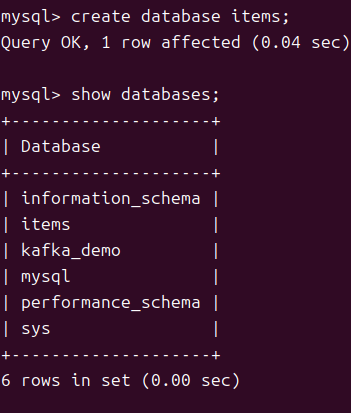
- 1. 우선 items.apple을 생성하였다.
- 2. connector를 등록하였다.
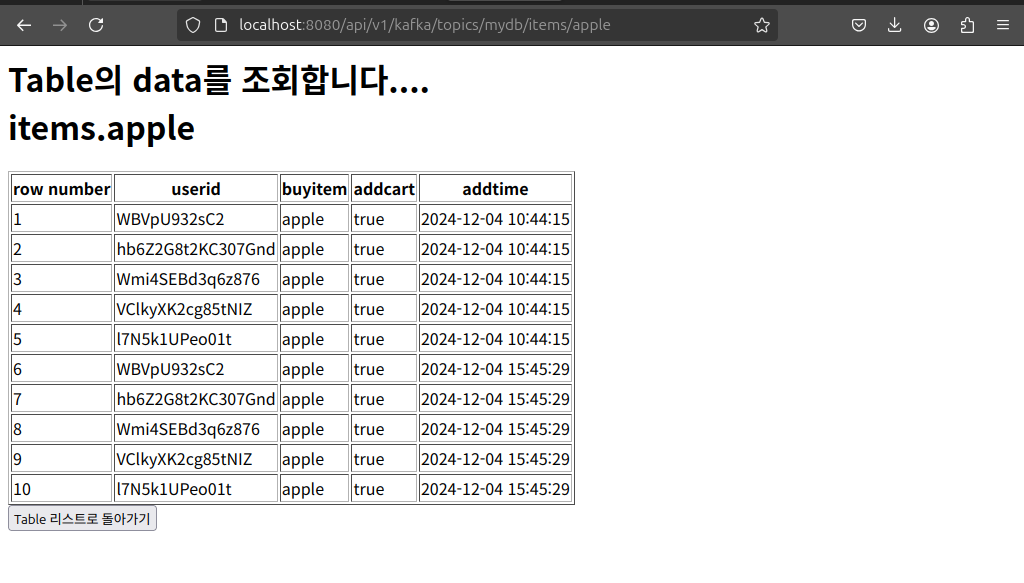
- 3. 확인.....
CREATE TABLE apple (
    userid VARCHAR(50),
    buyitem VARCHAR(100),
    addcart VARCHAR(20),
    addtime VARCHAR(50)
);
curl -X POST -H "Content-Type: application/json" --data '{
    "name": "mysql-sink-connector-apple",
    "config": {
        "connector.class": "io.confluent.connect.jdbc.JdbcSinkConnector",
        "tasks.max": "1",
        "topics": "item-log-apple-added-rst",
        "connection.url": "jdbc:mysql://localhost:3306/items",
        "connection.user": "root",
        "connection.password": "root123",
        "auto.create": "true",
        "auto.evolve": "true",
        "insert.mode": "insert",
        "table.name.format": "apple",
        "pk.mode": "none",
        "value.converter": "org.apache.kafka.connect.json.JsonConverter",
        "value.converter.schemas.enable": "true",
        "key.converter": "org.apache.kafka.connect.json.JsonConverter",
        "key.converter.schemas.enable": "true",
        "delete.enabled": "false"
    }
}' http://localhost:8083/connectors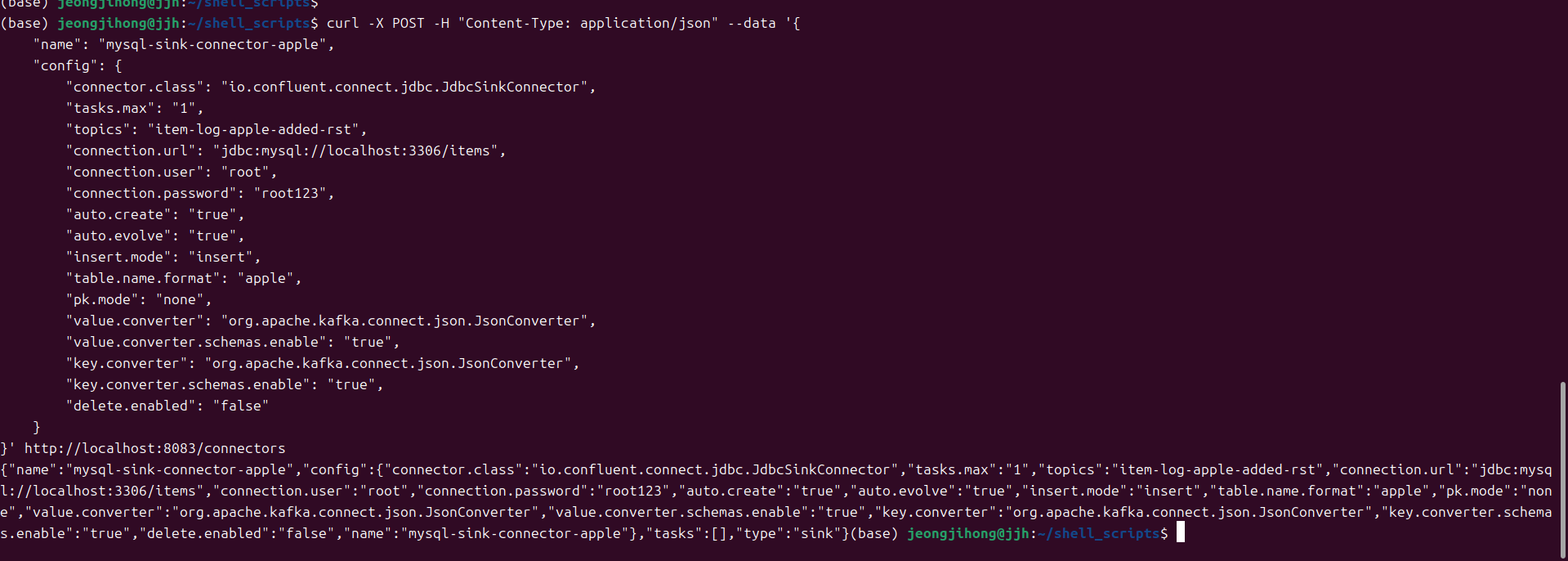

7. 수정한 MessageController.java
- 화면에 보여주는 부분들 수정
package com.example.kafka_sw_project.controller;

import java.sql.Connection;
import java.sql.DriverManager;
import java.sql.ResultSet;
import java.sql.Statement;
import com.example.kafka_sw_project.kafka.KafkaProducer;
import org.springframework.http.ResponseEntity;
import org.springframework.web.bind.annotation.*;
import org.springframework.http.HttpStatus;
import java.io.BufferedReader;
import java.io.InputStreamReader; // 추가
import java.io.IOException;      // 추가
import java.util.ArrayList;
import java.util.List;

import org.springframework.http.MediaType;
import org.springframework.web.bind.annotation.GetMapping;
import org.springframework.web.bind.annotation.PathVariable;
import org.springframework.web.bind.annotation.RestController;


// RestController는 이 클래스가 spring의 restful 웹서비스의 컨트롤러임을 의미한다. 이 클래스는 http요청을 처리하고, json or xml 형식의 데이터를 반환함.
// RequestMapping은 이 클래스 내의 모든 http요청의 경로가 괄호안으로 시작함을 명시.
@RestController
@RequestMapping("/api/v1/kafka")
public class MessageController {
    // KafkaProcuder는 message를 kafka로 전송하는 class이다. 여기서는 MessageController클래스에서 이 producer를 사용해서 message를 전송한다.
    private KafkaProducer kafkaProducer;
    public MessageController(KafkaProducer kafkaProducer) {
        this.kafkaProducer = kafkaProducer;
    }


    // Kafka 토픽 목록과 메시지 소비
    @GetMapping("/topics")
    public String listTopics() {
        StringBuilder htmlResponse = new StringBuilder();
        htmlResponse.append("<html><body>");
        htmlResponse.append("<h1>Kafka project</h1>");

        // DB 조회 버튼 추가
        htmlResponse.append("<a href=\"/api/v1/kafka/topics/mydb\"><button>DB 조회</button></a>");
        htmlResponse.append("<hr>");  // 줄 추가

        // Kafka 토픽 목록을 출력하는 코드
        try {
            ProcessBuilder processBuilder = new ProcessBuilder(
                    "kafka-topics",
                    "--bootstrap-server", "localhost:9092",
                    "--list"
            );

            Process process = processBuilder.start();
            BufferedReader reader = new BufferedReader(new InputStreamReader(process.getInputStream()));
            String line;

            while ((line = reader.readLine()) != null) {
                if (line.contains("item") && !line.contains("rst")) {
                    htmlResponse.append("<p><a href=\"/api/v1/kafka/topics/").append(line).append("\">").append(line).append("</a></p>");
                }
            }

            int exitCode = process.waitFor();
            if (exitCode != 0) {
                htmlResponse.append("<p>Error executing kafka-topics command.</p>");
            }

        } catch (IOException | InterruptedException e) {
            htmlResponse.append("<p>Error occurred: ").append(e.getMessage()).append("</p>");
        }

        htmlResponse.append("</body></html>");
        return htmlResponse.toString();
    }


    @GetMapping("/topics/{topic}")
    public String printTopicMessages(@PathVariable String topic) {
        StringBuilder htmlResponse = new StringBuilder();
        htmlResponse.append("<html><head>");
        htmlResponse.append("<title>Kafka Topic Messages</title>");

        // JavaScript로 새로고침 제어 및 버튼 전환 코드 추가
        htmlResponse.append("<script>");
        htmlResponse.append("let refreshInterval = setInterval(() => location.reload(), 5000);"); // 5초마다 새로고침
        htmlResponse.append("function toggleReloading() {");
        htmlResponse.append("  const button = document.getElementById('reloadButton');");
        htmlResponse.append("  if (refreshInterval) {");
        htmlResponse.append("    clearInterval(refreshInterval);");
        htmlResponse.append("    refreshInterval = null;");
        htmlResponse.append("    button.textContent = '다시 불러오기';");
        htmlResponse.append("  } else {");
        htmlResponse.append("    refreshInterval = setInterval(() => location.reload(), 5000);");
        htmlResponse.append("    button.textContent = '불러오기 중지';");
        htmlResponse.append("  }");
        htmlResponse.append("}");
        htmlResponse.append("</script>");

        htmlResponse.append("</head><body>");
        htmlResponse.append("<h1>Topic으로 부터 message를 consuming하는중.....").append("<br>선택한 topic은 ").append(topic).append("입니다.</h1>");

        // 새로고침 제어 버튼 추가
        htmlResponse.append("<button id='reloadButton' onclick=\"toggleReloading()\">불러오기 중지</button>");

        // 테이블 시작
        htmlResponse.append("<table border='1'>");
        htmlResponse.append("<tr>")
                .append("<th>행 번호</th>")
                .append("<th>Key값</th>")
                .append("<th>회원 아이디</th>")
                .append("<th>품목</th>")
                .append("<th>장바구니 담기 여부</th>")
                .append("<th>담은 시각</th>")
                .append("</tr>");

        // 메시지를 저장할 리스트
        List<String[]> messages = new ArrayList<>();

        try {
            ProcessBuilder consumerBuilder = new ProcessBuilder(
                    "kafka-console-consumer",
                    "--bootstrap-server", "localhost:9092",
                    "--topic", topic,
                    "--from-beginning",
                    "--timeout-ms", "1000", // 2초 제한
                    "--property", "print.key=true", // Key 출력 설정
                    "--property", "key.separator= : " // Key-Value 구분자 설정
            );

            Process consumerProcess = consumerBuilder.start();
            BufferedReader consumerReader = new BufferedReader(new InputStreamReader(consumerProcess.getInputStream()));
            String consumerLine;

            while ((consumerLine = consumerReader.readLine()) != null) {
                // Key와 Value 구분
                String[] keyValue = consumerLine.split(" : ", 2);
                String key = keyValue.length > 1 ? keyValue[0] : "(null)";
                String value = keyValue.length > 1 ? keyValue[1] : keyValue[0];

                // Value를 콤마로 구분하여 파싱
                String[] valueParts = value.split(",\\s*");
                String firstValue = valueParts.length > 0 ? valueParts[0] : "(null)";
                String secondValue = valueParts.length > 1 ? valueParts[1] : "(null)";
                String thirdValue = valueParts.length > 2 ? valueParts[2] : "(null)";
                String fourthValue = valueParts.length > 3 ? valueParts[3] : "(null)";

                // 메시지 리스트에 추가
                messages.add(new String[] { key, firstValue, secondValue, thirdValue, fourthValue });
            }

            int consumerExitCode = consumerProcess.waitFor();
            if (consumerExitCode != 0) {
                htmlResponse.append("<p>Error consuming messages from the topic.</p>");
            }

        } catch (IOException | InterruptedException e) {
            htmlResponse.append("<p>Error occurred: ").append(e.getMessage()).append("</p>");
        }

        // 메시지를 역순으로 테이블에 추가
        int rowNumber = messages.size();
        for (int i = messages.size() - 1; i >= 0; i--) {
            String[] message = messages.get(i);
            htmlResponse.append("<tr>")
                    .append("<td>").append(rowNumber).append("</td>")
                    .append("<td>").append(message[0]).append("</td>") // Key
                    .append("<td>").append(message[1]).append("</td>") // First Value
                    .append("<td>").append(message[2]).append("</td>") // Second Value
                    .append("<td>").append(message[3]).append("</td>") // Third Value
                    .append("<td>").append(message[4]).append("</td>") // Fourth Value
                    .append("</tr>");
            rowNumber--;
        }

        // 테이블 끝
        htmlResponse.append("</table>");
        htmlResponse.append("<a href=\"/api/v1/kafka/topics\"><button>Topic list로 돌아가기</button></a>");
        htmlResponse.append("</body></html>");

        return htmlResponse.toString();
    }


    @GetMapping("/topics/mydb")
    public String showDatabasesWithItemUsingJDBC() {
        StringBuilder htmlResponse = new StringBuilder();
        htmlResponse.append("<html><body>");
        htmlResponse.append("<h1>MySQL Databases 조회</h1>");

        String jdbcUrl = "jdbc:mysql://localhost:3306";
        String username = "root";
        String password = "root123";

        try (Connection connection = DriverManager.getConnection(jdbcUrl, username, password);
             Statement statement = connection.createStatement();
             ResultSet resultSet = statement.executeQuery("SHOW DATABASES")) {

            while (resultSet.next()) {
                String databaseName = resultSet.getString(1);
                // "item" 단어가 포함된 경우만 출력
                if (databaseName.contains("item")) {
                    htmlResponse.append("<p><a href=\"/api/v1/kafka/topics/mydb/").append(databaseName).append("\">").append(databaseName).append("</a></p>");
                }
            }

        } catch (Exception e) {
            htmlResponse.append("<p>Error occurred: ").append(e.getMessage()).append("</p>");
        }

        htmlResponse.append("<a href=\"/api/v1/kafka/topics\"><button>Topic 리스트로 돌아가기</button></a>");
        htmlResponse.append("</body></html>");

        return htmlResponse.toString();
    }


    @GetMapping("/topics/mydb/{database}")
    public String showTables(@PathVariable String database) {
        StringBuilder htmlResponse = new StringBuilder();
        htmlResponse.append("<html><body>");
        htmlResponse.append("<h1>선택한 Database에 존재하는 table들.....<br>선택힌 database는 ").append(database).append("</h1>");

        String username = "root";
        String password = "root123";

        try {
            // MySQL SHOW TABLES 명령어 실행
            ProcessBuilder processBuilder = new ProcessBuilder(
                    "mysql",
                    "-u" + username,
                    "-p" + password,
                    "-e", "SHOW TABLES IN " + database
            );
            Process process = processBuilder.start();
            BufferedReader reader = new BufferedReader(new InputStreamReader(process.getInputStream()));
            String line;

            boolean isHeader = true; // 첫 번째 줄은 'Tables_in_database' 헤더이므로 건너뜀
            while ((line = reader.readLine()) != null) {
                if (isHeader) {
                    isHeader = false;
                    continue;
                }

                // 테이블 이름을 클릭하면 해당 테이블 데이터를 조회하는 URL로 이동
                htmlResponse.append("<p><a href=\"/api/v1/kafka/topics/mydb/")
                        .append(database).append("/").append(line)
                        .append("\">").append(line).append("</a></p>");
            }

            int exitCode = process.waitFor();
            if (exitCode != 0) {
                htmlResponse.append("<p>Error executing MySQL command.</p>");
            }

        } catch (IOException | InterruptedException e) {
            htmlResponse.append("<p>Error occurred: ").append(e.getMessage()).append("</p>");
        }

        htmlResponse.append("<a href=\"/api/v1/kafka/topics/mydb\"><button>  DB 리스트로 돌아가기  </button></a>");
        htmlResponse.append("</body></html>");

        return htmlResponse.toString();
    }
    @GetMapping("/topics/mydb/{database}/{table}")
    public String showTableData(@PathVariable String database, @PathVariable String table) {
        StringBuilder htmlResponse = new StringBuilder();
        htmlResponse.append("<html><body>");
        htmlResponse.append("<h1>Table의 data를 조회합니다....<br>").append(database).append(".").append(table).append("</h1>");

        String jdbcUrl = "jdbc:mysql://localhost:3306/" + database; // Database를 경로에 포함
        String username = "root";
        String password = "root123";

        try (Connection connection = DriverManager.getConnection(jdbcUrl, username, password);
             Statement statement = connection.createStatement()) {
            // SQL query to fetch all data from the specified table
            String query = "SELECT * FROM " + table;
            ResultSet resultSet = statement.executeQuery(query);

            // Get column names
            int columnCount = resultSet.getMetaData().getColumnCount();
            htmlResponse.append("<table border='1'><tr>");
            htmlResponse.append("<th>row number</th>"); // 행 번호 열 추가
            for (int i = 1; i <= columnCount; i++) {
                htmlResponse.append("<th>").append(resultSet.getMetaData().getColumnName(i)).append("</th>");
            }
            htmlResponse.append("</tr>");

            // Get row data
            int rowNum = 1; // 행 번호
            while (resultSet.next()) {
                htmlResponse.append("<tr>");
                htmlResponse.append("<td>").append(rowNum++).append("</td>"); // 행 번호 추가
                for (int i = 1; i <= columnCount; i++) {
                    htmlResponse.append("<td>").append(resultSet.getString(i)).append("</td>");
                }
                htmlResponse.append("</tr>");
            }
            htmlResponse.append("</table>");

        } catch (Exception e) {
            htmlResponse.append("<p>Error occurred: ").append(e.getMessage()).append("</p>");
        }

        htmlResponse.append("<a href=\"/api/v1/kafka/topics/mydb/").append(database).append("\"><button>  Table 리스트로 돌아가기  </button></a>");
        htmlResponse.append("</body></html>");

        return htmlResponse.toString();
    }


    // GetMappring은 http GET요청을 처리하는 핸들러 메서드를 정의함.
    // key와 value를 각각 요청 파라미터로 받아 처리
    @GetMapping("/publish")
    public ResponseEntity<String> publish(
            @RequestParam("key") String key,
            @RequestParam("value") String value) {
        // KafkaProducer의 sendMessage 메서드에 key와 value 전달
        kafkaProducer.sendMessage("item-log", key, value);
        return ResponseEntity.ok("from MessageController : Message를 topic으로 보냄.");
    }
}

#! /bin/bash
kafka-topics --bootstrap-server localhost:9092 --delete --topic item-log

kafka-topics --bootstrap-server localhost:9092 --delete --topic item-log-apple
kafka-topics --bootstrap-server localhost:9092 --delete --topic item-log-banana
kafka-topics --bootstrap-server localhost:9092 --delete --topic item-log-candy
kafka-topics --bootstrap-server localhost:9092 --delete --topic item-log-coffee
kafka-topics --bootstrap-server localhost:9092 --delete --topic item-log-melon
kafka-topics --bootstrap-server localhost:9092 --delete --topic item-log-peach
kafka-topics --bootstrap-server localhost:9092 --delete --topic item-log-water

kafka-topics --bootstrap-server localhost:9092 --delete --topic item-log-apple-added
kafka-topics --bootstrap-server localhost:9092 --delete --topic item-log-banana-added
kafka-topics --bootstrap-server localhost:9092 --delete --topic item-log-candy-added
kafka-topics --bootstrap-server localhost:9092 --delete --topic item-log-coffee-added
kafka-topics --bootstrap-server localhost:9092 --delete --topic item-log-melon-added
kafka-topics --bootstrap-server localhost:9092 --delete --topic item-log-peach-added
kafka-topics --bootstrap-server localhost:9092 --delete --topic item-log-water-added